DocumentNumber:PD196‐220R5 PDI‐P14W Page6of23
PDiCommunicationSystems,Inc.40GreenwoodLaneSpringboro,Ohio45066USAPH1‐800‐628‐9870FX937‐743‐5664
INSTALLINGTELEVISION
InstallationPrecautions
1. UseonlyapowersourcefromaCSACertified/ULApprovedClass2PowerSupplysuitableforuseina
HealthCareFacility.ThisTVwilloperateoneitherDCorACvoltage,range18to32volts.
2. ArmRecoilHazard:ThesafetybrakepinmustremainintheSAFETYBRAKEPINHOLEwheneverthe
televisionisremovedfromthearmorwhenthearmisremovedfromthewallbrackettopreventthearm
fromspringingopen.
CoaxCableSpecifications
Whenusingacentralpowersupply,cableselectioniscrucial.Duetolongcoaxcablerunsencounteredinhospital
installations,coaxcableemployingasolidcoppercenterconductorandcoppershieldisrequired.Cablerun
lengthsMUSTNOTexceed150feet.RequiredcoaxialcablenumbersincludeAlpha9804C(non‐plenum),Belden
9248(non‐Plenum),WestPenn806(non‐Plenum),orWestPenn25806(Plenum),whichhavebeentestedwith
coax‐poweredTVs.
ArmMounting
Thistelevisionisdesignedtoattachtoawallmountedsuspensionarmadjustedtosupportatelevisionweighing
sevenpounds.ThesinglecoaxialcableontopoftheTVisusedtosupplylowvoltageACorDCpower(28VACor
24VDC)andtheRFsignaltothetelevision.
Note:ContactPDiforadditionalinformationonarmcompatibilityandcablerequirements.
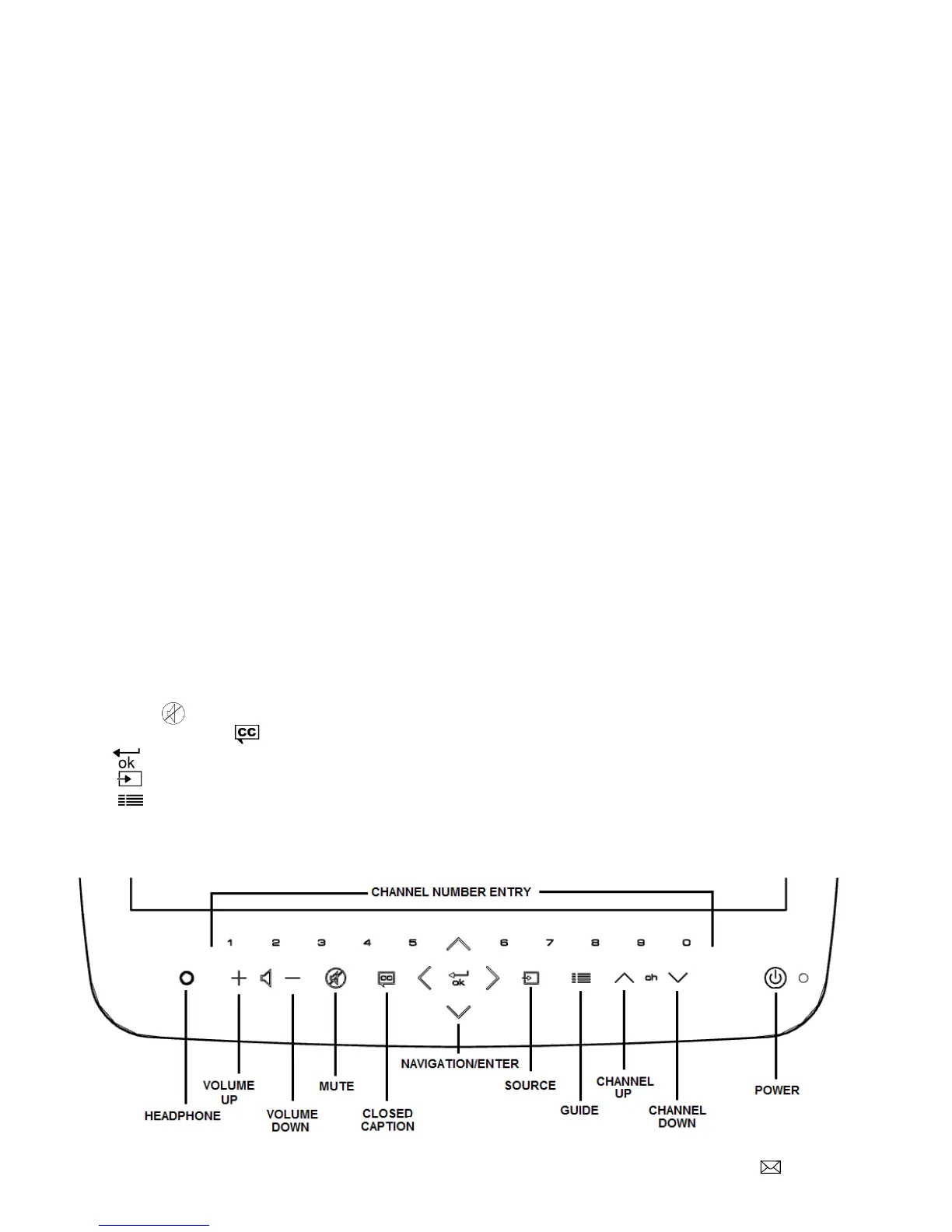
DIRECTENTRYKEYPAD
Youcanusetheglasskeypadtochoosepower,source,channel,volume,andguide.Thenavigationalarrowsused
inEPGmodewillguideyoutoyourchoice.
1. ChannelNumber Directentryofdesiredchannel
2. Headphone Plugforlisteningtodevice
3. Volume(+)(‐) Increaseordecreasesound
4. MuteSilencetheaudio
5. ClosedCaption AllowsthedisplayofClosedCaption
6. Enter OK/Entertochooseitems
7. Source Selectadesiredsourceofinput
8. Guide Displaysprograms,last5channels,andavailablesources
9. Channel˄˅ Selecthigherorlowernumberedchannels
10. PowerTurnsthedeviceonandoff



 To Next Page