DocumentNumber:PD196‐220R5 PDI‐P14W Page8of23
PDiCommunicationSystems,Inc.40GreenwoodLaneSpringboro,Ohio45066USAPH1‐800‐628‐9870FX937‐743‐5664
PROGRAMMINGMENUSANDSETUP
Note:Aprogrammingremotecontrolisrequiredtoperformallsetupoperationsforthetelevision.The
programmingremote(PartNumberPD108‐420)isNOTpackagedwiththeTVandmustbeorderedseparately.
Thefollowinginstructionsassumeyouhaveaprogrammingremote,havecorrectlymountedtheTV,and
connectedacoaxcablethatprovidesbothpowerandRFsignal.
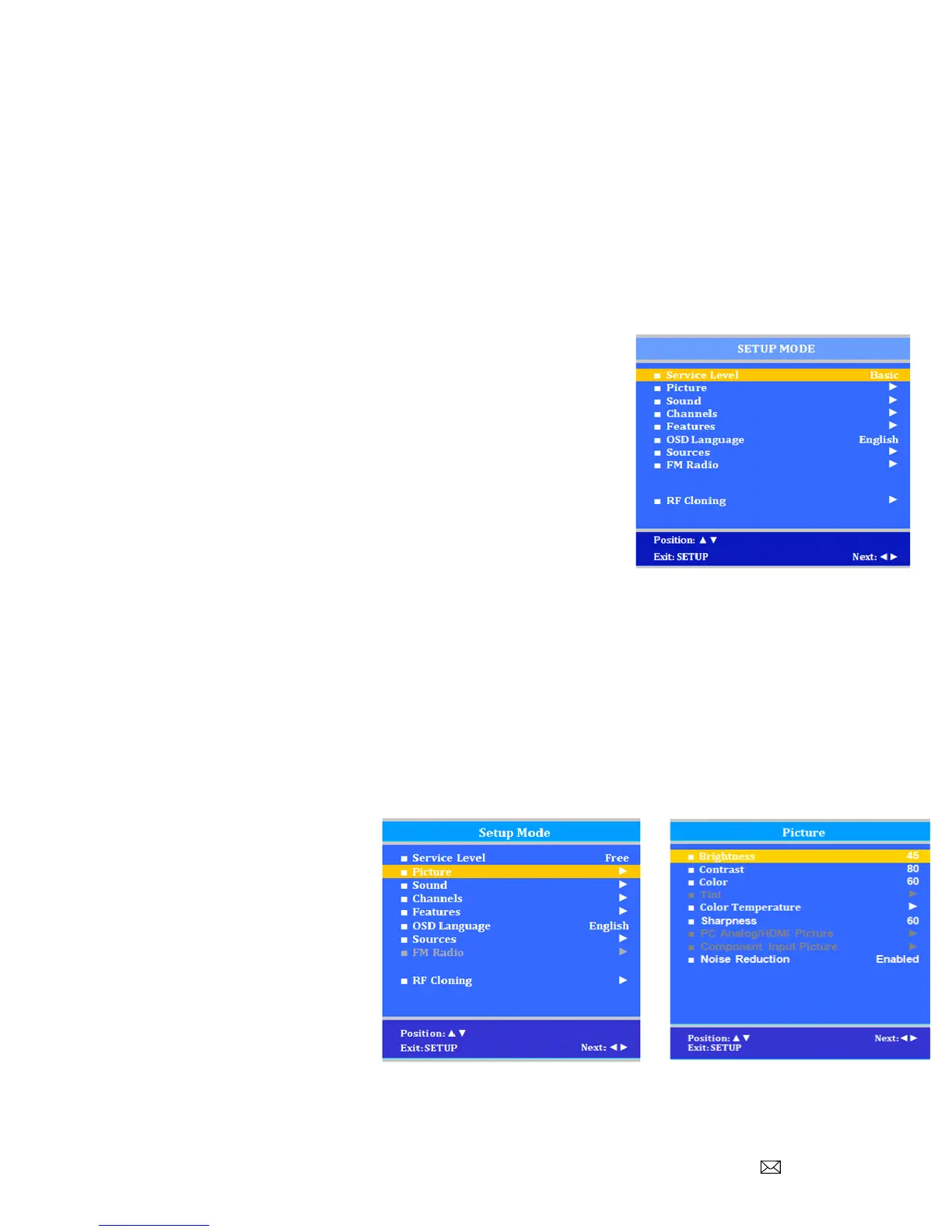
SERVICELEVEL
ThisTVoffersadisableandthreedifferentprogrammableServiceLevels:Free,Basic,andPremium.Onlyone
ServiceLevelisusableatatime.
Disabledislikeamechanicalkeylock–wheninDisabledservicelevel,theTVcanbeturnedOFFandON,but
cannotbeusedforviewing.Astandardmessageappearsonablackscreen.
Freeletspatientswatchhospitaleducationandinformationchannels
withoutrentingtheTV.Thechannelscontainingprogrammingfornocharge
aretypicallyprogrammedintothislevelofservice.Thisisthefactorydefault
settingforservicelevel.
Basicservicetypicallyallowsadditionalchannelsbeyondthoseofferedin
theFREElevel.
PremiumisthehighestServiceLevelwithtypicallythemostchannels
availableforviewing.
1. PresstheSETUPbuttontodisplaytheSETUPMODEmenu.
2. PresstheVOL►todisableorselectdesiredservicelevel.(Free,Basic,Premium)
PICTURE
AdjustmentofpictureBrightness,Contrast,Color,
Tint,ColorTemperatureandSharpnessisavailableto
customizethelevelsyoupreferusingtheon‐screenmenus.
Brightness,Contrast,Color,Tint,andSharpness
Thesesettingshavearangeof1‐100.Tochangeoneofthem,simplychangethenumberbyfollowingthisprocess.
1. PresstheSETUPbuttontodisplaytheSETUPMODEmenu.
2. SelectthePicturemenuitem.
3. Pressthe
CH
▲
/CH
▼
buttonsto
highlightthedesiredpictureitem
–
Brightness,Contrast,Color,Color
Temperature,Sharpness
,and
NoiseReduction
.
4.
Adjustthepictureitemusingthe
VOL
▲
/
VOL
▼
buttons
tothe
desiredlevel.
5.
PresstheSETUPbuttontostore
thepicturevalues.



 To Next Page