EasyManua.ls Logo

PDK PDR1000 - User Manual

PDK PDR1000
25 pages
Print Icon
To Next Page IconTo Next Page
Loading...
PDR1000
Digital Pressure Gauge
Users Manual
25
Question and Answer IconNeed help?

Do you have a question about the PDK PDR1000 and is the answer not in the manual?

Summary

General Introduction

Abbreviations & Initials

Introduction

Specification

Details technical specifications of the PDR1000 Digital Pressure Gauge.

Front; Back Panel Overview

Describes the physical layout and components of the PDR1000's front and back panels.

On; Off Key Function

Explains the function of the PDR1000 Power On/Off key.

PEAK;MENU Key Function

Describes the PEAK/MENU key functions for viewing max/min values and navigating menus.

UNITS; Analog Out; Down Key

Details how to change units and use the Down key for analog output and menu navigation.

ZERO; Up Key Function

Explains the ZERO key function for zeroing and using the Up key for menu navigation.

Back Light; Enter Key Function

Describes how to use the backlight and the Enter key for menu setup and data logger functions.

Operation

Key Operation Basics

Explains the basic operations using the keys on the front panel.

Power On Procedure

Instructions on how to power on the PDR1000 device.

PEAK; MENU Usage

How to use the PEAK/MENU key for max/min values and menu navigation.

UNITS Selection

Function to change engineering units and set Analog Out.

ZERO Function

Function for zeroing the PDR1000 gauge.

Back Light; Enter Usage

Instructions for using the backlight and the Enter key for Data Logger setup.

Menu;Function Select

Alarm Configuration

Configuration of the alarm function, requiring external power supply.

Pressure Switch Test

Explains how to test the pressure switch functionality and its operation modes.

Calibration Procedures

Guides on adjusting Zero and Full Scale values for accurate pressure measurements.

Baud Rate Settings

How to set the Baud Rate for RS232 communication.

RS232 Communication Details

Details RS232 communication settings, descriptions, and data configurations.

Auto Power Off Settings

Configuration of the auto power off feature, with options for time intervals.

Data Logger Setup

Detailed steps for setting up and configuring the data logger function.

Storage Data Clear

Procedure for erasing saved data from the device's EPROM.

End Function

Function to activate and store configured settings, or return to the menu.

Maintenance and Calibration

Zero Adjustment

Explains zero point changes due to environmental factors and how to reset it.

Pressure Calibration

Recommends annual calibration by authorized organizations for accuracy.

Analog Output Calibration

Details calibration of analog output via RS232 for incorrect outputs.

Troubleshooting

Appendix

Warranty Statement

Outlines the 3-year warranty period and service center contact information.

Accessory Details

Lists included accessories, such as the user manual.

Pressure Unit Conversion Table

Overview

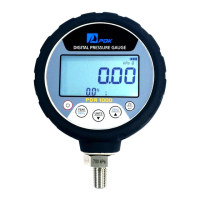
The PDR1000 Digital Pressure Gauge is a high-accuracy instrument designed for precise pressure measurement and testing. It serves as a reference digital pressure gauge, offering robust performance for various applications, both on-site and in laboratory settings. The device is engineered to measure pressure across a wide range, from -100 kPa to 500 MPa, without requiring an external power supply, making it highly versatile and portable. Its construction features a solid and stylish aluminum outer casing, ensuring durability in demanding environments.

Function Description

The PDR1000 is equipped with a range of built-in features that enhance its utility as a digital pressure gauge. Core functions include:

  • Pressure Measurement: Provides highly accurate pressure readings across its specified range.
  • Peak Value Display: Users can view maximum ("Hi") and minimum ("Lo") pressure values recorded during operation, which are cleared when the device is powered off.
  • Unit Conversion: Allows for easy switching between various engineering units (kPa, MPa, kg/cm², psi, mbar, bar, inHg, inH₂O, mmH₂O, mmHg, atm), catering to different application requirements.
  • Zero Adjustment: Enables the user to zero the pressure offset value, ensuring accurate readings, especially in gauge mode under normal atmospheric conditions or in absolute mode under vacuum. This function can also clear peak Hi/Lo values.
  • Backlight Control: Features a backlight for improved visibility in low-light conditions, which can be toggled on and off.
  • Menu/Function Selection: A comprehensive menu system allows users to configure various settings and functions, including Alarm, Pressure Switch Test, Calibration, Baud Rate, Auto Power Off, and Data Logger.
  • Alarm Function: When connected to an external power supply, the device can be configured to trigger alarms based on user-defined low and high-pressure thresholds, expressed as a percentage of the full scale. It supports both Normal Open (N_O) and Normal Close (N_C) electric contact alarm signal operations.
  • Pressure Switch Test: This function allows the PDR1000 to receive and indicate electric contact signals (On/Off) from an external pressure switch. It can hold the displayed pressure value when a switch status change occurs (e.g., Off to On or On to Off), with the percentage of pressure change visible at the bottom of the screen. The device also incorporates a hysteresis function, which accounts for the difference in pressure at which the electronic contact changes during pressurization versus depressurization.
  • Calibration: Offers both Zero Adjustment and Full Scale value adjustment. Zero adjustment corrects the zero point, while full scale adjustment allows for fine-tuning the pressure reading across the entire range, typically performed with a pressure controller/calibrator or piston gauge.
  • Baud Rate Setting: Configurable baud rates for RS232 communication, enabling data exchange with external systems.
  • RS232 Communication: Supports serial interface communication for data request and response, allowing for continuous sampling of pressure and temperature values, as well as single-sample requests.
  • Auto Power Off: Users can set an automatic power-off interval (5, 10, 20, or 30 minutes) to conserve battery life. The default setting is 10 minutes.
  • Data Logger: This function allows the PDR1000 to store pressure data at specified intervals (1, 3, 5, 30, or 60 seconds). It can store up to 3000 data points, organized into pages, with each page saving 100 sample data points (average and maximum values). Data logging temporarily disables RS232 communication.
  • Storage Data Clear: Provides a function to erase all saved data from the EPROM.

Usage Features

Operating the PDR1000 is designed to be straightforward, primarily through its front panel buttons:

  • Power On/Off: A dedicated key to power the device on and off.
  • PEAK/MENU Key: This multi-function key allows users to toggle between displaying maximum, minimum, and current pressure values. Holding it for 2 seconds accesses the setup and configuration menus.
  • UNITS / Analog Out / Down Key: Used to cycle through different pressure units. Holding it for 2 seconds activates the Analog Output function (requires external power). In configuration mode, it navigates backward through menu options.
  • ZERO / Up Key: Performs zero adjustment for pressure readings. In peak mode, it clears peak values. In configuration mode, it navigates forward through menu options.
  • Back Light / Enter Key: Toggles the display backlight. Holding it for 2 seconds starts or stops the Data Logger function or confirms selections within the menu.

The device's design emphasizes ease of use, with clear on-screen indicators for various modes and settings. The ability to connect an external power supply expands its capabilities, particularly for analog output and alarm functions. The RS232 communication port allows for integration into more complex data acquisition and control systems, providing detailed information about the device and its measurements.

Maintenance Features

The PDR1000 is built for long-term reliability, but certain maintenance aspects are highlighted:

  • Zero Adjustment: Due to potential long-term variations in the pressure sensor or PCB components, periodic zero adjustment is recommended. This can be performed using the Calibration Zero function within the CAL menu.
  • Pressure Calibration: As a reference gauge, the PDR1000 requires annual calibration by an authorized organization to maintain its guaranteed accuracy. The calibration function allows for adjusting the slope value to correct for any changes in pressure readings over time.
  • Analog Output Calibration: If the analog output (1-5 VDC, with options for 4-20mA, 0-5VDC, 0-10VDC when using external power) becomes inaccurate over time, it can be calibrated via the RS232 communication program.
  • Battery Replacement: The device operates on three AA alkaline batteries, offering approximately 1000 hours of use. A low battery indicator prompts replacement.
  • Troubleshooting Guide: The manual includes a troubleshooting section to help users diagnose common issues such as power-up failures, inaccurate pressure readings, or unresponsive keys, providing probable causes and recommended solutions (often advising contact with PDK for support).
  • Durability: The aluminum outer casing contributes to the device's robustness, designed to withstand typical operational stresses.

PDK emphasizes that the PDR1000 is a high-technology instrument and advises against users opening the case to resolve problems, as this could void the warranty and potentially damage the device. For suitable and stable troubleshooting, users are recommended to contact or send the PDR1000 to PDK. The device is intended for use under normal stable conditions as specified in the manual to ensure optimal performance and longevity.

PDK PDR1000 Specifications

General IconGeneral
TypeDigital Multimeter
Diode TestYes
Continuity TestYes
Power Supply9V Battery
Measurement RangeDepends on function
DisplayLCD