INTRODUCTION
Please read this manual thoroughly for correct operation and optimal
performance.
ENGLISH
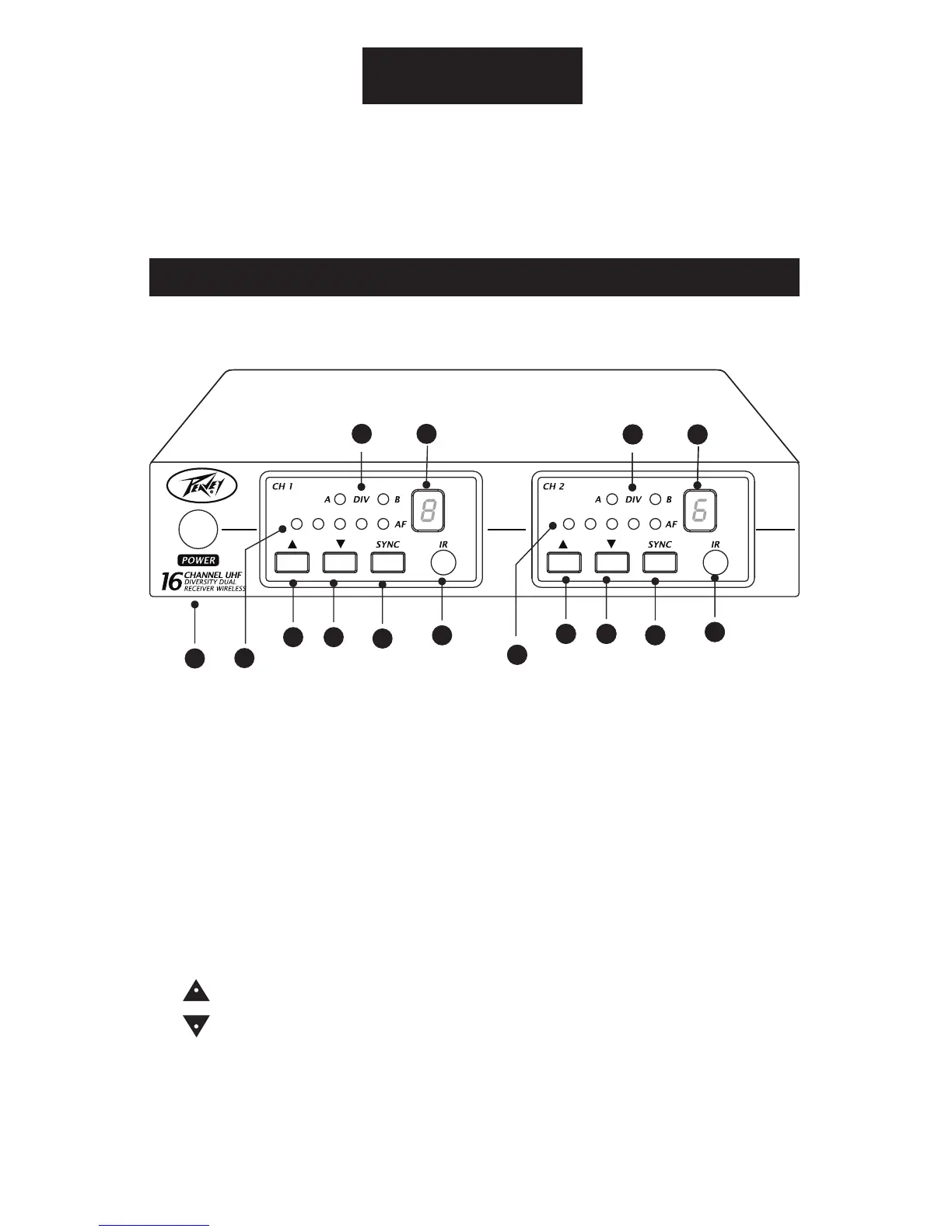
FRONT PANEL
(1) Power switch
(2) Infrared(IR) port: Broadcasts IR signal to transmitter.
(3) Channel indicator: To display system’s receiving channel.
(4) DIV indicator: Antenna receiver status indicator LED.
(5) AF1 - AF5 indicator: Indicate the audio signal level.
(6) UP select button.
(7) DOWN select button.
(8) SYNC button: Press to synchronize transmitter and receiver
frequencies.
NOTE: WHEN ch1 AND Ch2 ARE IN USE TOGETHER, PLEASE DON’T SET THEM
ON THE SAME CHANNEL.
PV
®
16 Channel Dual Receiver PLL Wireless Receiver Features
1
3
5
4
6 7
8
2
5
6 7
8
2
5
6 7
8
2
3
4
3
4



 To Next Page