BACK PANEL
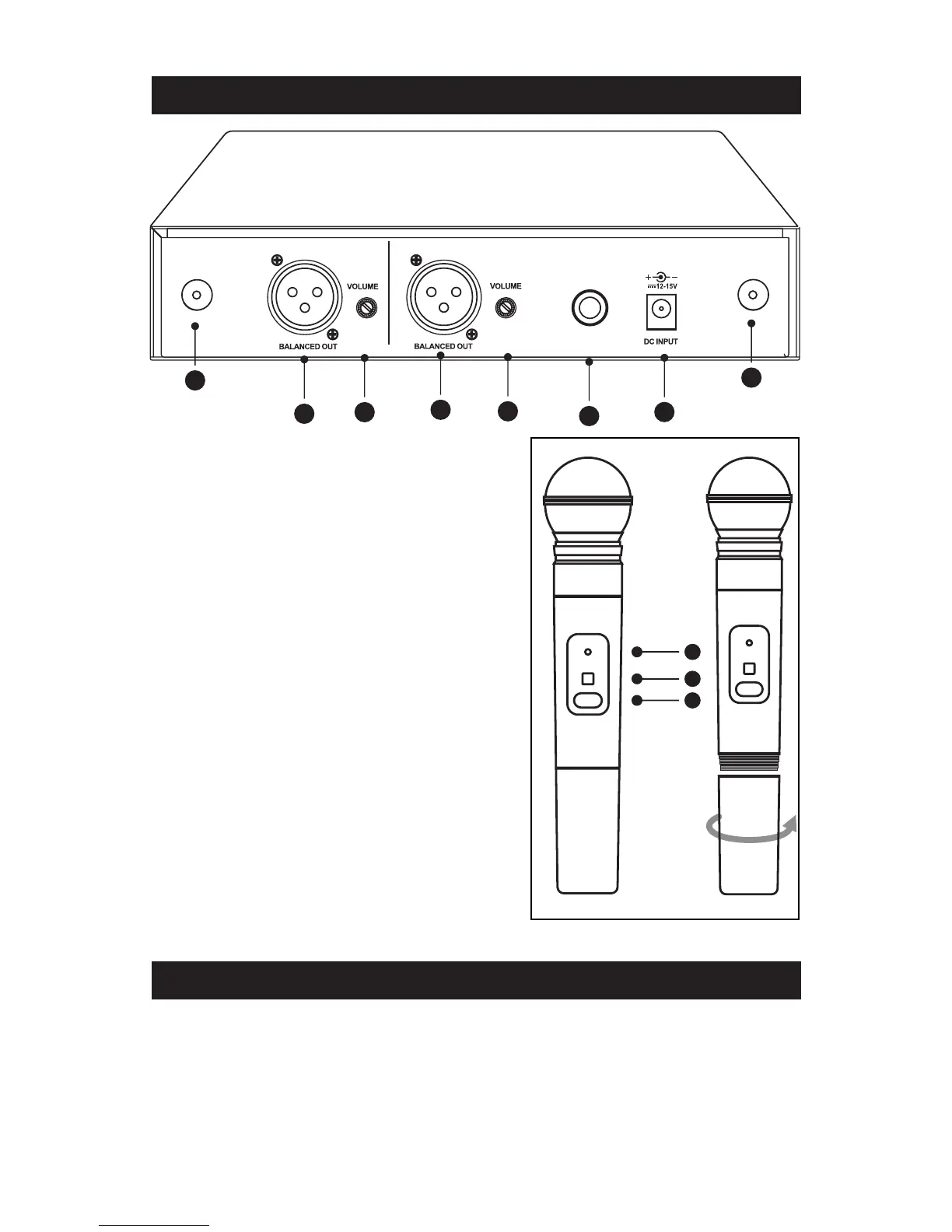
(9) Antenna connectors
(10) Balanced out Jack: XLR connector
provides balanced audio output signal
from this jack to the amplifier.
(11) Volume adjustment knob: Adjusts
the volume level of the AUDIO OUT.
(12) Unbalanced out Jack: MIX
OUTPUT, with Phone Jack provides
audio output signal from this jack to
the amplifier.
(13) DC input socket: Input socket for
12-15V Volt DC power. Please note that
the polarity of the central pin in the
socket is positive(+).
(14) Power / IR mute indicator
(15) SYNC port: Receives infrared beam to synchronize frequencies
(16) On-off / mute switch: Press and hold to turn on or off. Press and
release to mute or disengage mute function.
ANT A ANT
CH 2 CH 1
AUDIO OUT
9
10
11
12
13
9
11
10
PV
®
16 Channel Dual Receiver PLL Wireless Receiver Features
PV
®
16 Channel Dual Receiver PLL Handheld Transmitter
14
15
16



 To Next Page