support@pecron.com
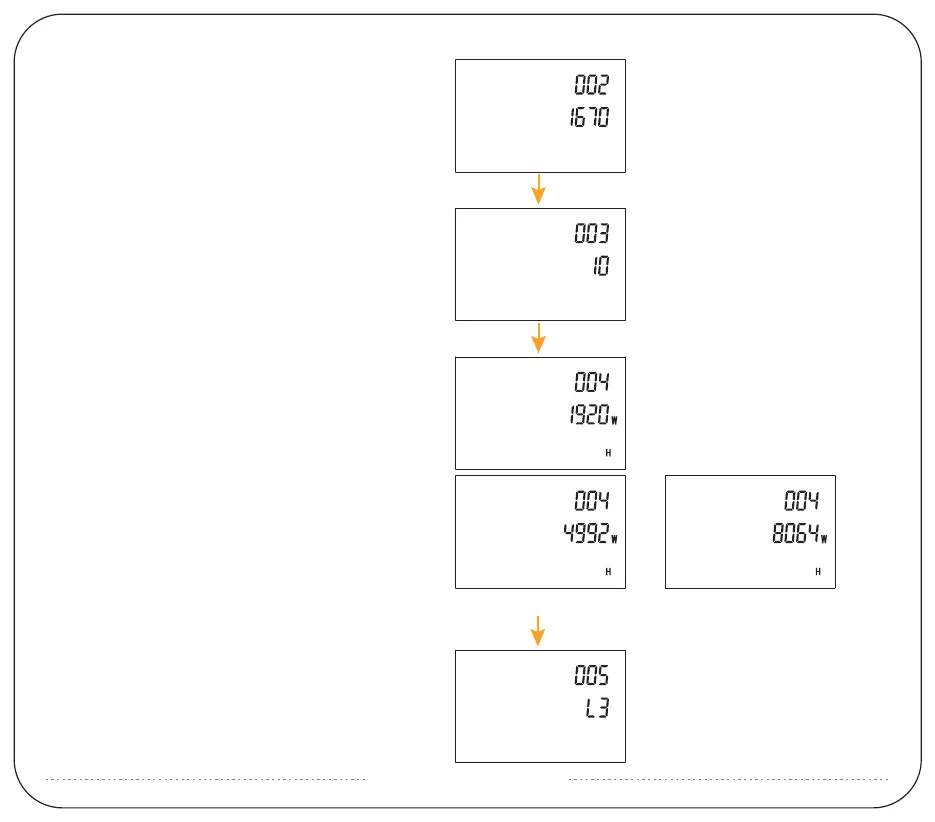
3: Long press AC to enter 002 (This is for 0-current
calibration, do not modify it)
4: Long press AC to enter 003, the default value is 10
(this is for current calibration, do not modify it)
5: Long press AC to enter 004, the default value is
1920Wh. You can modify it to the battery volume
after connecting with extra battery packs. Shortly
press DC to change the flashing number and short
press AC to switch the battery volume.
A power pack is 4992Wh;
The two power packs are 8064Wh.
6: Long press AC to enter 005, the default value is L3,
this means screen brightness. Shortly press DC can
increase the brightness or shortly press AC to
decrease the brightness.
Setting the battery volume when you
only connect one extra battery pack
Setting the battery volume when
you connect two battery packs.



 To Next Page