ISSUED: 02-13-07 SHEET #: 055-9485-1
Visit the Peerless Web Site at www.peerlessmounts.com
5 of 33
For customer care call 1-800-865-2112 or 708-865-8870.
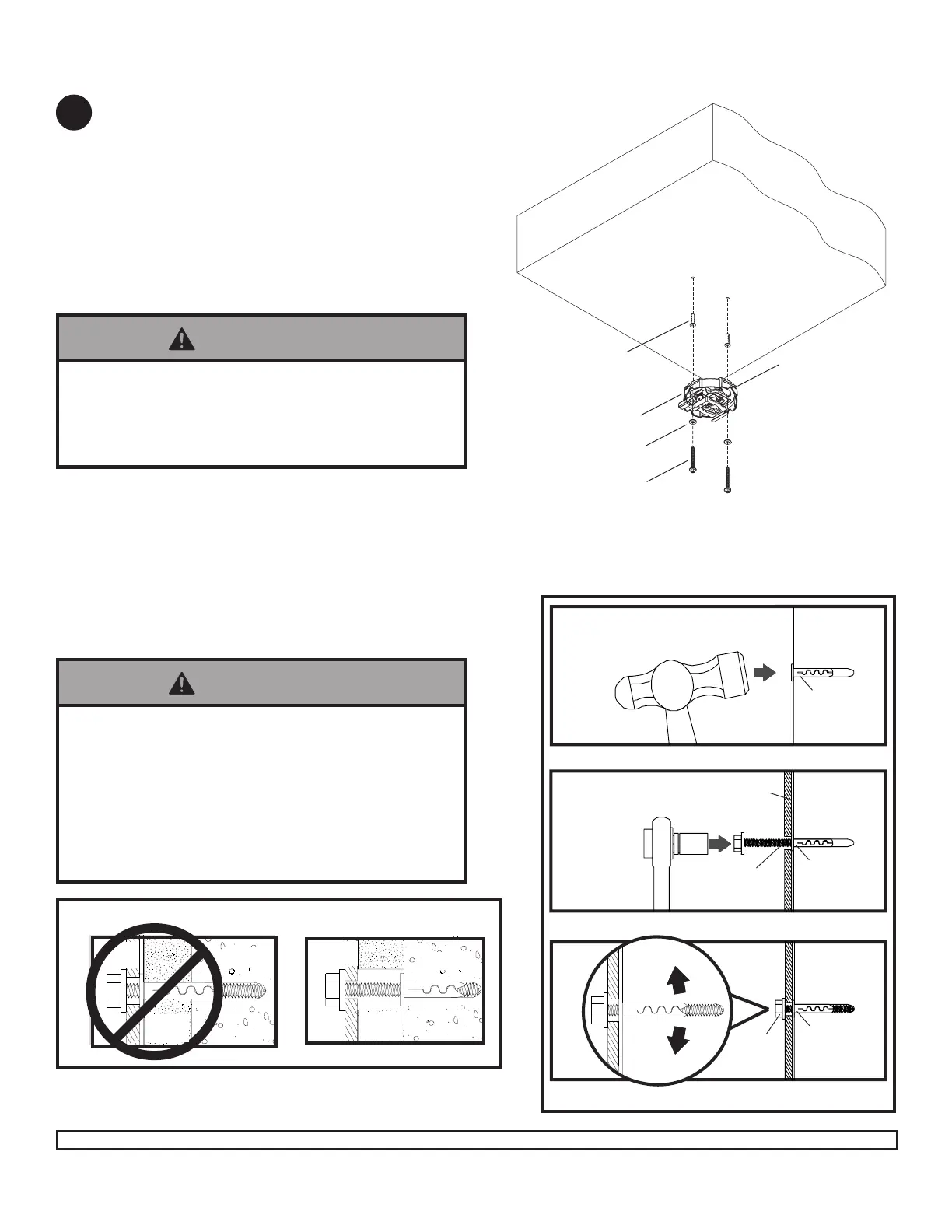
Place projector mount assembly (A) on ceiling as a
template and mark the center of the two mounting
holes. Drill two 1/4" (6 mm) dia. holes to a minimum
depth of 2.5" (64 mm). Attach projector mount
assembly (A) using two concrete anchors (C), two
flat washers (F), and two #14 x 2.5" wood screws (D)
as shown in Illustration A and 1, 2, and 3 (below).
Tighten wood screws (D) using 3/8" (10 mm) socket
wrench, phillips screwdriver or 10mm open end
wrench until projector mount assembly (A) is firmly
attached.
1
3
Drill hole and insert anchor
CUTAWAY VIEW
INCORRECT
concrete
plaster/
dry wall
CORRECT
concrete
plaster/
dry wall
concrete
ceiling
D
D
D
Illustration A
Installation to Concrete Ceilings
A
2
A
CONCRETE CEILING
F
C
C
C
NOTE: It is the responsibility of the installer to
verify that the ceiling will safely support the
combined load of all attached hardware and
components.
Skip to step 5.
C
FRONT OF
MOUNT
• Concrete anchors are not intended for attachment to
concrete ceiling covered with a layer of plaster,
drywall, or other finishing material. If mounting to
concrete ceiling covered with plaster/drywall is un-
avoidable, plaster/drywall (up to 5/8" thick) must be
counterbored as shown below. If plaster/drywall is
thicker than 5/8", custom fasteners must be supplied
by installer.
WARNING
• Tighten wood screws firmly, but do not overtighten.
Overtightening can damage the screws, greatly
reducing their holding power.
• Never tighten in excess of 80 in • lb (9 N.M.).
WARNING
3
A
A
Place mount over anchor and secure with screw
After repeating step one tighten all fasteners


 To Next Page