BRUSH CUTTER EXCELION 2 LH
53_154421-A
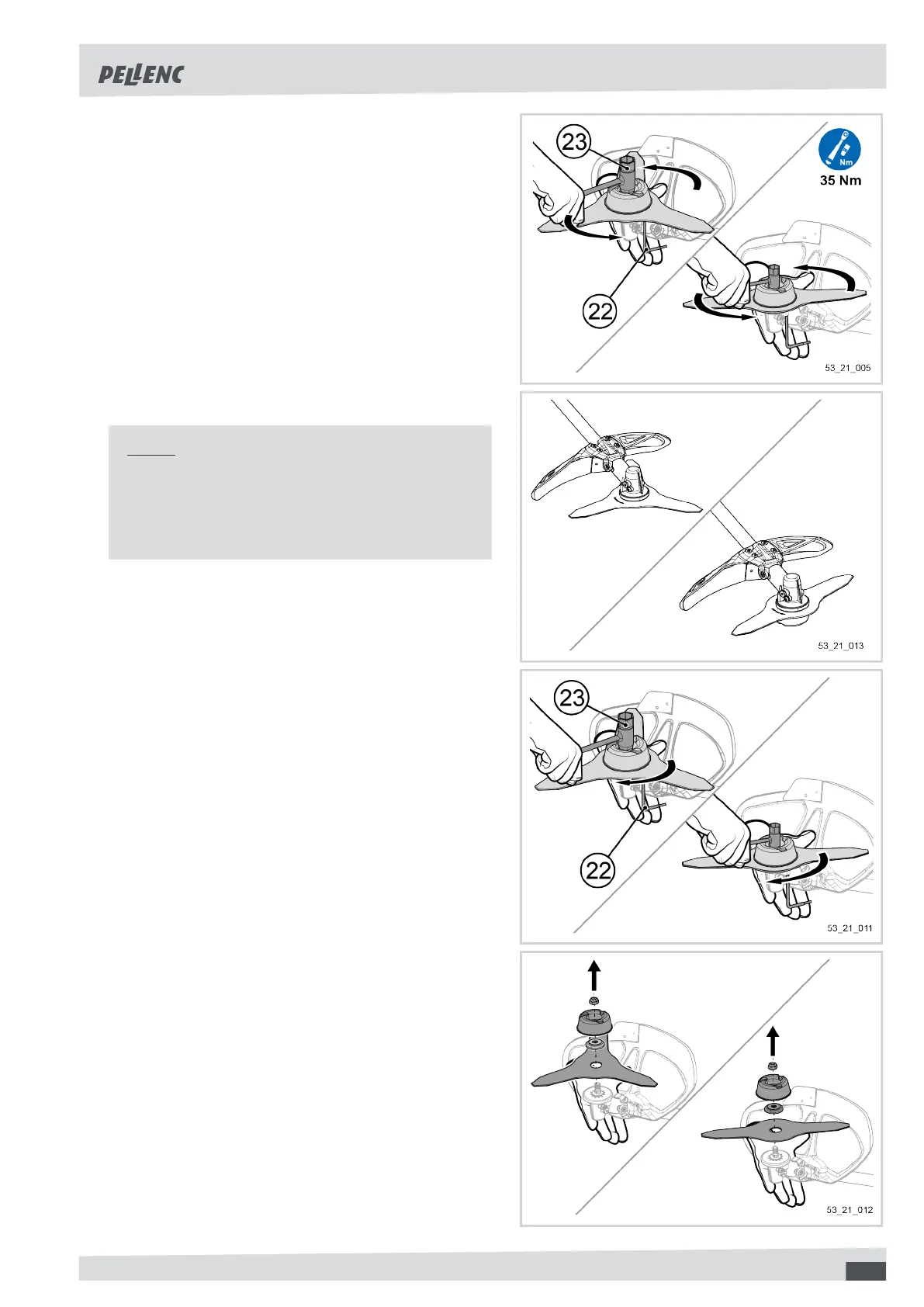
6. Using the special EXCELION 2 wrench (23) supplied
with your tool, tighten the nut anti-clockwise while
holding the protective bowl.
Tightening torque: 35 N m.
The blade is now fitted on your tool and is ready for use.
Note
After fitting your cutting head on your tool, it is nec-
essary to select it in the HMI to operate the tool. Re-
fer to Section 5.5.2, “Activation of the cutting head
via the HMI menu”.
Dismounting the tri-blade/twin-blade from the tool
1. Insert the Torx 25 wrench (22) supplied with your tool
into the hole on the angle gear.
This action will allow the position of the motor shaft
and the support washer to be locked.
2. Using the special EXCELION 2 wrench (23) supplied
with your tool, unscrew the nut clockwise while hold-
ing the protective bowl.
3. Remove:
• the tri-blade / the twin-blade,
• the blade locking washer,
• the protective bowl,
• the bowl retaining nut.
23


 To Next Page