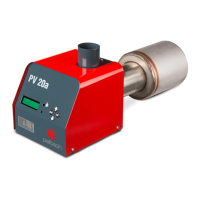
PV 20a
5 PELLETS Select fuel quality NORMAL NORMAL/LIGHT/HEAVY
6 POWER Actual power level AUTO AUTO/10/12/14/16/18/20
7 BASE AIR Fan speed correction for all fan
speeds
0 -2/-1/0/+1/+2/+3/+4/+5
8 LANGUAGE Language selection *
4
ENG See language list
9 PARAMETERS -> Parameter setup menu
*1 – see “Status menu description”
*2 – see “Info menu description”
*3 – see “HOLD FLAME” status description
*4 – see “Languages” chapter
Info Menu
To enter info menu, move in the main menu until the row INFO and press OK. Content of info menu
is following:
TOTAL = total amount of pellets burned with this burner. Amount is updated after every 10 kg.
COUNT = amount of pellets burned since last zero. Amount is updated after every 0,1 kg. To zero the
amount, be sure you are in this menu and hold down OK for 5 sec.
FAN = fan rotation speed as it is / fan rotation speed as it should be ± base air (selected base air in
the main menu)
P = currently working power/ power as it should be
T = burner internal temperature
U = Battery voltage level
I = Feeder current
DRAUGHT = when underpressure sensor is connected, draught is shown.
Languages
To change the burner language, move in the main menu until the row LANGUAGES and press OK.
Choose the requested language and press OK. Burner has following languages: english (ENG),
estonian (EST), finnish (FIN), french (FRA), german (GER), greek (GRE), latvian (LAT), lithuanian (LIT),
dutsch (NED), portuguese (POR), russian (RUS), serbian (SRB), spanish (SPA), slovakian (SLV), swedish
(SWE).
Table 6 Parameters menu
Parameter Description Unit Value
Nr Name Default Min. Max.
1 BURN AIR @10kW Fan speed at power level 1 rps 22 20 24
2 BURN AIR @12kW Fan speed at power level 2 rps 25 23 27
17 www.pelltech.eu


 To Next Page