EasyManua.ls Logo

Pendulum CNT-90 - Page 22

Pendulum CNT-90
189 pages
Print Icon
To Next Page IconTo Next Page
To Previous Page IconTo Previous Page
Loading...
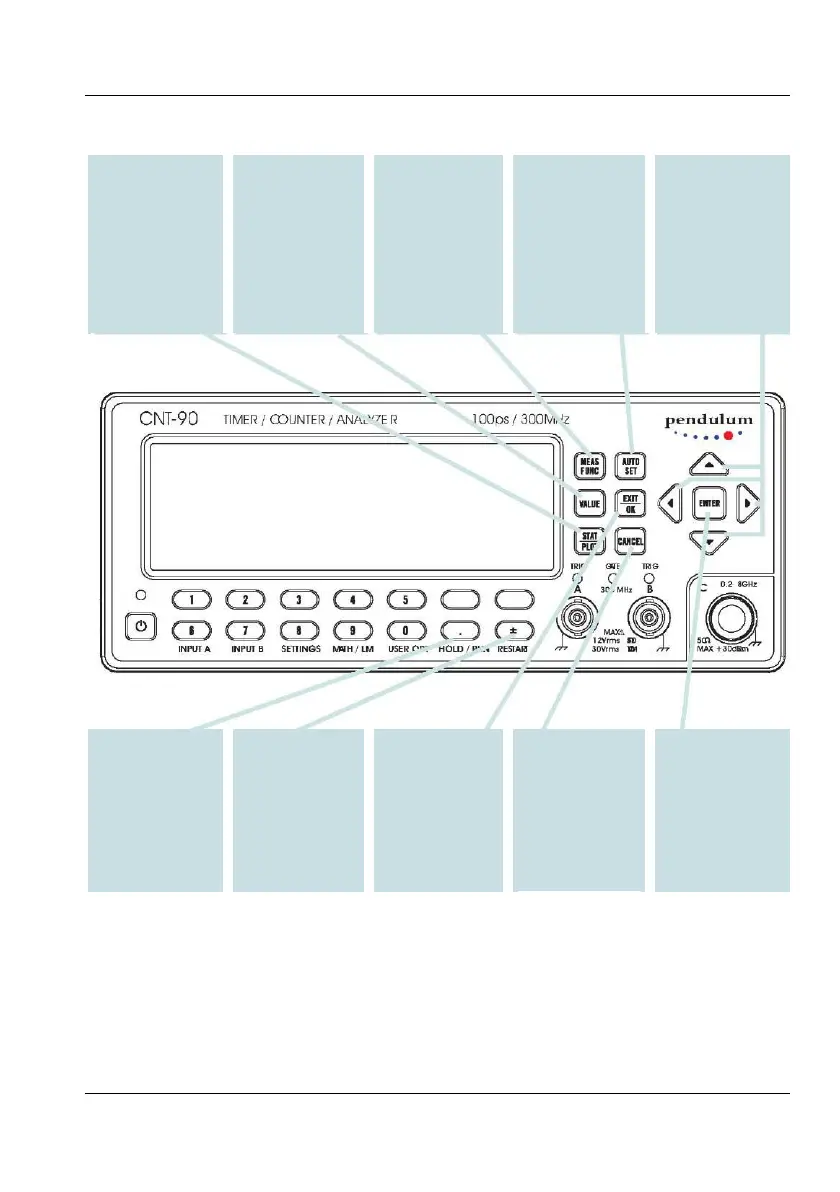
Using the Controls
The cursor position,
inversion on the
moved in four
ENTER
Confirms menu
selections without
leaving the menu
level.
selections and
moves up one level
in the menu tree.
CURSOR
CONTROL
marked by text
display, can be
directions.
AUTO SET
Adjusts input trigger
voltages
automatically to the
optimum levels for
the chosen
measurement
function.
Double-click for
default settings.
presentation mode
with one main
parameter and a
number of auxiliary
parameters.
presentation
modes. Switching
is done by toggling
the key.
STAT/PLOT
Enters one of three
statistics
between the modes
VALUE
Enters the normal
numerical
RESTART
Initiates one new
measurement if
HOLD is active.
MEAS FUNC
Menu tree for
selecting mea-
surement function.
You can use the
seven softkeys
below the display
for confirmation.
EXIT/OK
Confirms menu
HOLD/RUN
Toggles between
HOLD (one-shot)
mode and RUN
(continuous) mode.
Freezes the result
after completion of a
measurement if
HOLD is active.
CANCEL
Moves up one
menu level without
confirming
selections made.
Exits REMOTE
mode if not
LOCAL
LOCKOUT.
USER MANUAL ● CNT 9x Series ● Rev.22 February 2020
2-3

Table of Contents

Other manuals for Pendulum CNT-90

Related product manuals