77420 - 69/107 -
6. [Adjustment] Digital part (M-Test)
[Caution1] When T100 or C000 is replaced, this adjustment is required.
[Caution2] When replacing T100 or C000, [SR adjustment I (Unit adjustment)] (Input ID number) should be
completed before this adjustment.
[Caution3] Calibration of Light source with master body (76830) should be completed before
this adjustment.
[Caution4] Calibrate (Confirm) brightness and color temperature with using the color meter and LV
checker.
Light
value
Brightness Color temperature
LV12
LV12.00Ev ±0.10 2,856K ±30
LV11
LV11.00Ev ±0.01 −
LV 8
LV8.00Ev ±0.10 −
*Some pictures and adjustment screen are using previous model but basic contents (usage / operation
message) are the same as K-r.
[Required equipments]
□Programmed software for 77420 ---Digital adjustment (K-rCS_MTest)
□Light source(EX:LB3300,A light) □PC (Windows Xp (SP2), with USB port equipped)
□Master lens D20 or D20-01 and Diaphragm set ring F8 (KA-0-1A)
*Use the same master lens as the ID number printed on CD-ROM
□USB cable (I-USB17) □AC adaptor kit □Dark curtain
□Color temperature tester (for calibration) □LV meter (for calibration)
6-1. Setting the computer and Light source
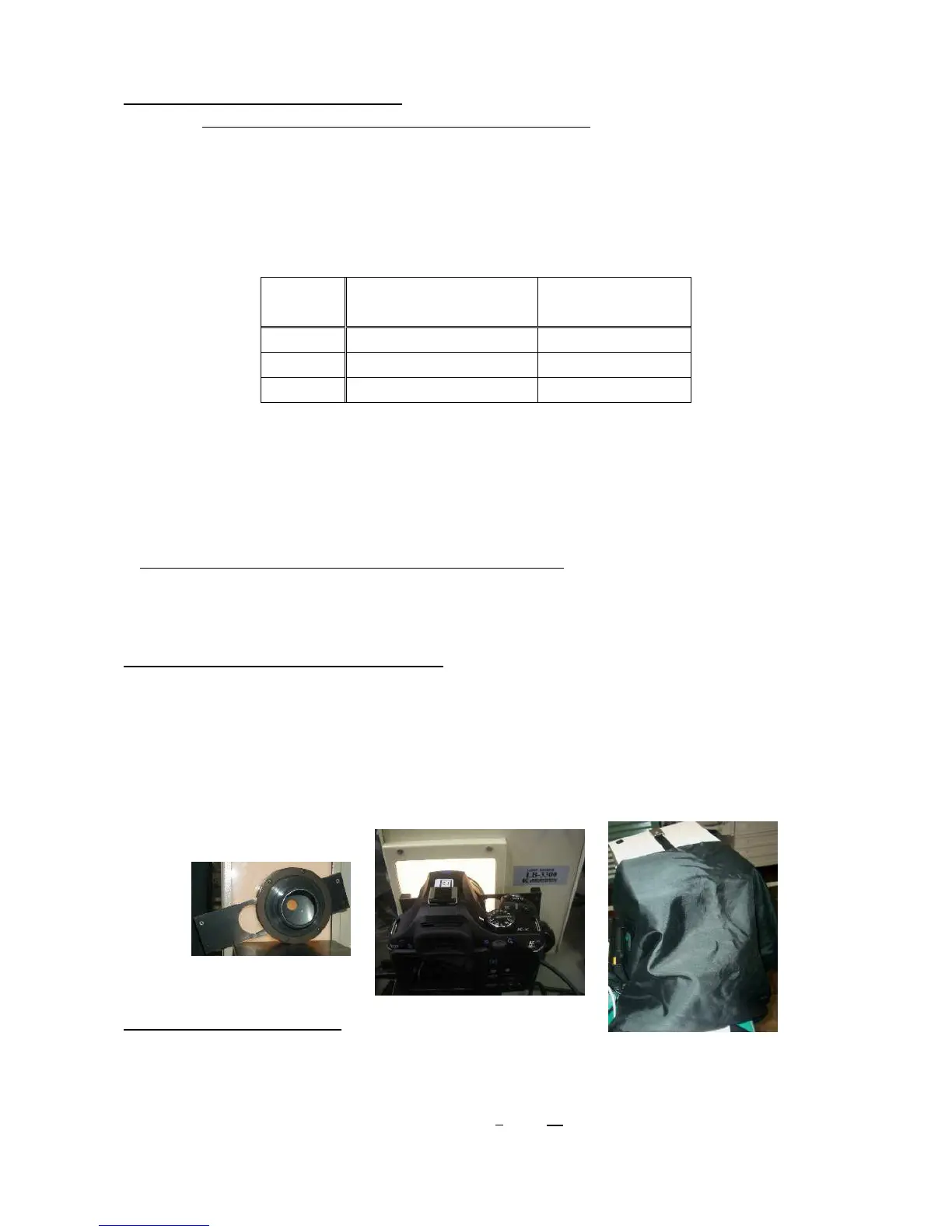
①Set mode dial to [M] and Set focus mode lever to [MF].
②Attach Diaphragm set ring F8 and Master lens(D20 or D20-01) to the camera.
③Set master lens to [F8 position].
④Set the lens toward center of light source window.
⑤Connect the camera and PC with USB cable and turn ON the camera.
⑥Cover the whole camera and light window by using dark curtain to avoid surrounding light.
6-2. Procedure of adjustment
①Double click [K-r_SLR_MTestt.exe ] in [K-rCS_ MTest ] folder to start up.
②Select content on below screen.( Basically All or WDC only)
Following method for selecting “Basically All”.
③ Input lens ID number then click [Enter]. (EX:”321”, ”0
58”→ 58)


 To Next Page