77420 - 90/107 -
Correlation table of EV with Y:
11-10. .WB (Confirmation of White Balance)
*The checking method is the same as 6830(K10D) ,76700(K100D), 77170 (K-m) and 77310 (K-x).
[Required equipment]PC, DC/AC adaptor, USB cable, FA50mm F1.4 (or F1.7), A light (2856 K°),
Color checker (Macbeth
TM
Chart or equivalent), Fluorescent lamp (White 4244K°), Fluorescent lamp
(Neutral white 5111K°), SD card (for taking picture), Image viewing software (e.g. Adobe Photo shop or
ACDSee
TM
), Gray chart (90x60cm or above)
[CAUTION] Both fluorescent lamps for checking should be used the Inverter (high-frequency converter)
lighting.
[Preparations] Attach the lens to the camera and insert the SD card to the camera then set as followings.
Image: Natural, Capture mode: AV (Aperture-priority) mode, Metering Method:
Multi-Segment Metering, Sensitivity: ISO200, Focus mode SW: AF, Recorded pixels: Default setting,
Quality Level: Default setting, Color Saturation: Normal, Image
Sharpness: Normal, Contrast: Normal, Color Space: sRGB (Default setting)
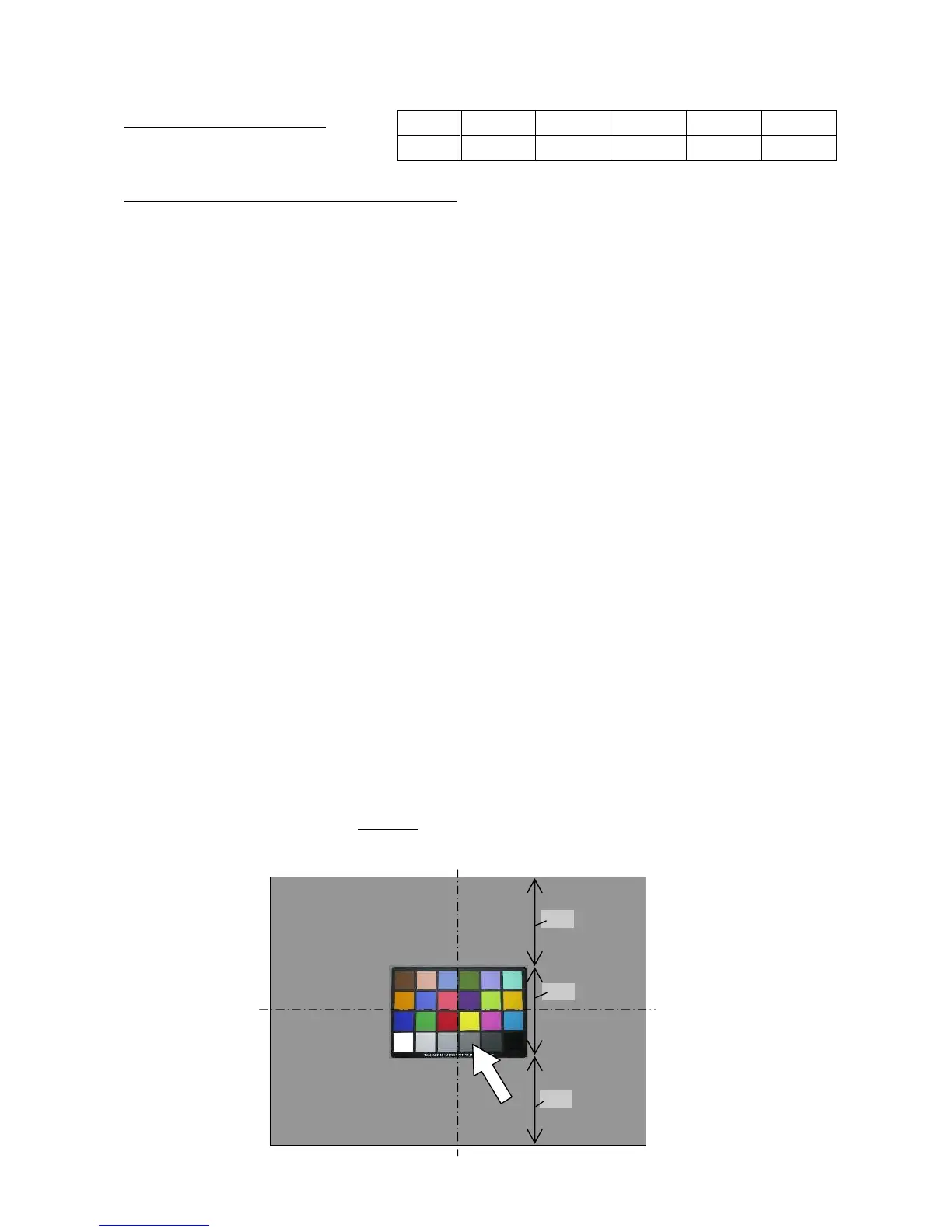
① Put the Color checker on the Gray chart as shown in the figure below.
② Light up the Color checker by the A light.
③ Set the WB (White Balance) mode to “Tungsten Light”.
④ Position the camera so that the Color-Checker and Gray-Chart are framed in the viewfinder as
shown in the figure below while looking through the viewfinder.
⑤Take a picture of them while changing the aperture value (F2.8~F8) so that the TV value
becomes between from 1/30 to 1/250.
⑥Take a picture of them similarly by setting the WB to “Fluorescent Light W white”
while using the Fluorescent lamp (white 4244K°) for lighting.
⑦Take a picture of them similarly by setting the WB to “AWB” while using the Fluorescent lamp
(Neutral white 5111K°) for lighting.
⑧View the three pictures which have been taken above by the Image viewing software, and
confirm whether the true color of Neutral 5
indicated by arrow in the figure below is reproduced
or not while comparing with Color chart. And, confirm that other colors also have not been changed.
EV
−1.0 −0.5 ±0 +0.5 +1.0
Y= 67 87
110
132 155


 To Next Page