76
Taking Pictures
4
You can choose the number of recorded pixels from [2560×1920],
[2048×1536], [1600×1200], [1024×768] and [640×480].
The more pixels there are, the larger the picture and the bigger the file
size. The data volume also varies depending on the quality level setting
(1p.78).
Number of Recorded Pixels
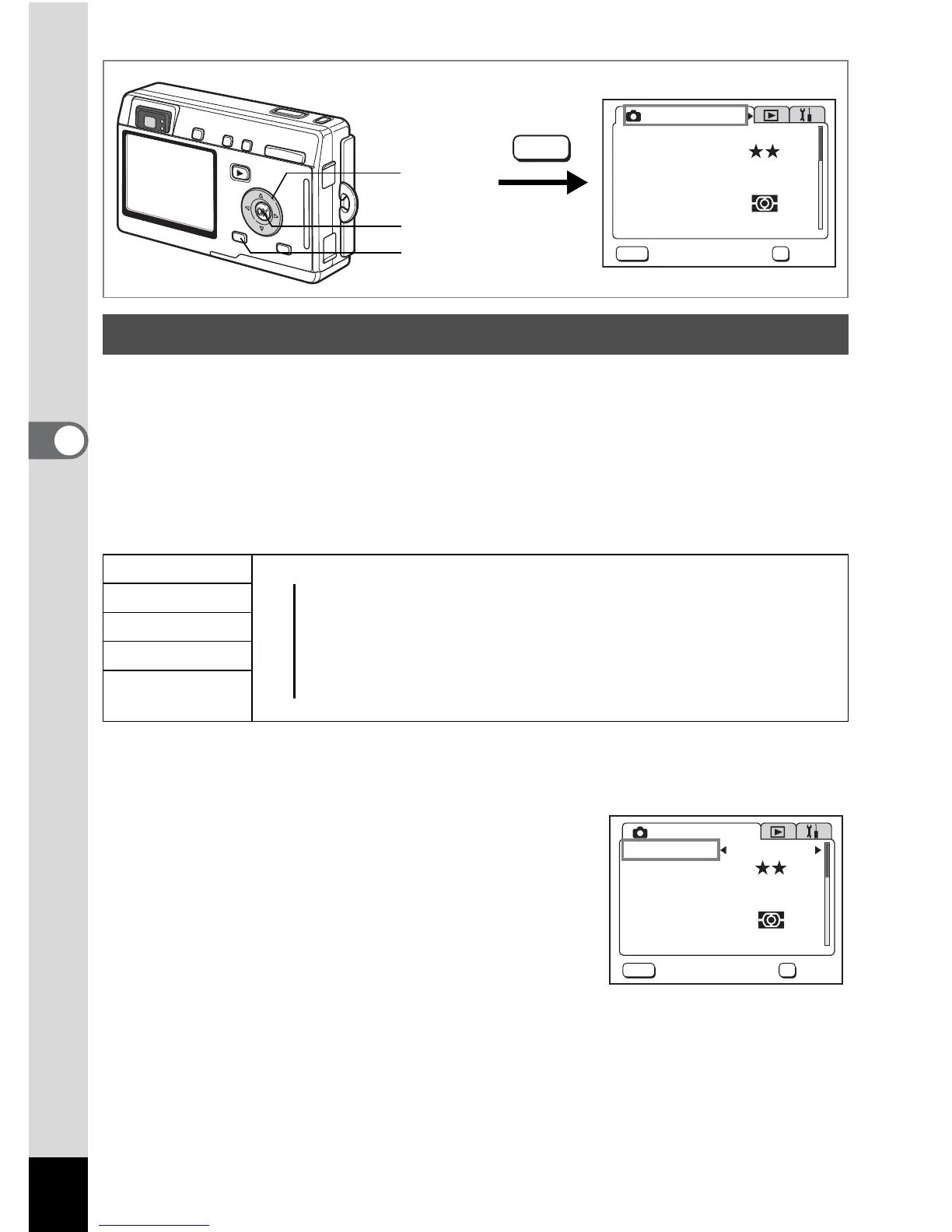
1 Press the MENU button in Capture mode.
The [A Rec.Mode] menu appears.
2 Use the four-way controller (23)
to select [Recorded Pixels].
3 Use the four-way controller (45)
to change the size.
4 Press the OK button.
The camera is ready to take the picture.
Selecting the Recorded Pixels
2560×1920
Printing images with high-resolution settings in your printer,
2048×1536
Printing at A4 size or larger, Editing and processing images
1600×1200
1024×768
Printing at postcard size
640×480
For use as images on websites, For attaching images to
e-mail
Rec. Mode
Recorded Pixels
Quality Level
White Balance
Focusing Area
AE Metering
Sensitivity
Multiple
Auto
AWB
2560x1920
MENU
OK
OK
Exit
1
2, 3
4
MENU
AWB
2560x1920
MENU
OK
OK
Exit
Rec. Mode
Recorded Pixels
Quality Level
White Balance
Focusing Area
AE Metering
Sensitivity
Multiple
Auto
▲
Clear, Fine




 To Next Page