11
Prepare your camera for use before you begin using it.
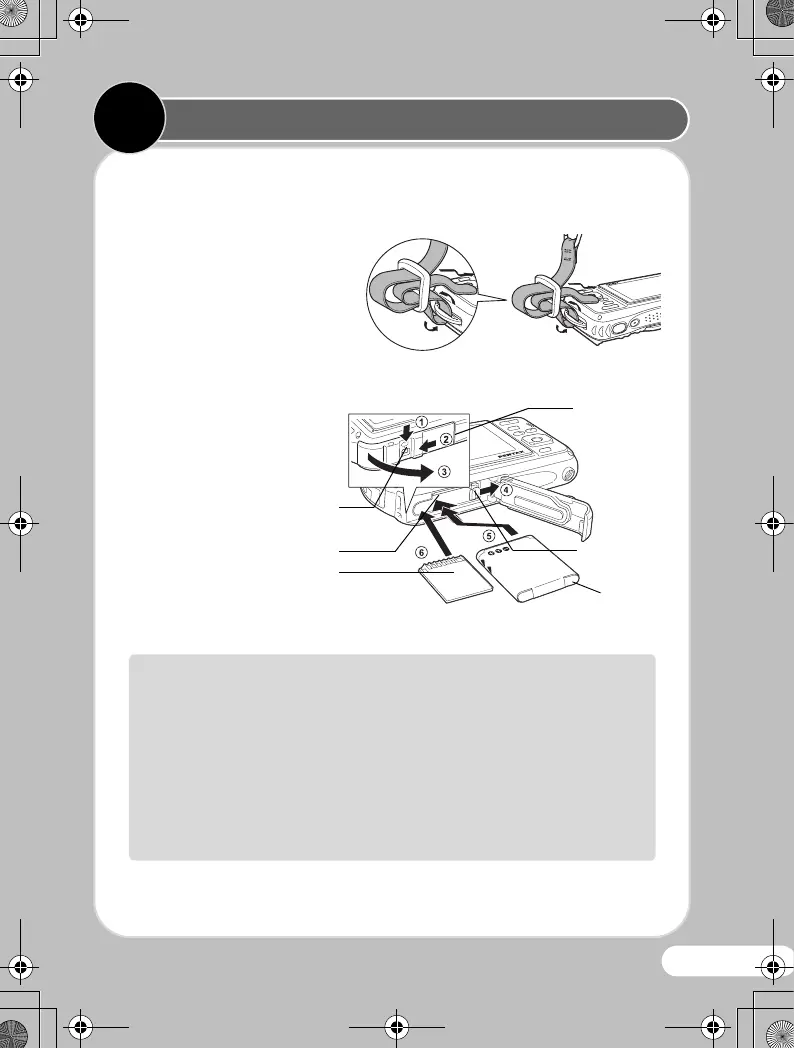
zAttaching the Carabiner Strap
Attach the carabiner strap
supplied with the camera as
shown in the illustration.
zInstalling the Battery and SD Memory Card
Install the battery and SD
Memory Card as shown in
the illustration.
* The SD Memory Card is sold separately.
Battery/
card cover
Battery lock
lever
Battery
The inside of the battery/card and terminal covers are not waterproof
• In locations where the camera is exposed to water or dirt such as
underwater, at the beach, in a kitchen, etc., make sure that the
battery/card and terminal cover lock levers are firmly locked so that
they won't open unexpectedly. Do not open the covers in such
locations.
• When removing the battery or card, avoid surroundings where the
camera may be exposed to water or dirt, and make sure the camera,
battery, card, and your hands are completely dry.
Preparing the Camera for Use
1
1
Battery/card cover
lock lever
SD Memory Card socket
SD Memory Card
OptioWG-1_QSG_ENG.book Page 11 Friday, March 11, 2011 8:59 AM



 To Next Page
 Loading...








