EasyManua.ls Logo

Pentax P5 - Page 29

Pentax P5
68 pages
Print Icon
To Next Page IconTo Next Page
To Previous Page IconTo Previous Page
Loading...
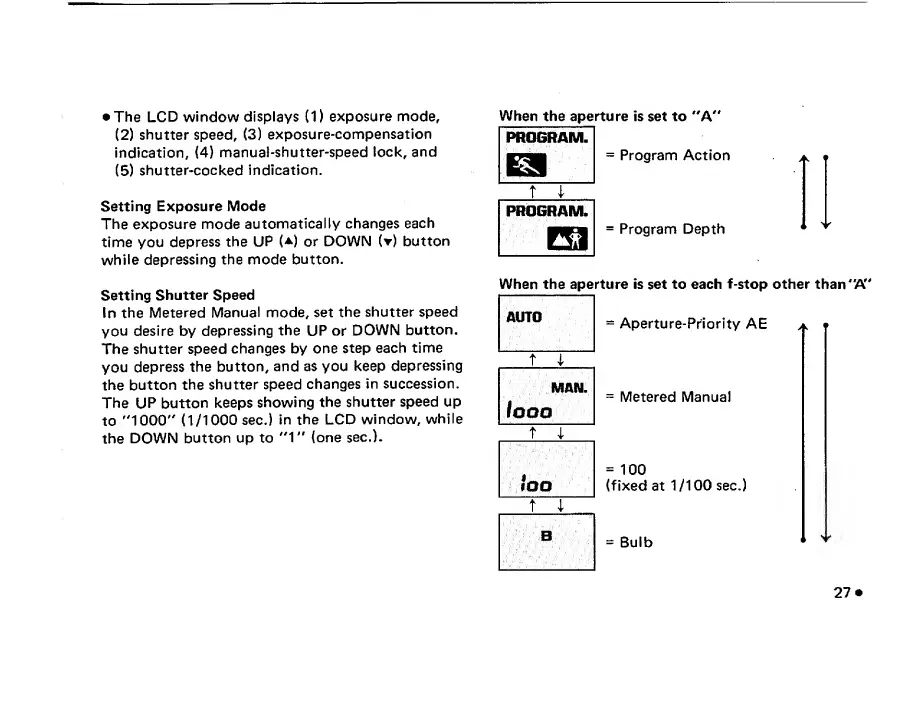
The
LCD
window
displays
(1)
exposure
mode,
(2)
shutter
speed,
(3)
exposure-compensation
indication,
(4)
manual-shutter-speed
lock,
and
(5)
shutter-cocked
indication.
Setting
Exposure
Mode
The
exposure
mode
automatically
changes
each
time
you
depress
the
UP
(*)
or
DOWN
(t)
button
while
depressing
the
mode
button.
When
the
aperture
is
set
to
"A"
=
Program
Action
=
Program
Depth
Setting
Shutter
Speed
In
the
Metered
Manual
mode,
set
the
shutter
speed
you
desire
by
depressing
the
UP
or
DOWN
button.
The
shutter
speed
changes
by
one
step
each
time
you
depress
the
button,
and
as
you
keep
depressing
the
button
the
shutter
speed
changes
in
succession.
The
UP
button
keeps
showing
the
shutter
speed
up
to
"1000"
(1/1000
sec.)
in
the
LCD
window,
while
the
DOWN
button
up
to
"1"
(one
sec.).
When
the
aperture
is
set
to
each
f-stop
other
than
"A"
=
Aperture-Priority
AE
a.
m
=
Metered
Manual
=
100
(fixed
at
1/100
sec.)
=
Bulb
"
27

Related product manuals