EasyManua.ls Logo

Pentax P5 - Exposure-Memory Lock

Pentax P5
68 pages
Print Icon
To Next Page IconTo Next Page
To Previous Page IconTo Previous Page
Loading...
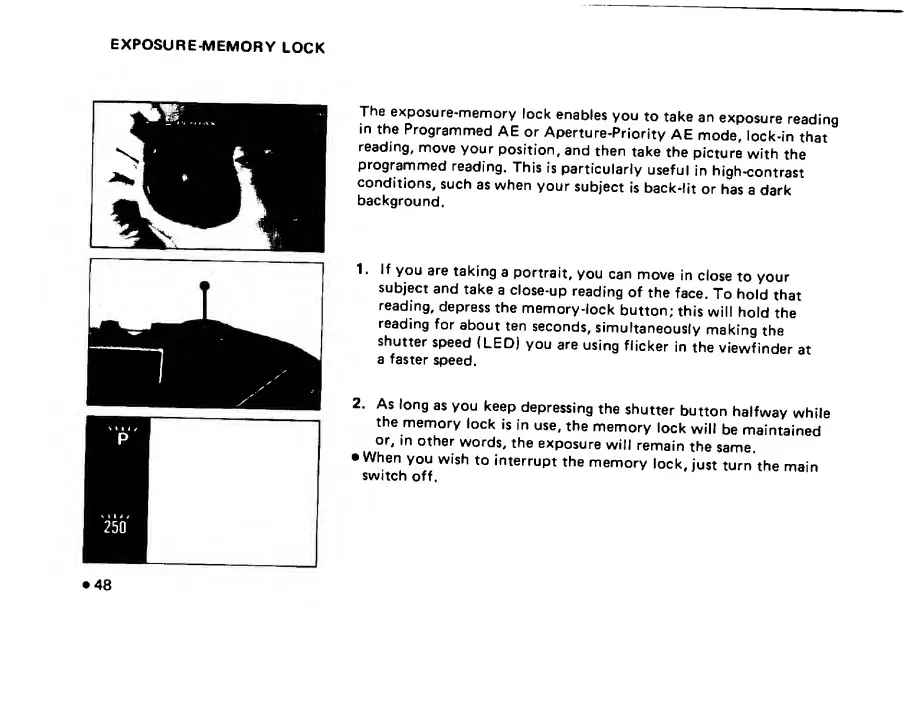
The
exposure-memory
lock
enables
you
to
take
an
exposure
reading
in
the
Programmed
AE
or
Aperture-Priority
AE
mode,
lock-in
that
reading,
move
your
position,
and
then
take
the
picture
with
the
programmed
reading.
This
is
particularly
useful
in
high-contrast
conditions,
such
as
when
your
subject
is
back-lit
or
has
a
dark
background.
1.
If
you
are
taking
a
portrait,
you
can
move
in
close
to
your
subject
and
take
a
close-up
reading
of
the
face.
To
hold
that
reading,
depress
the
memory-lock
button;
this
will
hold
the
reading
for
about
ten
seconds,
simultaneously
making
the
shutter
speed
(LED)
you
are
using
flicker
in
the
viewfinder
at
a
faster
speed.
2.
As
long
as
you
keep
depressing
the
shutter
button
halfway
while
the
memory
lock
is
in
use,
the
memory
lock
will
be
maintained
or,
in
other
words,
the
exposure
will
remain
the
same.
When
you
wish
to
interrupt
the
memory
lock,
just
turn
the
main
switch
off.

Related product manuals