EasyManua.ls Logo

Pentax P5 - Using 100 (1;100 Sec.)

Pentax P5
68 pages
Print Icon
To Next Page IconTo Next Page
To Previous Page IconTo Previous Page
Loading...
USING
100
(1/100
sec.)
When
using
a
general,
clip-on
type
flash
on
this
camera,
the
camera
must
be
set
to
100
(1/100
sec.).
Although
this
1/100
sec.
setting
can
be
used
for
an
ordinary
picture
taking
purpose,
you
cannot
confirm
correct
exposure
through
the
viewfinder.
Set
the
lens
aperture
to
an
f-stop
other
than
A.
Set
the
main
switch
to
ON.
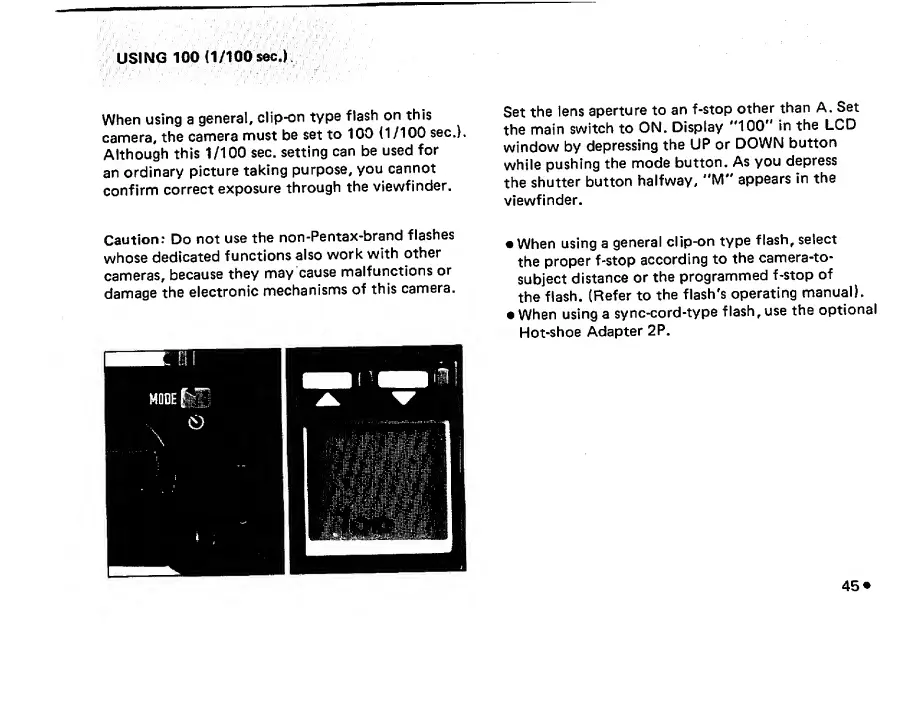
Display
"100"
in
the
LCD
window
by
depressing
the
UP
or
DOWN
button
while
pushing
the
mode
button.
As
you
depress
the
shutter
button
halfway,
"M"
appears
in
the
viewfinder.
Caution:
Do
not
use
the
non-Pentax-brand
flashes
whose
dedicated
functions
also
work
with
other
cameras,
because
they
may
cause
malfunctions
or
damage
the
electronic
mechanisms
of
this
camera.
When
using
a
general
clip-on
type
flash,
select
the
proper
f-stop
according
to
the
camera-to-
subject
distance
or
the
programmed
f-stop
of
the
flash.
(Refer
to
the
flash's
operating
manual).
When
using
a
sync-cord-type
flash,
use
the
optional
Hot-shoe
Adapter
2P.

Related product manuals