EasyManua.ls Logo

Pentax P5 - Shooting in Metered-Manual Mode

Pentax P5
68 pages
Print Icon
To Next Page IconTo Next Page
To Previous Page IconTo Previous Page
Loading...
SHOOTING
IN
METERED
MANUAL
MODE
ft
m
00
10
15
3
22*
16*
V'WV
V22
22
16
11
8
5.6
4
2:8
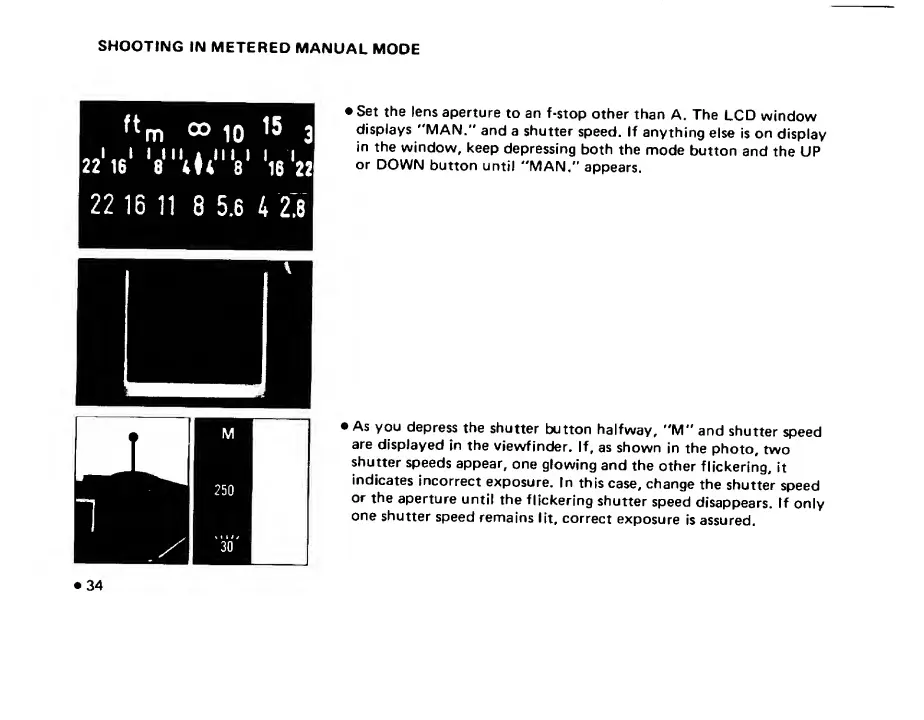
Set
the
lens
aperture
to
an
f-stop
other
than
A.
The
LCD
window
displays
"MAN."
and
a
shutter
speed.
If
anything
else
is
on
display
in
the
window,
keep
depressing
both
the
mode
button
and
the
UP
or
DOWN
button
until
"MAN."
appears.
As
you
depress
the
shutter
button
halfway,
"M"
and
shutter
speed
are
displayed
in
the
viewfinder.
If,
as
shown
in
the
photo,
two
shutter
speeds
appear,
one
glowing
and
the
other
flickering,
it
indicates
incorrect
exposure.
In
this
case,
change
the
shutter
speed
or
the
aperture
until
the
flickering
shutter
speed
disappears.
If
only
one
shutter
speed
remains
lit,
correct
exposure
is
assured.
34

Related product manuals