EasyManua.ls Logo

Pentax P5 - Exposure Compensation

Pentax P5
68 pages
Print Icon
To Next Page IconTo Next Page
To Previous Page IconTo Previous Page
Loading...
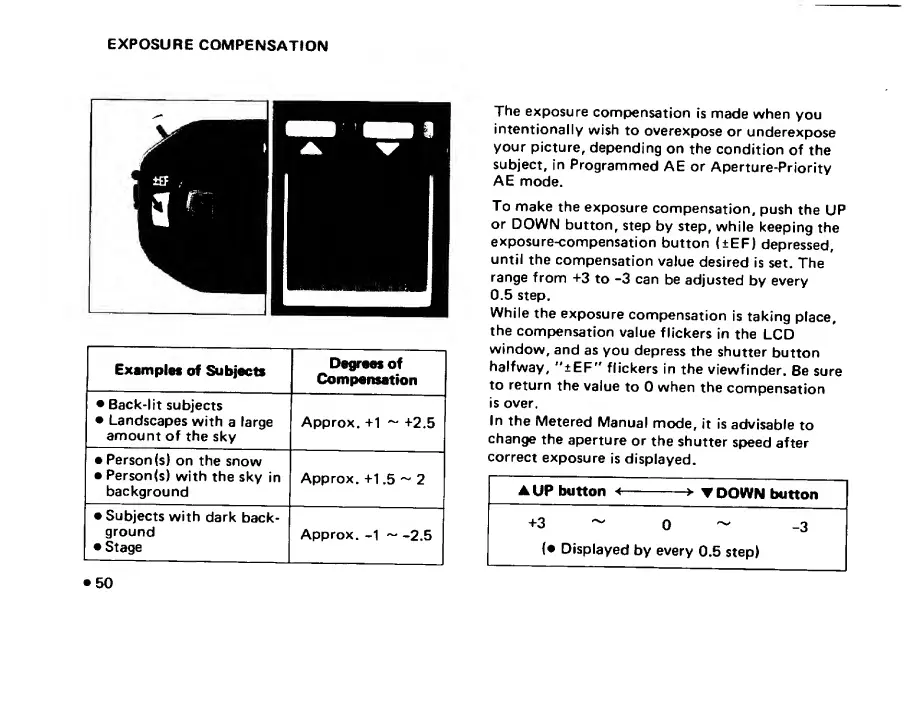
EXPOSURE
COMPENSATION
Examples
of
Subjects
Degrees
of
Compensation
Back-lit
subjects
Landscapes
with
a
large
amount
of
the
sky
Approx.
+1
+2.5
Person
(s)
on
the
snow
Person(s)
with
the
sky
in
background
Approx.
+1.5
~
2
Subjects
with
dark
back¬
ground
Stage
Approx.
-1
-
-2.5
The
exposure
compensation
is
made
when
you
intentionally
wish
to
overexpose
or
underexpose
your
picture,
depending
on
the
condition
of
the
subject,
in
Programmed
AE
or
Aperture-Priority
AE
mode.
To
make
the
exposure
compensation,
push
the
UP
or
DOWN
button,
step
by
step,
while
keeping
the
exposure-compensation
button
(±EF)
depressed,
until
the
compensation
value
desired
is
set.
The
range
from
+3
to
-3
can
be
adjusted
by
every
0.5
step.
While
the
exposure
compensation
is
taking
place,
the
compensation
value
flickers
in
the
LCD
window,
and
as
you
depress
the
shutter
button
halfway,
"±EF"
flickers
in
the
viewfinder.
Be
sure
to
return
the
value
to
0
when
the
compensation
is
over.
In
the
Metered
Manual
mode,
it
is
advisable
to
change
the
aperture
or
the
shutter
speed
after
correct
exposure
is
displayed.
A
UP
button
<
>
T
D
OWN
button
+3
^
0
~
-3
{•
Displayed
by
every
0.5
step)
50

Related product manuals