Page | 11
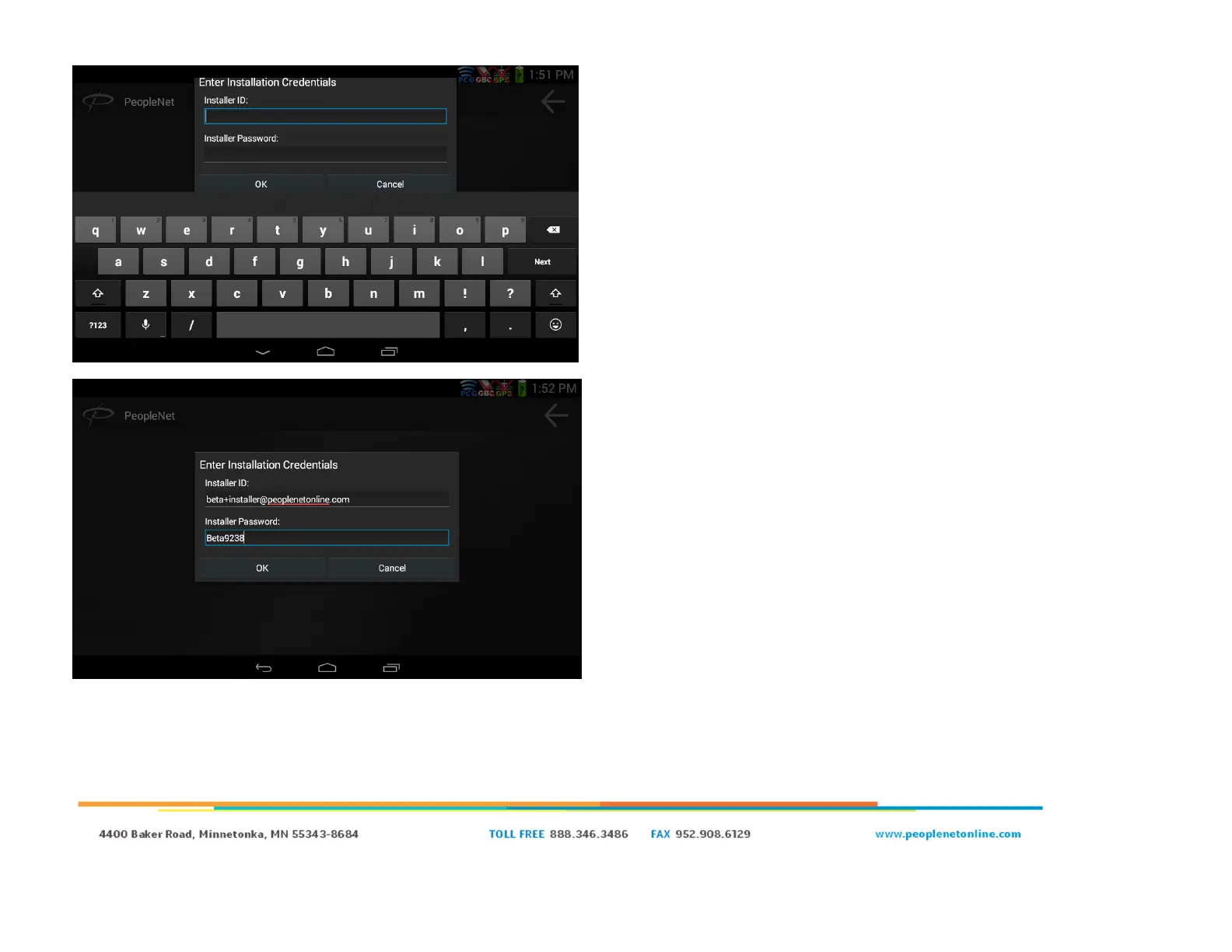
● Once the wifi network is established, you will be prompted to
enter your “Installation Credentials”.
○ This is a new prompt unique to the PCG/PD5 pairing
process.
○ The installation credentials are on the next screen.
● In the Installer ID field enter: Your Installer ID
● In the Installer Password enter: Your Installer Password
● If you do not have an installer ID/Password please reach
out to your system administrator
● Click “OK”
● The step is very important, as it allows the PD5 to talk to the
PCG and Enterprise (back-end). It creates a trust relationship
and a certificate held by the PD5.
● There are a number of potential error messages depending on
how far the PD5 gets into the process
○ If you encounter an error message, verify that the
installation credentials were typed correctly
○ If the installation credentials are correct, try rebooting the
PD5 and the PCG. The most common issue is the PD5 or
PCG is unable to talk to the back-end, and rebooting will
cause the PCG to reinitialize its modem and re-register
with the cellular network.


 To Next Page