Page 17
ASSEMBLY
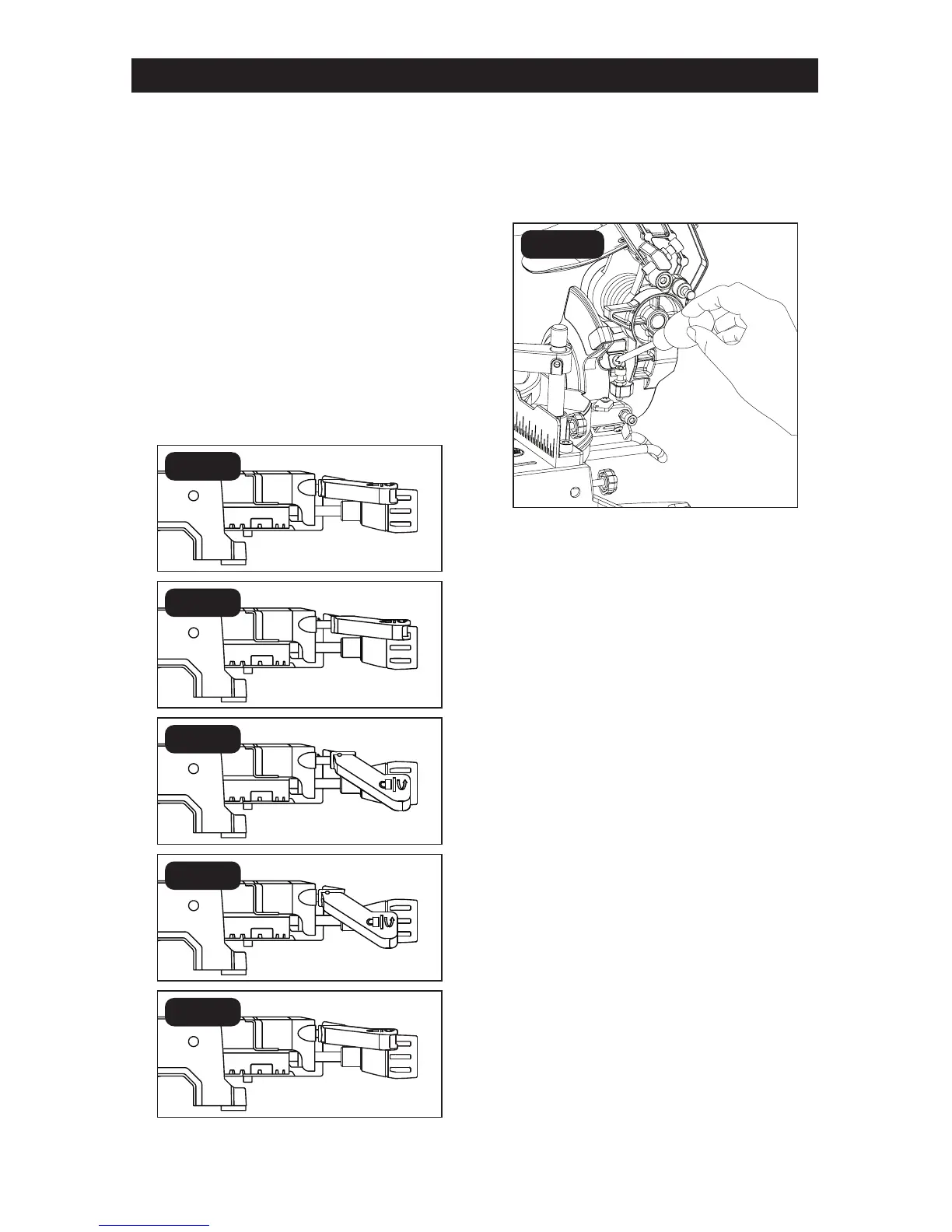
To loosen the bevel lock lever tension:
If the bevel locking lever is in the upper un-
locked position and the miter saw head will
not bevel, then perform the tension loosen-
ing steps shown below.
1. Start from the unlocked position (Lift up
the lever see g.9a)
2. Pull the lever towards you.(See g.9b)
3. Push the lever down. (Fig.9c)
4. Release the lever. (Fig.9d)
NOTICE: The lever should automatically
snap back. If it does not snap back, move
the lever up and down slightly until it releas-
es and snaps back.
5. Lift up the bevel lever. (Fig.9e)
BEVEL-ANGLE INDICATOR
ADJUSTMENT (IF NECESSARY)
(FIG. 10)
1. Unplug the saw.
2. Check to see if the bevel-angle indicator
is pointing to 0° on the bevel scale.
3. If the indicator is not at 0°, loosen the
bevel-angle indicator screw, adjust the
indicator to 0° on the bevel angle scale,
and tighten the screw.
FIG. 10
FIG. 9a
FIG. 9b
FIG. 9c
FIG. 9d
FIG. 9e


 To Next Page
 Loading...