4. Clean the cooling system filler cap and inspect the
gasket. If the gasket is damaged, discard the old
filler cap and install a new filler cap. If the gasket is
not damaged, use a suitable pressurizing pump in
order to pressure test the filler cap. The correct
pressure is stamped on the face of the filler cap. If
the filler cap does not retain the correct pressure,
install a new filler cap.
i07508033
DEF Filler Screen (Emission
Related Component) - Clean
NOTICE
Ensure that the engine is stopped before any servic-
ing or repair is performed.
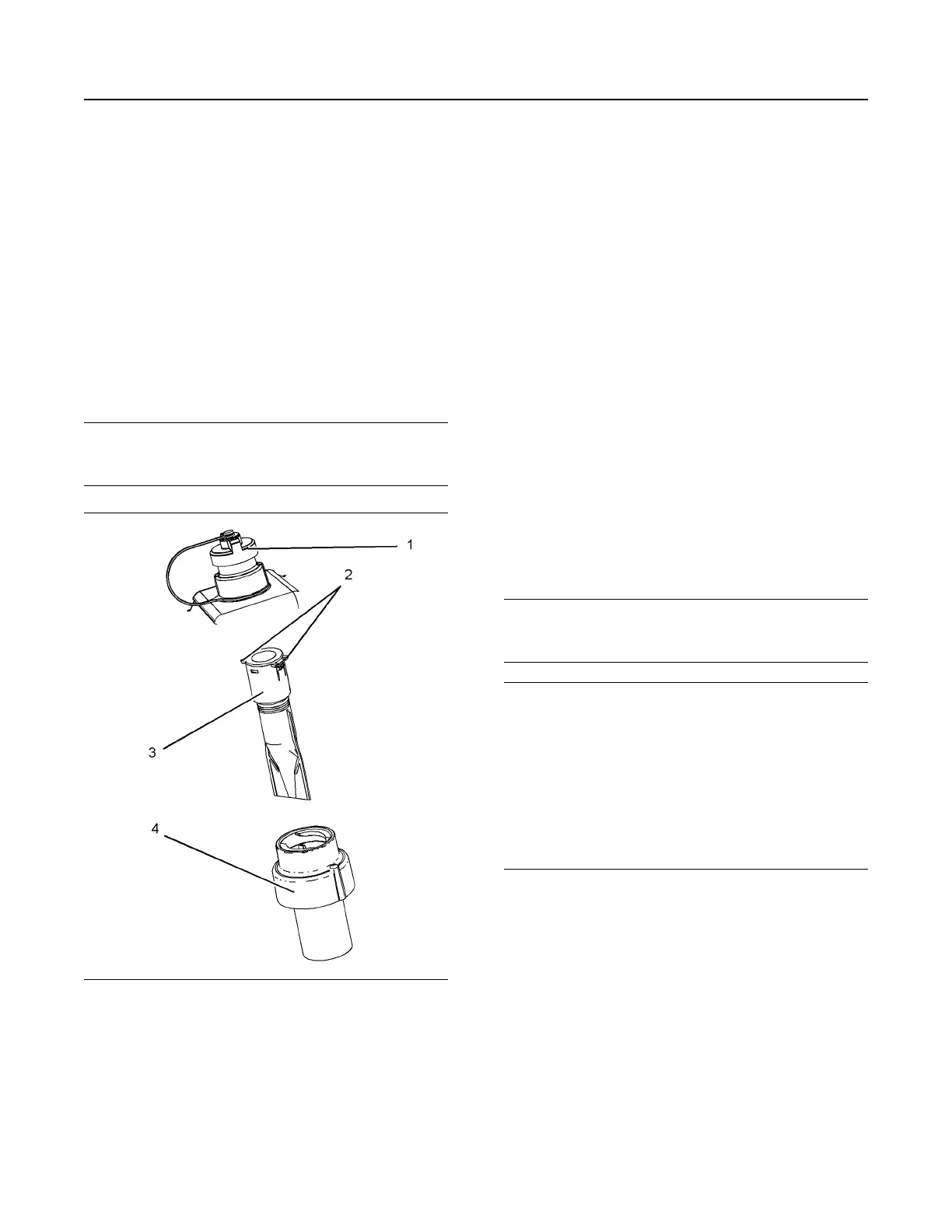
Illustration 73 g03725939
Typical example
1. Ensure that the area around cap on the Diesel
Exhaust Fluid (DEF) tank is clean. Remove cap
(1).
2. Using a suitable tool, press the tabs (2) in order to
release the tabs. With the tabs released remove
the filter screen (3) from DEF tank neck adapter
(4).
3. The filter screen can be cleaned in clean water and
dried using compressed air. Refer to this
Operation and Maintenance Manual, “General
Hazard Information” for information on using
compressed air.
4. If the filter screen cannot be cleaned or the filter
screen is damaged, then the filter screen must be
replaced.
5. Install filter screen (3) into DEF tank neck adapter
(4). Press filter screen into neck adapter and
ensure that tabs (2) are located correctly. Install
cap (1).
i07508564
DEF Manifold Filters (Emission
Related Component) - Replace
NOTICE
Ensure that the engine is stopped before any servic-
ing or repair is performed.
NOTICE
Care must be taken to ensure that Diesel Exhaust
Fluid (DEF) for the system are contained during per-
formance of inspection, maintenance, testing, adjust-
ing, and repair of the product. Be prepared to collect
the fluid with suitable containers before opening any
compartment or disassembling any component con-
taining fluids.
Dispose of all fluids according to local regulations
and mandates.
Ensure that the area around the DEF manifold is free
from contamination before any servicing or repair is
performed.
There are two different designs of manifold that could
be installed on your application.
Type 1 Manifold
1. Remove the manifold, refer to Disassembly and
Assembly, “Manifold (DEF Heater) - Remove and
Install” for the correct procedure.
M0076814-03 89
Maintenance Section
DEF Filler Screen (Emission Related Component) - Clean


 To Next Page