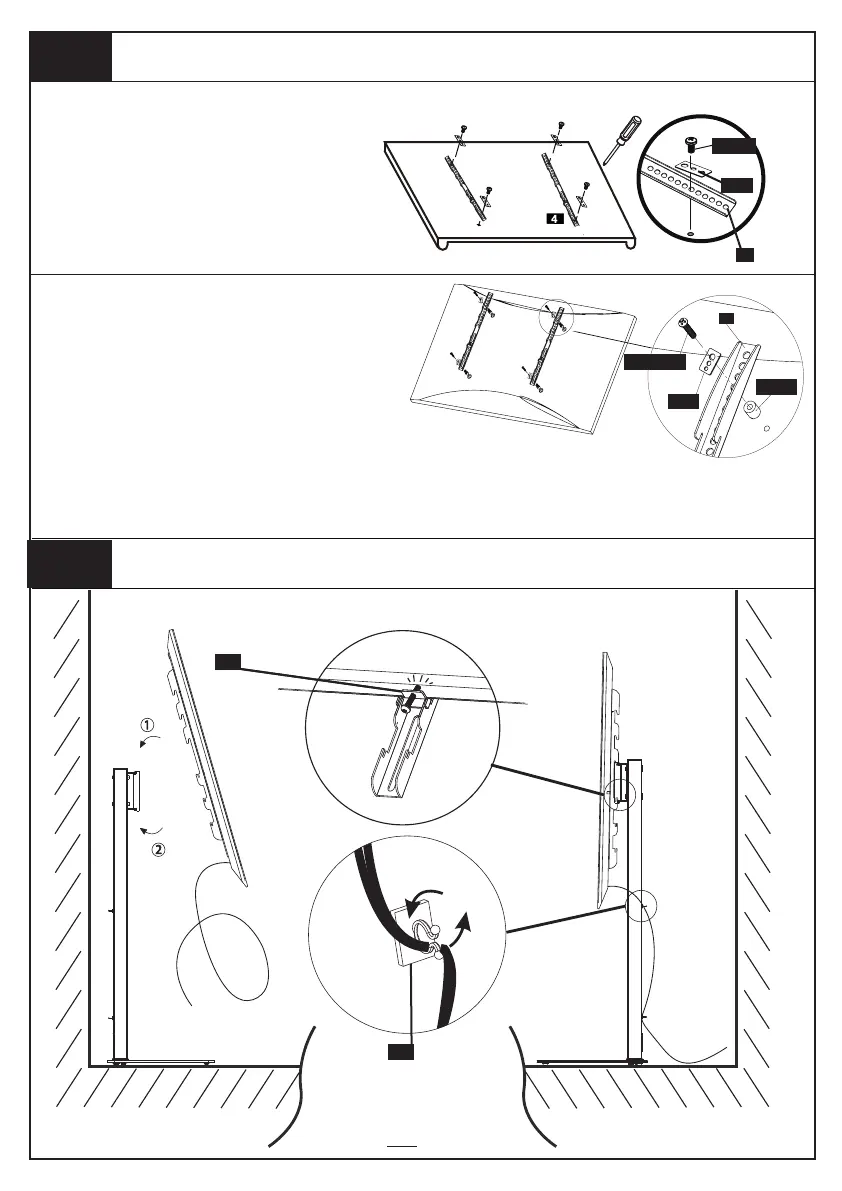
Attaching TV to TV Plate and Managing the Wires
Step 5
4
J
Wire Clip
Safety Lock
G
FLAT BACK TV
(UNIVERSAL MONITOR PLATE)
screwdriver(Not included)
ROUND BACK TV
(UNIVERSAL MONITOR PLATE)
First, make sure the diameter of the bolt(TV1-6) fits your TV. Then, please see the diagram above. You will need
to thread the bolt into the TV using the correct washer (TV9) and spacer (TV7 or TV8) if necessary with a
screwdriver(Not included). Please make sure the monitor brackets(4) are vertically centered and level with each
other.
TV9
4
4
Step 4
Mounting the Monitor Bracket to a TV
TV1,4
TV9
TV7,8
TV2,3,5,6






 To Next Page