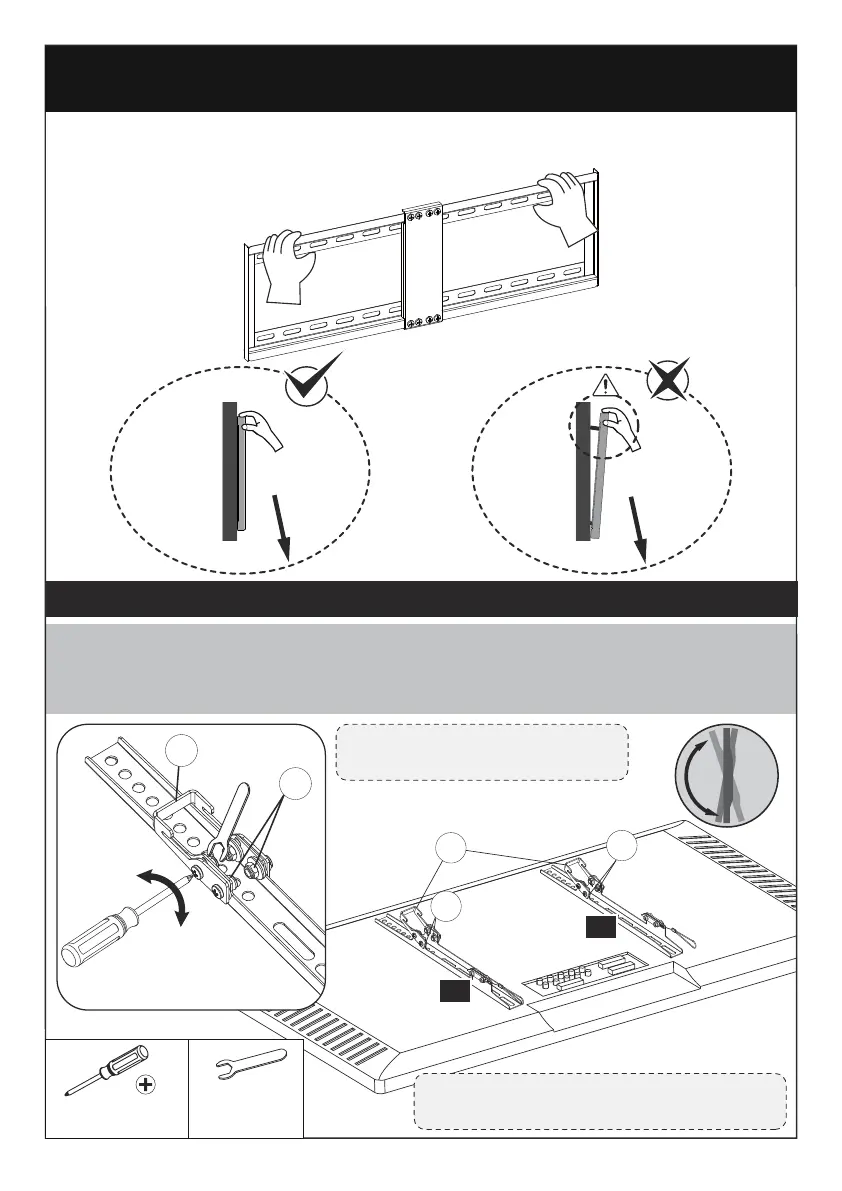
Step 5 Adjust Tilt Angle of TV
Slightly loosen 4 preassembled tilt tension bolts [S] in brackets [03] and [04]. Adjust the
hooks [H] to your desired angle. Then tighten tilt tension bolts [S] with a Phillips
screwdriver (NOT Included) and a wrench (not included) to fix the tilting angle of the
TV.
NOTE: Do not over-tighten
or over-loosen the bolts [S].
5/16” (8mm)
Wrench
(NOT lncluded)
Verify TV Plate Installation by Putting Pressure on TV
Plate
Step 4
Before attaching the TV to the mount, please try to pull down the TV wall
mount with your hands to check whether it is firmly secured.
Tighten
Loosen
H
S
04
03
H
NOTE: The tilt angles of the hooks on
the TV brackets must be the same.
S
S
Phillips Screwdriver
(NOT lncluded)
05 07 09 11






 To Next Page