EasyManua.ls Logo

Petlibro PLAF001 - User Manual

Petlibro PLAF001
10 pages
Print Icon
To Next Page IconTo Next Page
Loading...
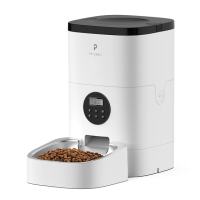
4L Automatic Pet Feeder
Model: PLAF001
Please read this User Guide before using
the product and retain for reference.
This product is intended for household use only.
User Guide

Questions and Answers

  • M
    Marcus ContrerasAug 3, 2025
    What to do if my Petlibro Pet Care Product food won’t come out?
    • L
      Latoya GreenAug 3, 2025
      If the Petlibro Pet Care Product isn't dispensing food, first ensure you're using dry food with kibble sizes between 2-10mm (0.07-0.4in). Also, check for any obstructions in the chute or outlet by disassembling the food tank. Finally, verify that the device has sufficient power, either through a connected power adapter or a charged battery.
  • D
    Diana MahoneyAug 8, 2025
    Why is the LCD display off on my Petlibro Pet Care Product?
    • A
      Allen BrownAug 8, 2025
      If the LCD display of your Petlibro Pet Care Product is off, first ensure the screen isn't locked by pressing and holding the Unlock button for 3 seconds. Next, check if the power adapter is properly connected. If the display remains off after these steps, it may indicate a malfunction.
  • S
    Sara OwensAug 13, 2025
    How to unlock the Petlibro Pet Care Product when I can’t press any buttons?
    • A
      Adam FisherAug 13, 2025
      If you can't press any buttons on your Petlibro Pet Care Product, it's likely that the screen is locked, which occurs automatically after 15 seconds of inactivity. To unlock it, press and hold the Unlock button for 3 seconds.
  • J
    James JohnsAug 18, 2025
    Why can’t I hear voice recordings on my Petlibro PLAF001?
    • K
      Kristin FisherAug 19, 2025
      If you cannot hear your voice recordings during feeding with the Petlibro Pet Care Product, first unlock the screen and press the Record button to check the recording. If no sound is heard, record your message again, ensuring you save it according to the instructions in the Recording a Meal Call section.
  • C
    Christopher RamirezAug 23, 2025
    How to check meal settings on Petlibro Pet Care Product?
    • T
      Tyrone LynchAug 25, 2025
      If you can’t remember the meal settings on your Petlibro Pet Care Product, unlock the screen and press the Set button. This will display the meal number, though not the portion size for each meal.
  • C
    carrie81Aug 28, 2025
    What to do if food volume is not the same for each portion on Petlibro PLAF001?
    • J
      Jennifer RodriguezAug 28, 2025
      If the food volume for each portion isn't consistent with your Petlibro Pet Care Product, note that the initial few portions may vary. This isn't necessarily a sign of a faulty device. The portions should become almost even after approximately six feedings.

Summary

Safety Precautions

General Warnings

Key safety warnings for operating the pet feeder safely, including handling, environment, and maintenance.

Operational Cautions

Important cautions regarding pet interaction, environmental conditions, power sources, and food compatibility.

Control Panel Functions

Cleaning and Maintenance

Disassembling Food Tank

Instructions for removing the food tank for cleaning.

Product Setup and Operation

Setting Feeding Schedule

Configuring current time, number of meals, and specific meal times/portions.

Troubleshooting Common Issues

Petlibro PLAF001 Specifications

General IconGeneral
Product NamePetlibro PLAF001
CategoryPet Care Product
Product TypeAutomatic Pet Feeder
Capacity4L
ConnectivityWi-Fi
App CompatibilityPetlibro App
Voice RecordingYes
Food TypeDry Food
Programmable MealsYes
Portion ControlYes
MaterialABS
Power SupplyDC 5V
Feeding ScheduleUp to 6 meals per day
Power SourceAC Adapter

Related product manuals