ENG
Operating Manual | Attachment and Installation Cooling Units | Standard Controller (SC) – 400 / 460 V, 3~ | 086100125 32/66
4.5.3 Assembly of the DTI cooling unit (Installation)
4.5.3.1 M
aking cut-outs for DTI cooling unit
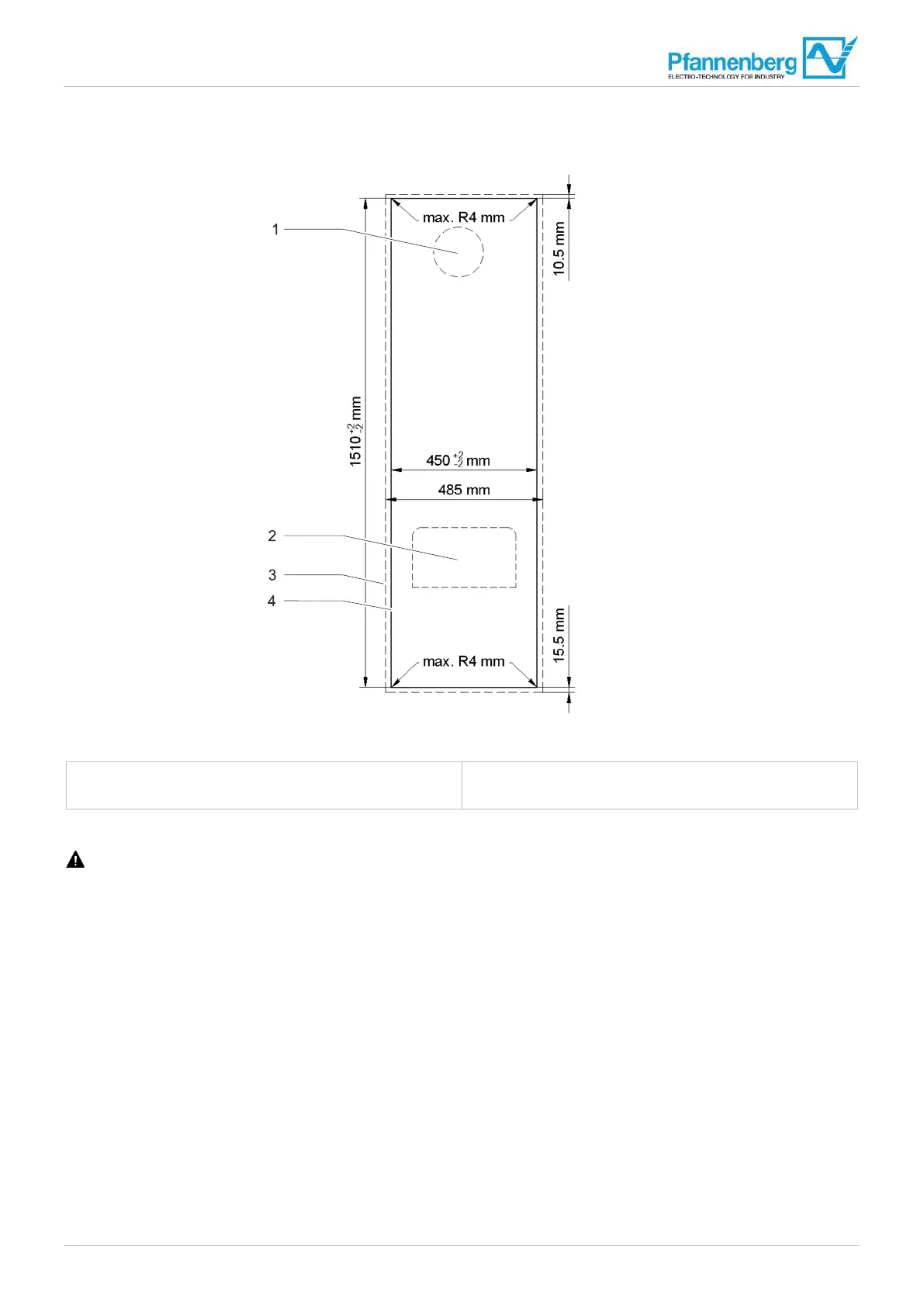
Fig. 1
2: External view switch cabinet, assembly cut-outs
1 Air inlet
2
Air outlet
3 Device contour
4 Assembly cut-out
Prerequisites
DANGER – Danger to life due to electric shock. Make sure that the unit is voltage-free.
• All general requirements are met, see "General", Page 29.
Required tools and materials
• Saw
• Switch cabinet mill if necessary
• Protective covers
Procedure
1. Ensure that the switch cabinet has a protective cover to protect against chips.
2. Provide switch cabinet with cut-outs. For prescribed dimensions, see Fig. 12.
3. The four cut-out corners can be made rectangular or with a max. radius of 4 mm.
4. Deburr the cutting edge.
5. Remove chips and assembly waste from the switch cabinet.
The cut-outs and holes are made and the cooling unit can be assembled.


 To Next Page