ENG
Operating Manual | Attachment and Installation Cooling Units | Standard Controller (SC) – 400 / 460 V, 3~ | 086100125 48/66
5.3 Service interface
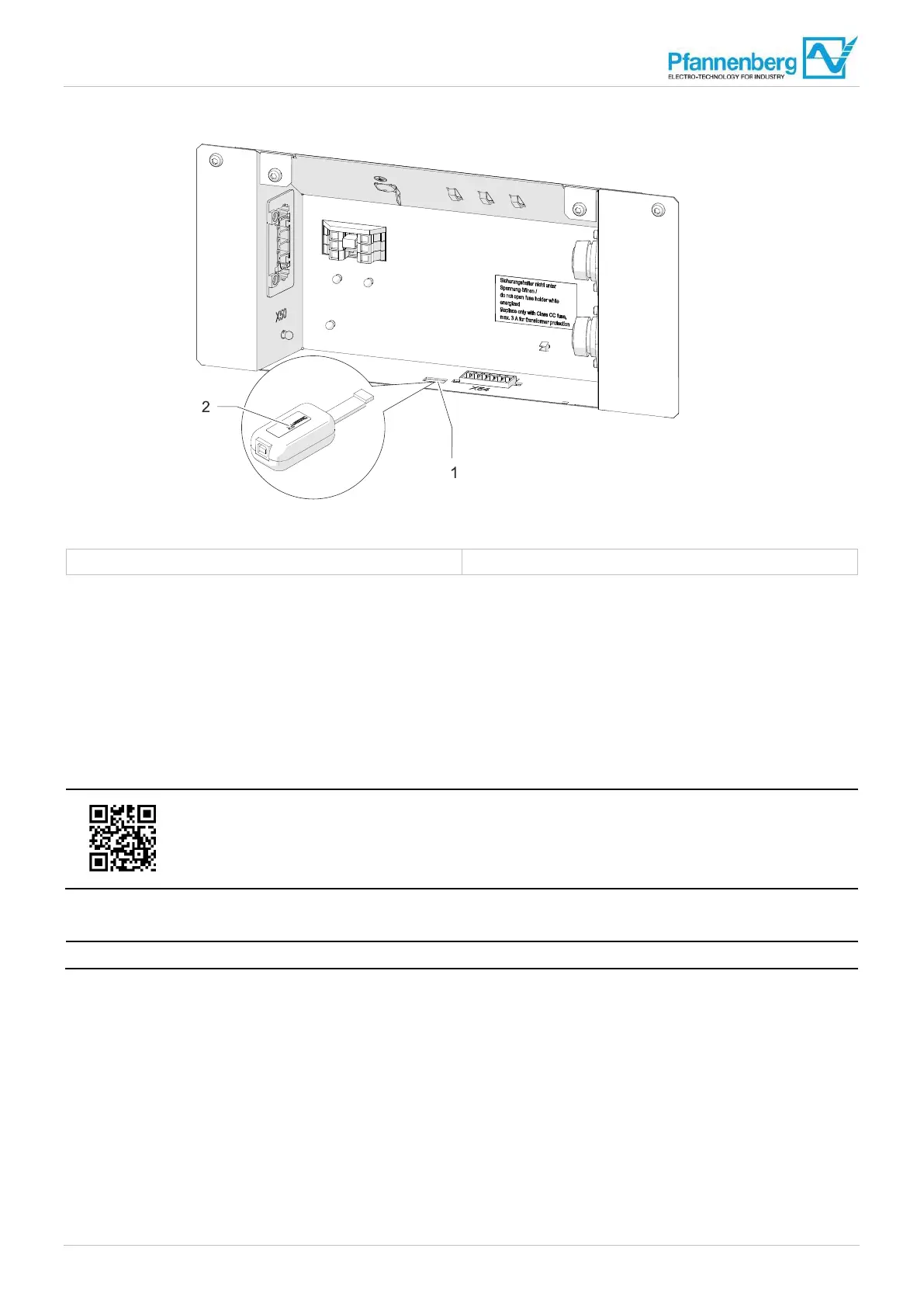
Fig. 23: Service interface
1 S
ervice interface on the controller 2 USB adapter
The service interface enables operating parameters to be changed.
• A USB adapter and the configuration software ECoolPLANT 2.X, including the USB driver software are required for this.
• The connection for the USB adapter is marked on the circuit diagram with the device tag X28.
• The USB adapter enables connection to a computer that operates with the configuration software ECoolPLANT 2.X.
– The USB adapter is available as an accessory, see chapter "Spare parts and accessories", Page 64.
– Remove the USB adapter from the unit after use. The service interface is only intended for temporary data
exchange, e.g. to read out system messages. Continuous operation is forbidden.
• The ECoolPLANT software is available as a free download on the website Fehler! Linkreferenz
ungültig.. Alternatively, simply scan the QR code opposite.
• The appropriate operating manual for the ECoolPLANT software is available for downloading under
Fehler! Linkreferenz ungültig.
For a detailed description of the error messages and troubleshooting notes, see section "Error messages", Page 58.


 To Next Page