5
Initial phantom positioning
The Catphan® phantom is positioned in the CT scanner by mounting it on the case.
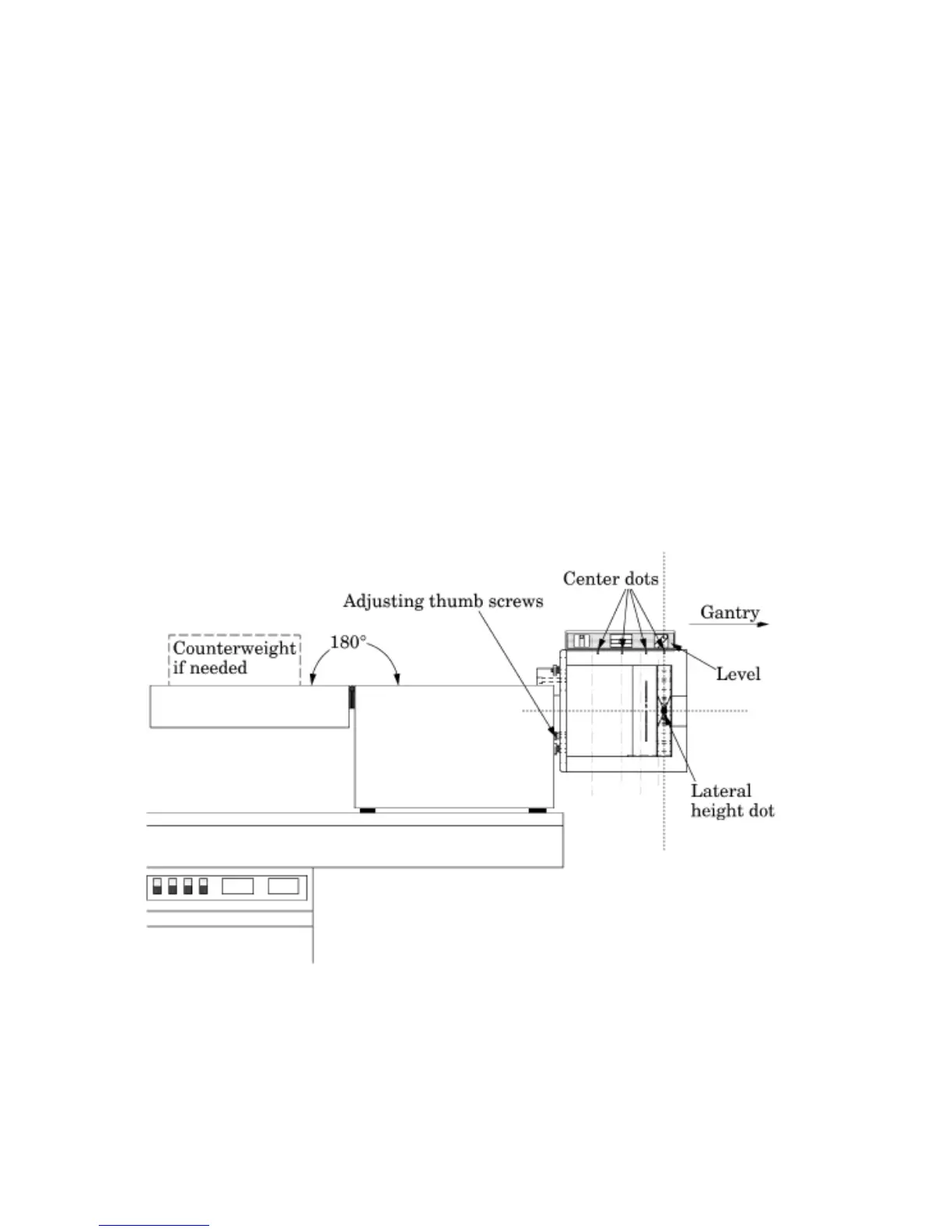
Place the phantom case on the gantry end of the patient table with the box hinges away
from the gantry. It is best to place the box directly on the table and not on the table pads.
Open the box, rotating the lid back 180°. If you are using an annulus, additional weight
will need to be placed in the box to counterweigh the phantom. The patient straps can be
used for additional stability.
Remove the phantom from the box and hang the Catphan® from the gantry end of the
box. Make sure the box is stable with the weight of the phantom and is adequately
counterweighed to prevent tipping.
Use the level and adjust the black thumb screws to level the Catphan®. Once the
phantom is level, slide the phantom along the end of the box to align the section center
dots on the top of the phantom with the x axis alignment light. Raise or lower the
patient table so the laterial height dot on the side of the phantom aligns with the y axis
alignment light.
Use the z axis table drive to position the phantom for scanning.
Depending on the type of scanner being tested and the selected protocols there are
different ways to align the phantom along the z axis.
Cone beam CT: the most common approach is to center the scanner between the second
and third alignment dots and do a single scan that will provide slices of all test modules.
However because of beam divergence there will be variations between images taken of
a module that is in the center of the beam verses images taken on the edge of the beam.


 To Next Page