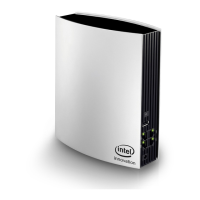
Phicomm K3C - AC1900 Smart Wi-Fi Router
Table of Contents
1 About this guide................................................................................................................................. 1
1.1 Structure of this guide............................................................................................................................................ 1
1.2 Symbols and conventions .................................................................................................................................... 1
2 Introduction ........................................................................................................................................ 3
3 Hardware connections ...................................................................................................................... 4
3.1 Package contents .................................................................................................................................................... 4
3.2 Connect your devices ............................................................................................................................................ 4
4 Get started .......................................................................................................................................... 6
4.1 TCP/IP settings ......................................................................................................................................................... 6
4.2 Set up router via web browser ........................................................................................................................... 7
4.3 Log into Web Management .............................................................................................................................. 10
4.4 Configuring router via Phicomm app ........................................................................................................... 11
5 General configurations ...................................................................................................................12
5.1 Manage devices .................................................................................................................................................... 12
5.2 Wireless settings ................................................................................................................................................... 13
5.3 WAN settings .......................................................................................................................................................... 15
5.4 LAN settings............................................................................................................................................................ 16
6 Advanced settings ...........................................................................................................................17
6.1 DHCP service ......................................................................................................................................................... 17
6.2 Guest Wi-Fi ............................................................................................................................................................. 17
6.3 QoS ............................................................................................................................................................................. 18
6.4 UPnP .......................................................................................................................................................................... 19
6.5 Port forwarding ...................................................................................................................................................... 20
6.6 DMZ ............................................................................................................................................................................ 21
6.7 Dynamic DNS ......................................................................................................................................................... 22
6.8 Remote access ...................................................................................................................................................... 23
6.9 VPN server .............................................................................................................................................................. 25
6.10 VPN client ........................................................................................................................................................... 27
6.11 USB storage ...................................................................................................................................................... 28
6.12 Parental control ................................................................................................................................................ 32
7 Administration ..................................................................................................................................33
7.1 Router status .......................................................................................................................................................... 33
7.2 Time zone ................................................................................................................................................................ 33
7.3 Security ..................................................................................................................................................................... 34
7.4 Firmware update ................................................................................................................................................... 35
7.5 Diagnostics .............................................................................................................................................................. 38
7.6 Restore/Reset ........................................................................................................................................................ 39
Appendix .......................................................................................................................................................40
Troubleshooting ................................................................................................................................................................. 40
Technical support – contact us .................................................................................................................................... 41


 To Next Page
 Loading...