DDC Instructions (Continued)
26
107T6 CRT
Go to cover page
To Monitor
D-sub/DVI cable
DC 8~12V
To Printer port
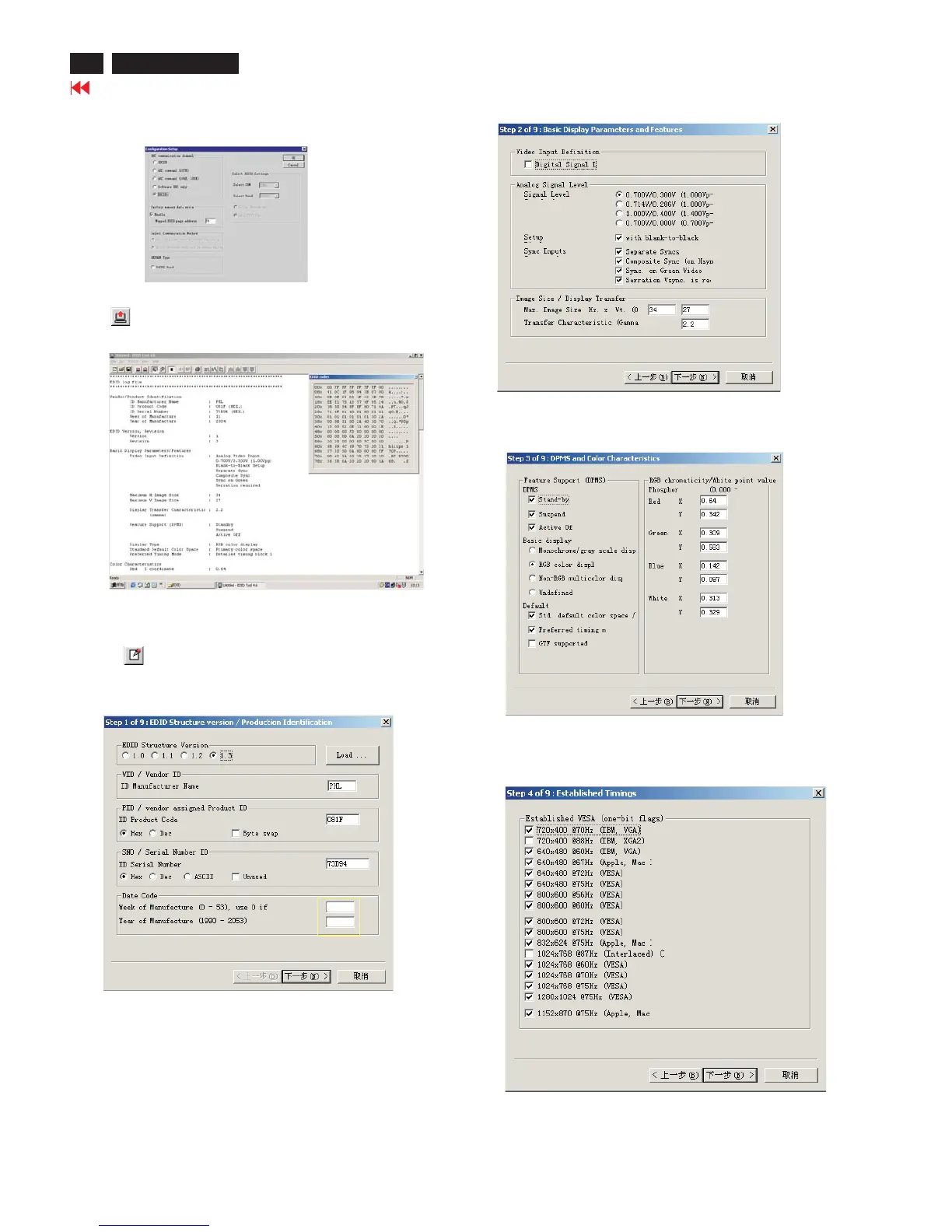
Step 3: Modify DDC data (verify EDID version, week, year)
1. Click (new function) icon from the tool bar, bring up
Step 1 of 9 as shown in Fig. 13 .
EDID46 DDC application provides the function selection and
text change (select & fill out) from Step 1 to Step 9.
Step 4: Modify DDC data (Monitor Serial No.)
Next1. Click , bring up Fig. 14.
2. Click , bring up Fig. 15.Next
3. Click OK button to confirm your selection.
4. Click icon (Read EDID function) to read DDC EDID data from
monitor. The EDID codes will display on screen as shown in Fig. 12.
Fig. 14
Fig. 15
2. Select the DDC2Bi as the communication channel.
As shown in Fig. 11.
Fig. 11
Fig. 12
Fig. 13
Select and fill out,
If necessary.
Don't close this screen. --->
Fig. 16
3. Click , bring up Fig. 16.Next
2003
5



 To Next Page