220BL2 LCD 17
(OHFWULFDO,QVWUXFWLRQV
Electrical characteristics
1 Interface signals
1.1 D-Sub Analog
Input signal: Video, Hsync., Vsync
Video: 0.7 Vp-p, input impedance, 75 ohm @DC
Sync.: Separate sync TTL level , input impedance
2.2k ohm terminate
Hsync Positive/Negative
Vsync Positive/Negative
Composite sync TTL level, input impedance 2.2k ohm
terminate (Positive/Negative)
Sync on green video 0.3 Vp-p Negative (Video 0.7
Vp-p Positive)
1.2 DVI-D Digital
Input signal: Single TMDS link (Three channels:
RX0-/+, RX1-/+, RX2-/+)
1.3 Audio (waiting for supplier input)
Input signal: 1000 mVrms
Loudspeaker (Impedance: 5.25 Ohm +/-15%):
1.5W+1.5W stereo for RMS Power
Frequency range: 450Hz - 20KHz
Headphone connection will mute speakers
1.4 USB PLUG
USB port (1 upstream, 1 downstream)
2 Interface
2.1 D-Sub Cable
Length : 1.8 M +/- 50 mm
Fix with monitor when packing, with transplant pin
protective cover.
Connector type : D-Sub male with DDC2B pin
assignments.
Blue connector thumb-operated jack screws
2.2 DVI Cable
The input signals are applied to the display through
DVI-D cable.
Length : 1.8 M +/- 50 mm
Connector type : DVI-D male with DDC-2B pin
assignments
White connector thumb-operated jackscrews
With transplant pin protective cover.
2.3 Audio Cable
Length : 1.8 M +/- 50 mm
Connector type : 3.5-mini jack with color on the
both end heads.
Sliver & Black model: Black heads and cable.
T color model: Green heads and white cable.
3 Timing requirement
3.1 Factory Preset mode definition:
3.1.1 Perfect FOS while presenting those timings.
3.1.2 Will specify those timing in User's Manual
3.2 Preset mode definition:
3.2.1 Need to support those timings.
3.2.2 Perfect FOS after auto adjustment.
3.3 User mode
3.3.1 Can save those timing that not in Preset mode
and can be showed (not over scalar or Panel spec.)
3.3.2 It needs to reserve the 10 timings space in
memory size.
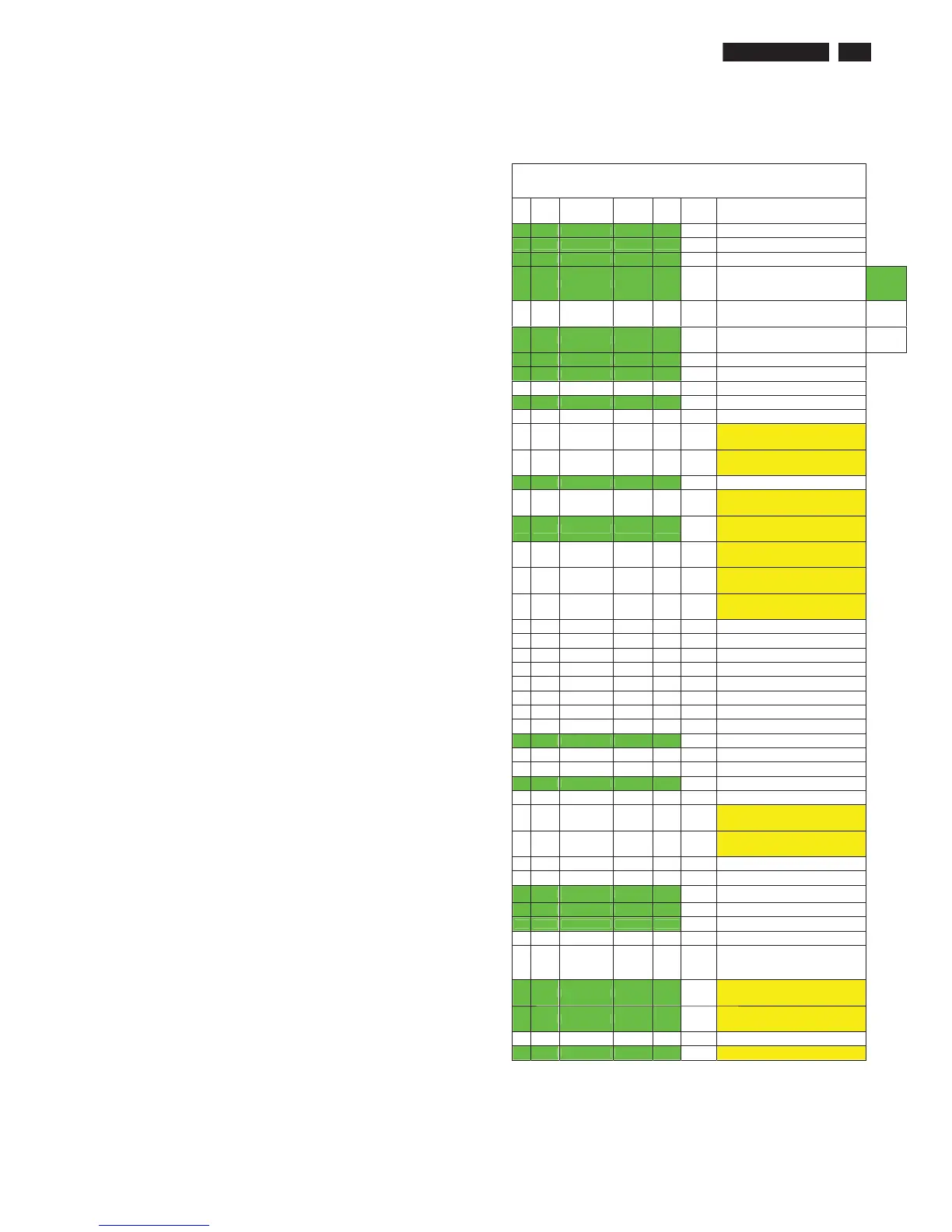
3.3.3 Factory preset modes (18 modes)
Γ Factory modes and preset modes are defined in the
enclosed timing table file
M2 20W and 22W Mode Table
Item H.Freq.
(KHz)
Mode Resolution V.Freq.
(Hz)
BW(MHz) Remark
1 31.469 IBM VGA 10H 640x350 70.086 25.175
can't put it in EDID, change to preset mode
2 31.469 IBM VGA 3H 720x400 70.087 28.322
ʳ
3 31.469 IBM VGA 12H 640x480 59.94 25.175
ʳ
4 35 MACINTOSH 640x480 67 30.24
ʳ
Factory
Preset
mode: 17
Sets
5 37.861 VESA 640x480 72.809 31.5
Preset
mode: 45
Sets
6 37.5 VESA 640x480 75 31.5
ʳ User
mode: 10
Sets
7 35.156 VESA 800x600 56.25 36
ʳ
8 37.879 VESA 800x600 60.317 40 ʳ
9 48.077 VESA 800x600 72.188 50
10 46.875 VESA 800x600 75 49.5
ʳ
11 49.7 MACINTOSH 832x624 75 57.28
ʳ
12 44.75 - 960x720 60 57.58
960x720 and 1280x720 information are
same, need to do AUTO to separate them.
Default timing is 1280x720
13 56.4 - 960x720 75 72.42
960x720 and 1280x720 information are
same, need to do AUTO to separate them.
Default timing is 1280x720
14 48.363 VESA 1024x768 60.004 65
15 56.476 VESA 1024x768 70.069 75
1280x768 and 1360x768 information are
same, need to do AUTO to separate them.
Default timing is 1280x768
16 60.023 VESA 1024x768 75.029 78.75
1280x768 and 1360x768 information are
same, need to do AUTO to separate them.
Default timing is 1280x768
17 61.1 IBM XGA-2 1024x768 76.09 83.096
1280x768 and 1360x768 information are
same, need to do AUTO to separate them.
Default timing is 1280x768
18 47.776 CVT 2.3MA 1280 x768 59.87 79.5
1280x768 and 1360x768 information are
same, need to do AUTO to separate them.
Default timing is 1280x768
19 60.289 CVT 2.3MA 1280 x768 74.893 102.25
1280x768 and 1360x768 information are
same, need to do AUTO to separate them.
Default timing is 1280x768
20 53.986 ʳ 1152x864 59.985 79.9
21 63.851 ʳ 1152x864 70.012 94.499
ʳ
22 67.5 VESA 1152x864 75 108 ʳ
23 68.681 MACINTOSH 1152x870 74.98 100.001 ʳ
24 61.846 SUN WS 1152x900 66.004 94.5 ʳ
25 71.809 SUN WS 1152x900 76.149 108 ʳ
26 60 VESA 1280x960 60 108 ʳ
27 75.171 VESA 1280x960 75.021 129.806 ʳ
28 63.981 VESA 1280x1024 60.02 108 ʳ
29 71.691 SUN WS 1280x1024 67.189 116.999 ʳ
30 76.02 DOS/V 1280x1024 71.448 130.223 ʳ
31 79.976 VESA 1280x1024 75.025 135 ʳ
32 81.135 SUN WS 1280x1024 76.111 135.008 ʳ
33 44.772 VESA 1280x720 59.885 74.5
960x720 and 1280x720 information are
same, need to do AUTO to separate them.
Default timing is 1280x720
34 52.5 VESA 1280x720 70 89.04
960x720 and 1280x720 information are
same, need to do AUTO to separate them.
Default timing is 1280x720
35 65.317 CVT 1400x1050 59.978 121.75 ʳ
36 82.278 CVT 1400x1050 74.867 156.001 ʳ
37 55.469
VESA-reduced
blanking mode
1440x900 59.901 88.75 ʳ
38 55.935 VESA 1440x900 59.887 106.5 ʳ
39 70.635 VESA 1440x900 74.984 136.75 ʳ
40 75 VESA 1600x1200 60 161 ʳ
41 66.587 CVT 2.3MA-R 1920x1080 60 138.5
2006/08/22, Joshua/Paul> Not put into EDID,
some DELL N/B will use it as power on
default timing,
it cause display fails
42 65.29 CVT1.76MW 1680x1050 59.954 146.25
1680x1050 and 1440x1050 information are
same, need to do AUTO to separate them
Default timing is 1680x1050
43 64.674 CVT1.76MW-R 1680x1050 59.883 119
1680x1050 and 1440x1050 information are
same, need to do AUTO to separate them
Default timing is 1680x1050
44 49.702 CVT 1.02 1280x800 59.81 83.5 ʳ
45 82.306 CVT1.76MW 1680x1050 74.892 187 Just for D-sub



 To Next Page