Meridian 5
CC170C
W8 LCD
C
C
3. Operating Instructions
3.1 General Instructions
Press the power button to turn the monitor on or off.
The other control knobs are located at front panel of
the monitor. By changing these setting, the picture
can be adjusted to your personal preference.
﹡The power cord should be connected.
﹡ Press the power button to turn on the monitor.
The power indicator will light up.
3.2 Control Buttons
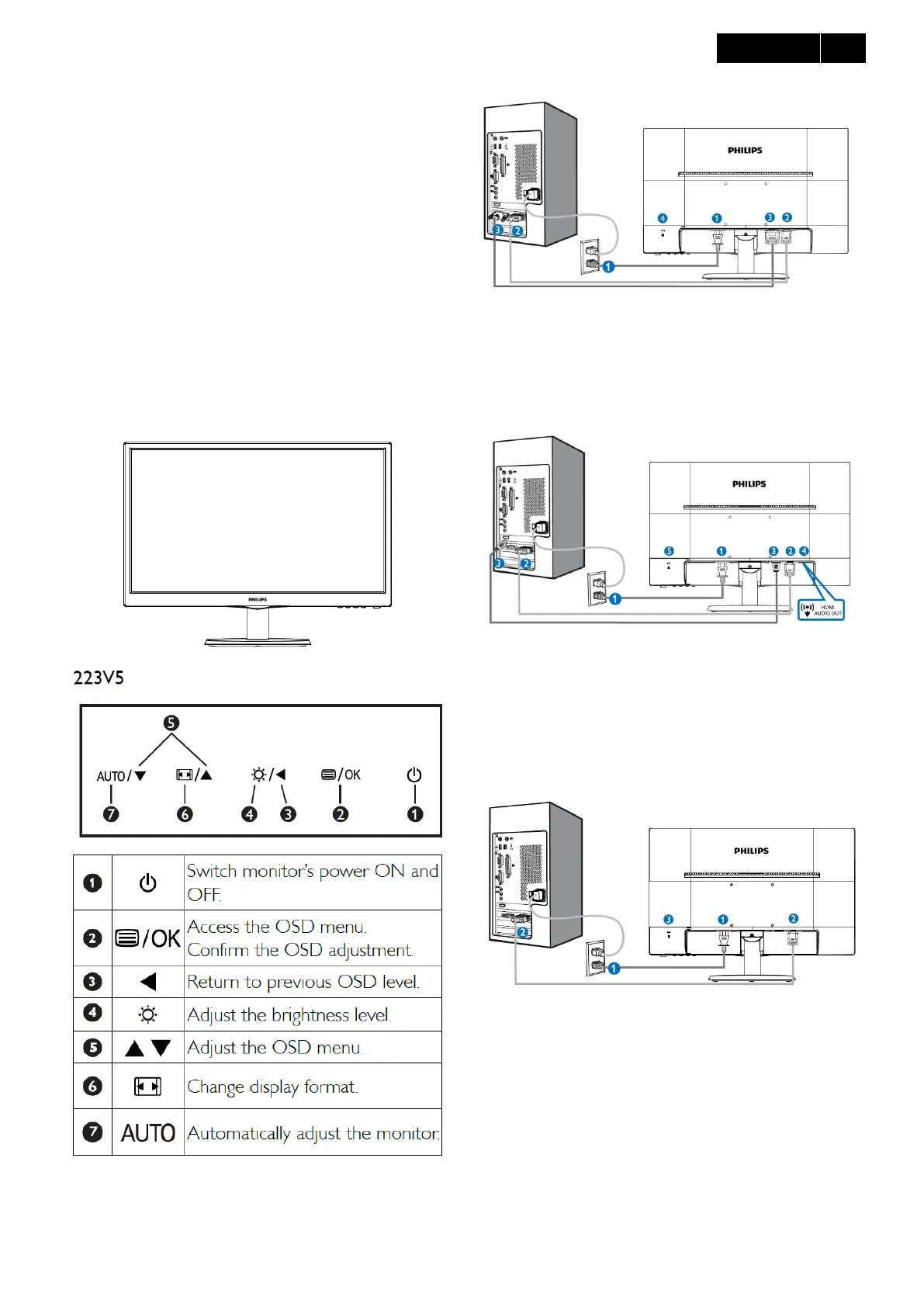
1. Operating the Monitor
Front view product description
2. Connecting to your PC
223V5LSB/223V5LSW/223V5LSB2
1. AC power input
2. VGA input
3. DVI-D input (available for selected models)
4. Kensington anti-theft lock
223V5LHSB/223V5LHSW/223V5LHSB2
1. AC power input
2. VGA input
3. HDMI input
4. HDMI Audio out
5. Kensington anti-theft lock
223V5BSB2
1. AC power input
2. VGA input
3. Kensington anti-theft lock
Connect to PC
1. Connect the power cord to the back of the monitor
firmly.
2. Turn off your computer and unplug its power cable.
3. Connect the monitor signal cable to the video



 To Next Page