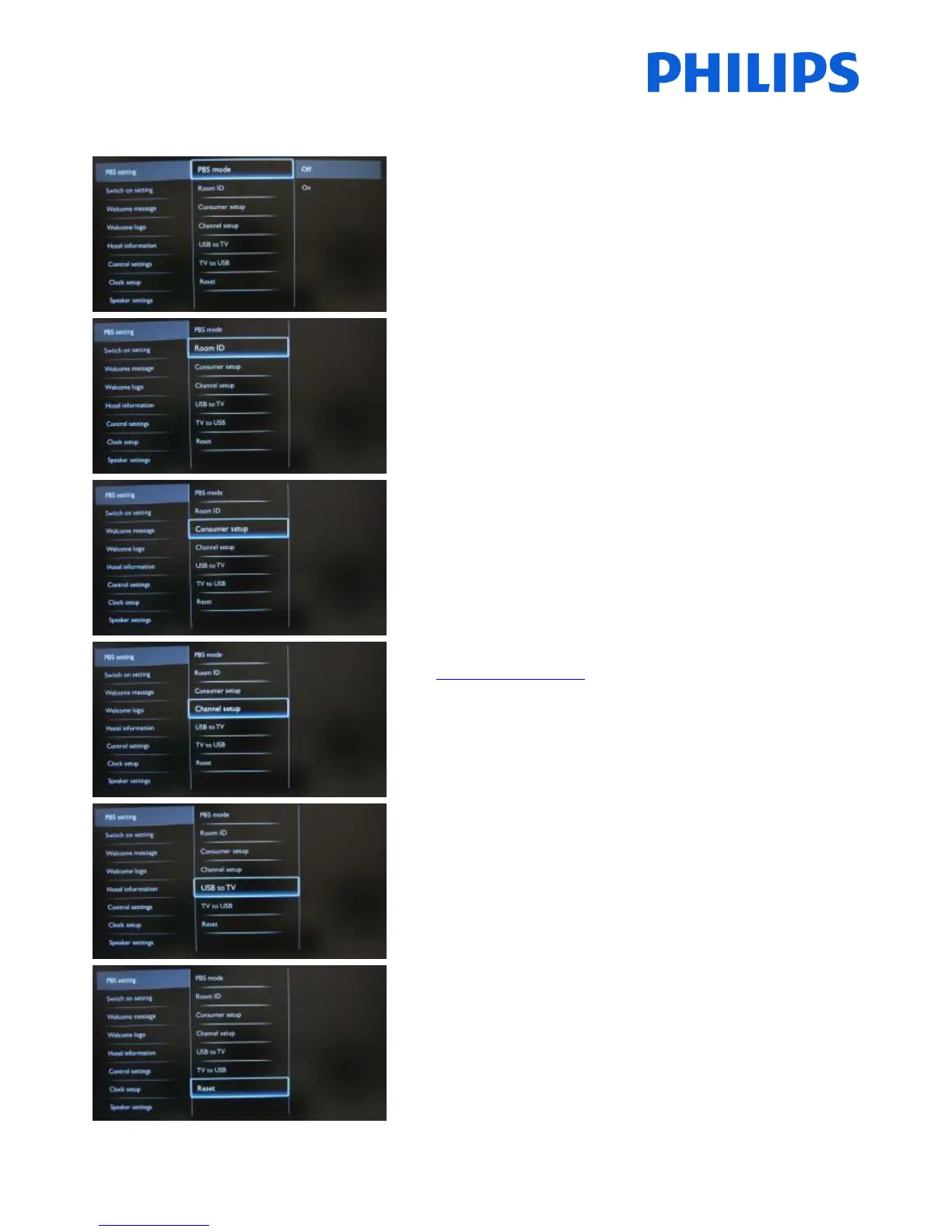
[Off]: The TV operates as a basic (consumer) TV.
[On]: All settings in the PBS mode Setup menu are active.
Only by switching on this mode the TV acts as a Hospitality
TV.
Sets the room ID.
Room ID can be used to distinguish between different
floors/rooms/setups when using SmartInstall.
A shortcut to enter the consumer installation menu.
Consumer installation menu should be accessed to change
e.g. picture and sound settings and update channels.
Using this shortcut will trigger a popup screen which warns
loosing settings in the PBS menu if you continue. Select
discard if you want to stay in the PBS menu or continue.
A shortcut to enter the channel grid.
Info: check Channel Options
In this grid you can reorder, rename and hide channels.
Using this shortcut will trigger a popup screen which warns
loosing settings in the PBS menu if you continue. Select
discard if you want to stay in the PBS menu or continue.
USB to TV: Loads the TV configuration data from a USB
device to the TV set.
TV to USB: Loads the TV configuration data from the TV set
to a USB device.
USB device needs to be formatted as FAT32.
Push “OK” button on remote control to reset all settings in
PBS setting menu to factory default.














 To Next Page