26
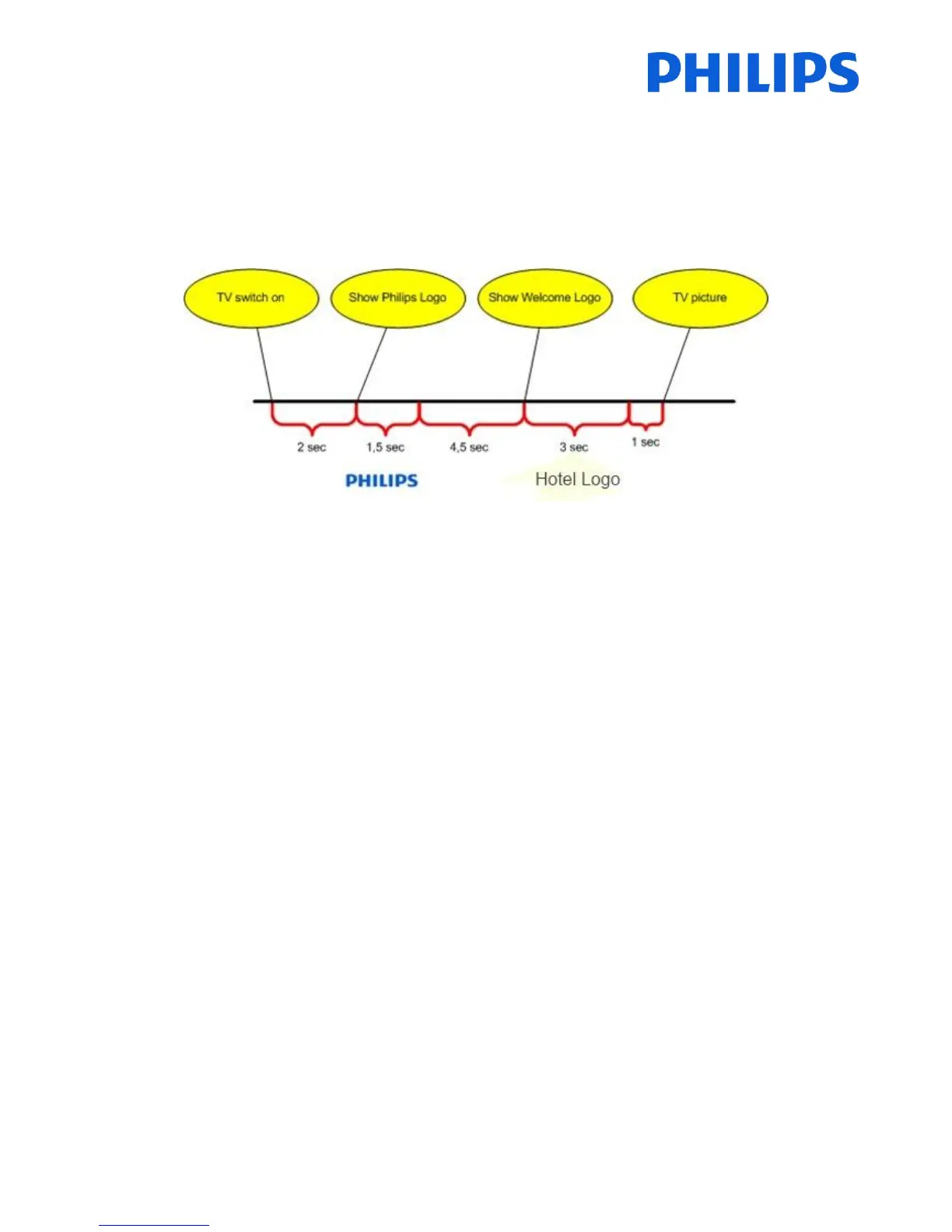
7. Welcome Logo
Startup time takes up approximately 7 seconds
File format: 1280 x 720 / PNG / NO layers / 256 colors
Note: below timing values are approximate indications and can differ from real situation!
How to upload Welcome Logo
1. Create graphics file: 1280 x 720 / PNG / NO layers / 256 colors.
2. File name: TPM63HE_WelcomeLogo.png (File name is case-sensitive)
3. Save into folder: TPM63HE_CloneData on USB memory device
4. Insert USB device into TV
5. Enter Professional menu
6. Select “Welcome logo”
7. Select USB -> TV
8. Select “Display logo”
9. Select “On” to enable Welcome Logo
10. Store setting before exiting the PBS setup menu.
Hotel Information
Any JPEG can be used for the Hotel information and triggered from consumer menu screen.
How to upload single page Hotel Info
1. Create JPEG graphics file with maximum resolution 1920 x 1080.
2. File name: TPM63HE_HotelInfo.jpeg (File name is case-sensitive).
3. Save into folder: TPM63HE_CloneData on USB memory device
4. Insert USB into TV
5. Enter Professional menu
6. Select “Hotel Information”
7. Select USB -> TV
8. Select “Display information”
9. Select “On” to enable Hotel Information














 To Next Page