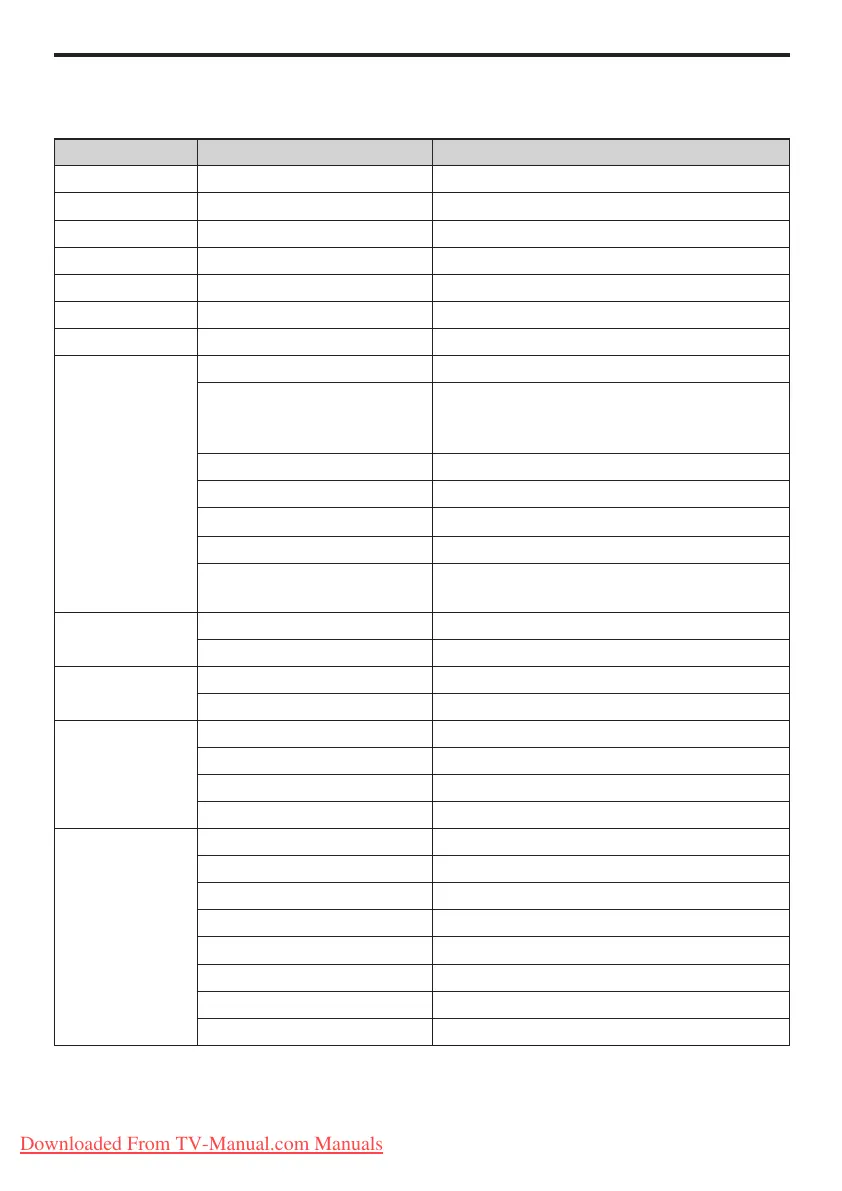
Professional mode options
This paragraph describes the functionality of each item in the Professional mode setup menu.
Layer 1 Layer 2 Layer 3
PBS settings PBS mode Off / On
Application Hospitality / Signage
Consumer setup Action
Smartloader / USB to TV Action
TV to Smartloader / USB Action
Store Action
Reset 0~60
Switch on settings Maximum volume 0 ~ 60
Switch on picture format Auto format / Super zoom / 4:3 / Subtitle Zoom
/ Movie expand 14:9 / Movie expand 16:9 / Wide
screen / Unscaled
Low power standby (Green / Fast) Fast / Green
Power on On / Standby / Last status
Smart power Off / Low / Medium / High
Display message Off / On
Set ID (Only available in Signage
mode)
Serial Xpress Adress ID range: 0~63
Switch on volume Last status Off / On
User dened 0 ~ 60
Switch on channel Last status Off / On
User dened [List of channels]
Welcome message Line 1 Edit
Line 2 Edit
Clear Action
Message Time-out 20 sec / 25 sec / 30 sec
Control settings Local KB block Off / On / All
RC lock Off / On
OSD display Off / On
High security mode Off / On
Auto scart Off / On (EXT 1 / EXT 2 / Power scart)
HDMI-CEC in Off / On
USB break in Off / On
Monitor out Off / On
Downloaded From TV-Manual.com Manuals







 To Next Page