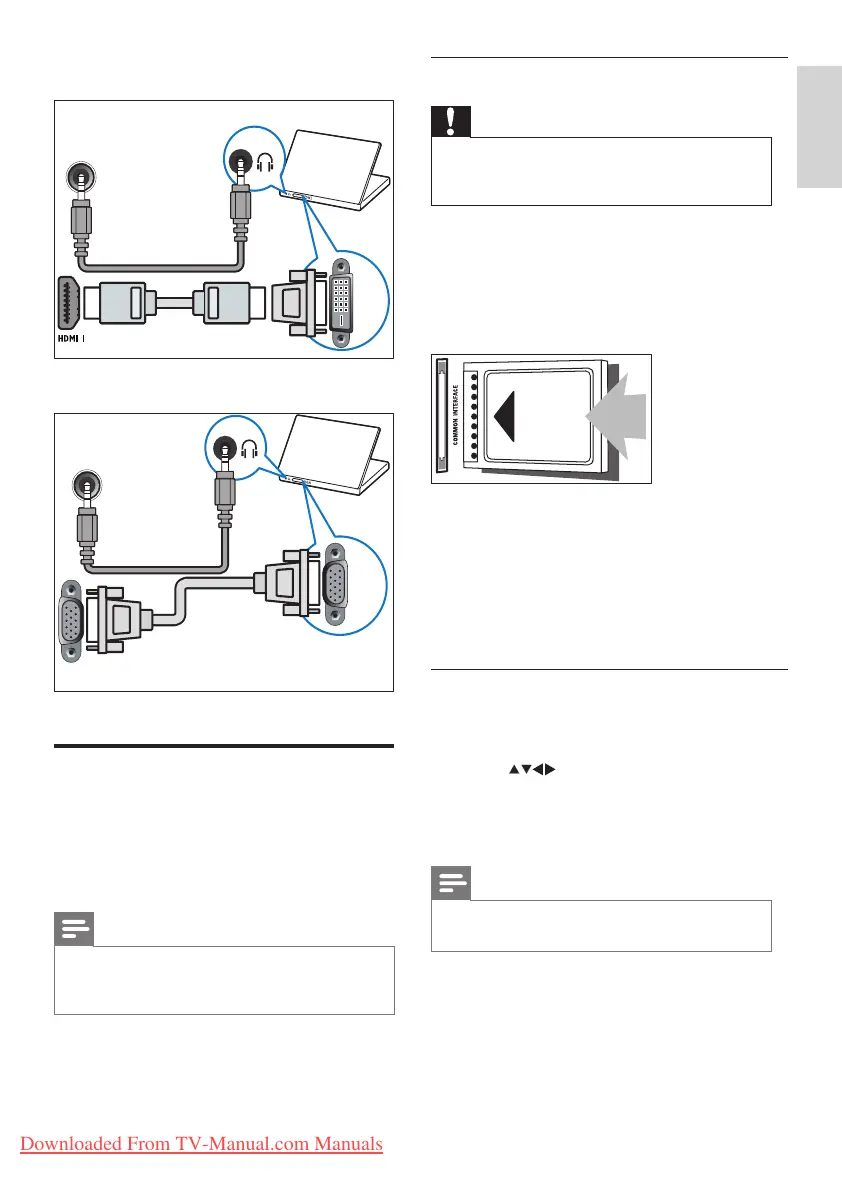
HDMI cable and HDMI-DVI adaptor•
VGA cable•
Use a Conditional Access
Module
A Conditional Access Module (CAM) is
provided by digital TV service operators to
decode digital TV channels.
Note
If required, refer to documentation from your •
operator on how to insert a smart card into
the Conditional Access Module.
DVI
LEFT / RIGHT
HDMI 1 / DVI
AUDIO IN :
PC IN(AUDIO)
For TV of size 26 inch and larger
For TV of size 22 inch
VGA
VGA
PC IN(AUDIO)
For TV of size 22 inch only
Insert and activate a CAM
Caution
Be sure to follow the instructions described •
below. Wrong insertion of a CAM may
damage both the CAM and your TV.
1 Switch off the TV.
2 Following the directions printed on the
CAM, gently insert the CAM into the
COMMON INTERFACE at the side of the
TV.
3 Push the CAM in as far as it will go.
4 Turn on the TV and wait for the CAM to be
activated. This may take several minutes. Do
not remove the CAM from the slot when
in use — removing the CAM will deactivate
digital services.
Access CAM services
1 After inserting and activating the CAM,
press MENU.
2 Press to select [Setup] > [Features]
> [Common interface].
Applications provided by the digital TV »
service operator appear on the screen.
Note
This menu option is available only if the CAM •
is inserted and activated correctly.
Downloaded From TV-Manual.com Manuals




 To Next Page