10
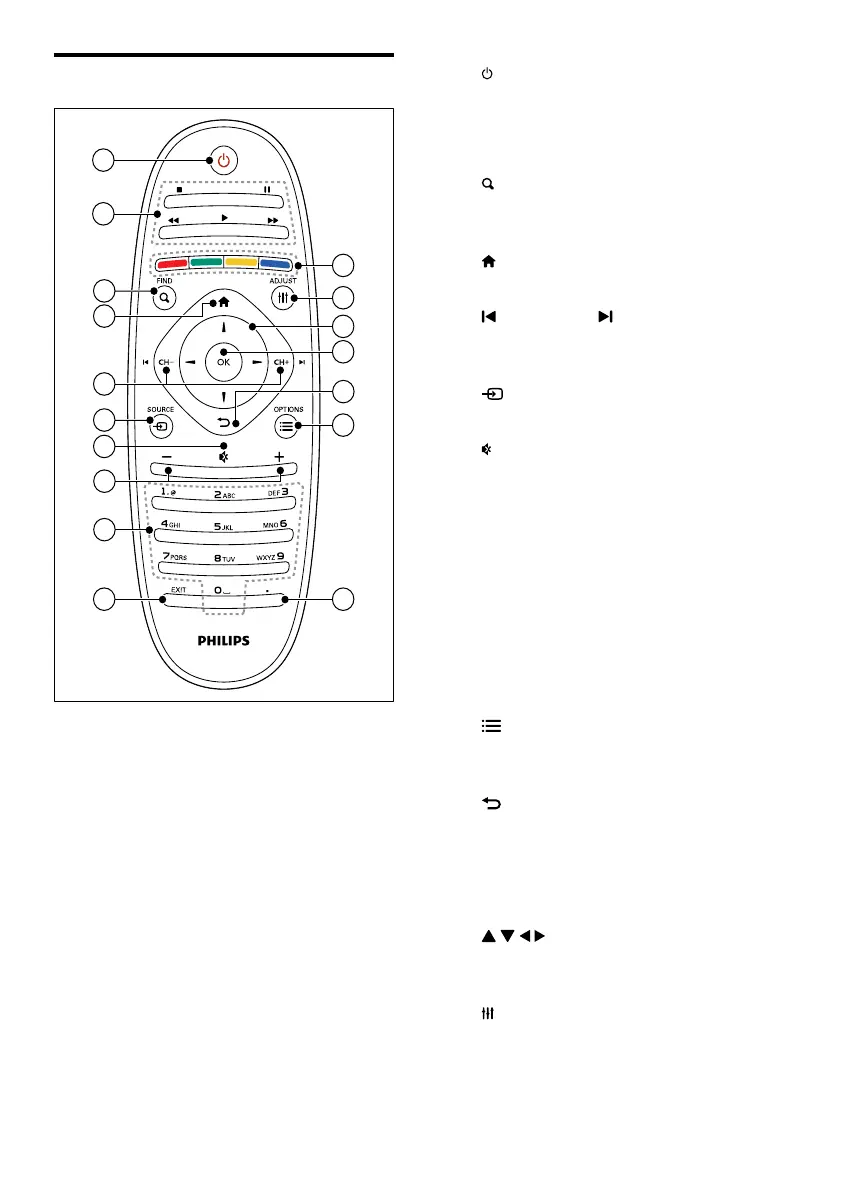
a (Standby-On)
• Switch the TV on or to standby.
b Play buttons
• Control video or music.
c
FIND
• Access the menu to select a TV
channel list.
d
(Home)
• Access the home menu.
e
CH - / CH + (Previous/Next)
• Switch channels or navigate through
menu pages, tracks, albums, or folders.
f
SOURCE
• Select connected devices.
g
• Mute or restore audio.
h +/-
• Adjust volume.
i 0-9 (Numeric buttons)
• Select channels.
j EXIT
• Exits a menu.
k . (Dot)
• Not in use.
l
OPTIONS
• Access options for the current activity
or selection.
m
• Return to the previous menu or exit
a function.
n OK
• Conrm an entry or selection.
o
(Navigation buttons)
• Navigate through menus and select
items.
p
ADJUST
• Access the menu to adjust settings.
q Color buttons
• Select tasks or options.
Remote control
11
10
1
2
17
16
12
15
14
13
7
4
5
3
6
9
8
EN








 To Next Page