36 EN
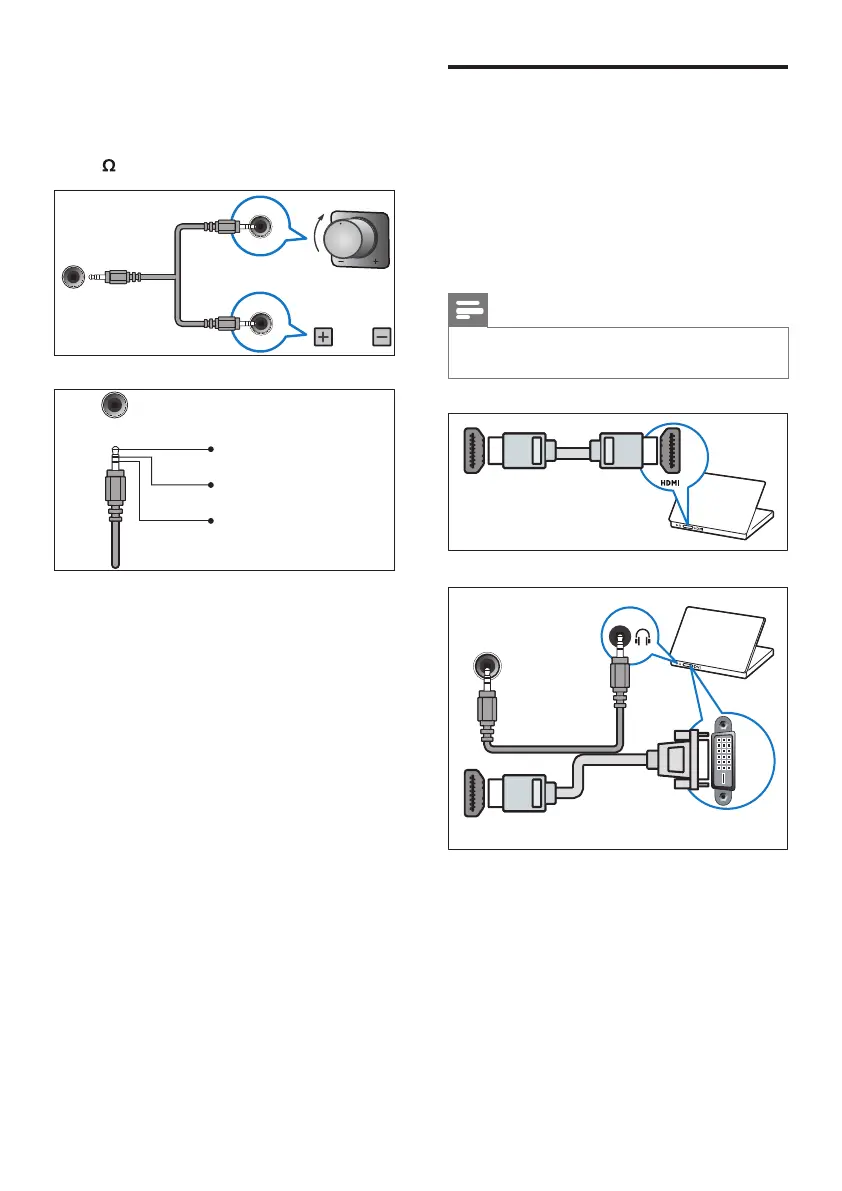
Connect a computer
Before you connect a computer to the TV
• Set the screen refresh rate on your
computer to 60Hz.
• Select a supported screen resolution on
your computer.
Connect a computer with one of the
following connectors:
Note
• Connections via DVI or VGA require an
additional audio cable.
• HDMI cable
• DVI-HDMI cable
DVI
PC IN (AUDIO)
HDMI 1/ HDMI
h EXT SPKR VOL CRTL
Connector for volume controller via
a stereo jack. To adjust the volume of
bathroom speaker connected with “2W
8 EXT SPKR OUT”.
Rotary Type
VOL
Tact Type
EXT. SPKR.
VOL. CTRL.
EXT. SPKR.
VOL. CTRL.
GND
Rotary-B → volume +
Tact-B → volume -
Rotary-A → volume -
Tact-A → volume +












 To Next Page