6 EN
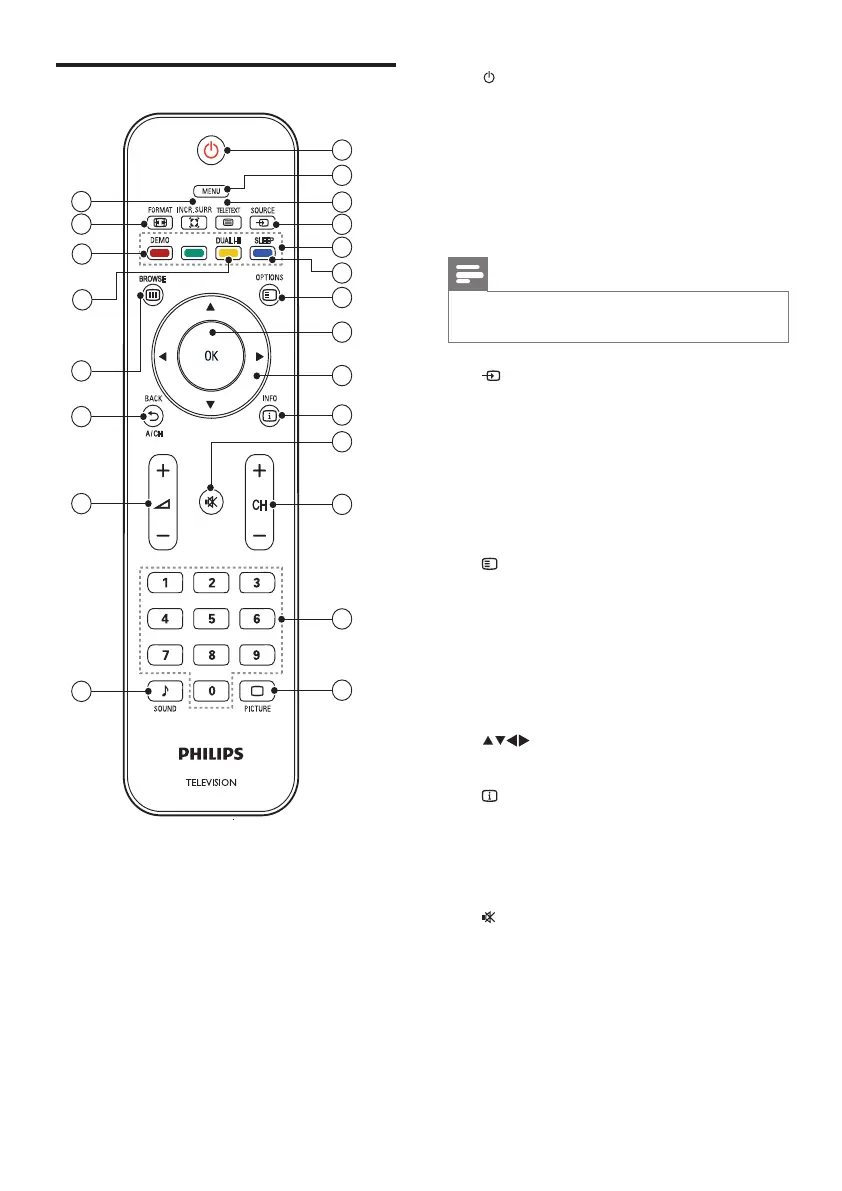
a (Standby-On)
• Switches the TV to standby if it is on.
• Switches on the TV if it is in standby.
b MENU
Toggles the main menu on or off.
c TELETEXT
Toggles teletext on or off.
Note
• Teletext is not applicable for China (/93)
models and only for selected models.
d SOURCE
Selects connected devices.
e Color buttons
• Selects tasks or options.
f SLEEP
Switches the TV to standby after a
pre-dened period of time.
g OPTIONS
Accesses options relating to the current
activity or selection.
h OK
Conrms an entry or selection and
displays the channel grid, when watching
TV.
i (Navigation buttons)
Navigates menus.
j INFO
Displays program information, when
available. If the information spans multiple
pages, press OPTIONS to go to the next
page.
k (Mute)
Mutes or restores volume.
Remote control
1
22
4
5
7
6
10
11
12
13
14
8
9
2
3
21
18
17
16
15
20
19












 To Next Page