Service Modes, Error Codes, and Fault Finding
EN 16 TPS10.1L LA5.
2013-Apr-26
back to
div. table
How to Navigate
• In the SAM menu, select menu items with the UP/DOWN
keys on the remote control transmitter. The selected item
will be indicated. When not all menu items fit on the screen,
use the UP/DOWN keys to display the next/previous menu
items.
• With the “LEFT/RIGHT” keys, it is possible to:
– (De) activate the selected menu item.
– (De) activate the selected sub menu.
– Change the value of the selected menu item.
• When you press the MENU button once while in top level
SAM, the set will switch to the normal user menu (with the
SAM mode still active in the background).
• Press the following key sequence on the remote control
transmitter: “062596” directly followed by the “Home”
button to switch to SDM (do not allow the display to time out
between entries while keying the sequence).
How to Store SAM Settings
To store the settings changed in SAM mode (except the
RGB Align settings), leave the top level SAM menu by using
the POWER button on the remote control transmitter or the
television set. The mentioned exceptions must be stored
separately via the STORE button.
How to Exit SAM
Use one of the following methods:
• Switch the set to STANDBY by pressing the mains button
on the remote control transmitter or the television set.
• Via a standard RC-transmitter, key in “00” sequence.
Note: When the TV is switched “off” by a power interrupt while
in SAM, the TV will show up in “normal operation mode” as
soon as the power is supplied again. The error buffer will not be
cleared.
5.2.4 Contents of the Factory mode:
Purpose
• To perform extended alignments.
Specifications
• Displaying and or changing Panel ID information.
• Displaying and or changing Tuner ID information.
• Error buffer clearing.
• Various software alignment settings.
• Testpattern displaying.
• Public Broadcasting Service password Reset.
• etc.
How to Activate the Factory mode
To activate the Factory mode, use the following method:
• Press the following key sequence on the remote control
transmitter: from the “Home screen” press “1999”, directly
followed by the “Back” button. Do not allow the display to
time out between entries while keying the sequence.
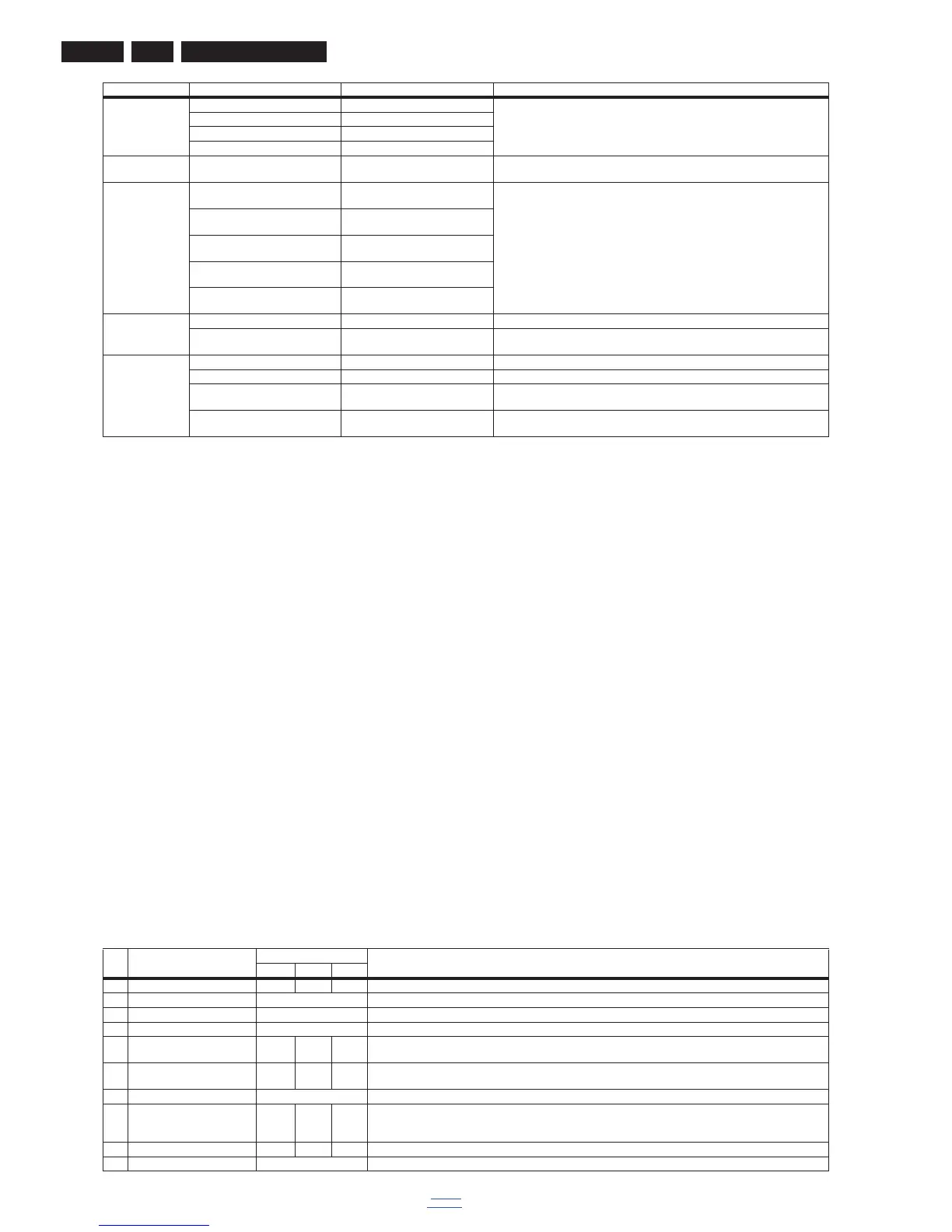
After entering the Factory mode, the following items are
displayed,
Table 5-2 Factory mode overview
Download from USB Copy Channel List from USB To download several settings from the USB stick to the TV
Copy NVM from USB
Copy Readable Info from USB
Copy EDID from USB
Initialize NVM Press [OK] to Initialize NVM
immediately
To initialize a (corrupted) NVM. Be careful, this will erase all settings.
Service Data Type Number Press [OK] use key pad edit type
number immediately
Edit and display the applicable service data by using the displayed key pad.
Production Number Press [OK] use key pad edit
production number immediately
12NC SSB Press [OK] use key pad edit SSB
immediately
12NC PSU Press [OK] use key pad edit PSU
immediately
12NC Display Press [OK] use key pad edit display
immediately
Dealer Options Set Virgin mode Virgin mode:Off Set Virgin mode
Store Press [OK] to store virgin mode
immediately
Store the virgin mode in the address
Event Count Software Events 0000 0000 Software Events
Hardware Events 0000 0000 Hardware Events
Clear Software Events Press [OK] to clear software events
immediately
Clear Software Events
Clear Hardware Events Press [OK] to clear hardware events
immediately
Clear Hardware Events
Main Menu Sub-menu 1 Sub-menu 2 Description
Item Item value
Default value
Description32" 39" 42"
0 Main-MCU Ver V1.00 V2.06 V1.03 Main-MCU Version
1 Bootloader Ver V0.01 Bootloader Version
2 Sub-MCU Ver NA SUB-MCU Version
3 EEPROM Ver NA EEPROM Version
4 Date Dec 24
2012
Mar 18
2013
Jan 22
2013
Software release date
5 ModelName 32PFL3
018D
39PFL
3008D
42PFL
3008D
Model name
6 Scaler MST6931XP Scaler model
7 Panel Type TPT315
B5-A05
1
TPT39
0J1-HV
N01
TPT42
0H2-H
VN04
Display model
8 Source DTV ATV HDMI1 Input source
9 Auto Color GO Only need to do automatic correction input source of effective,otherwise it is not action











 To Next Page