10
Change picture format
1 Press FORMAT .
A picture format bar appears. »
2 Press to select a picture format.
The selected picture format is activated. »
3 Press OK to con rm your choice.
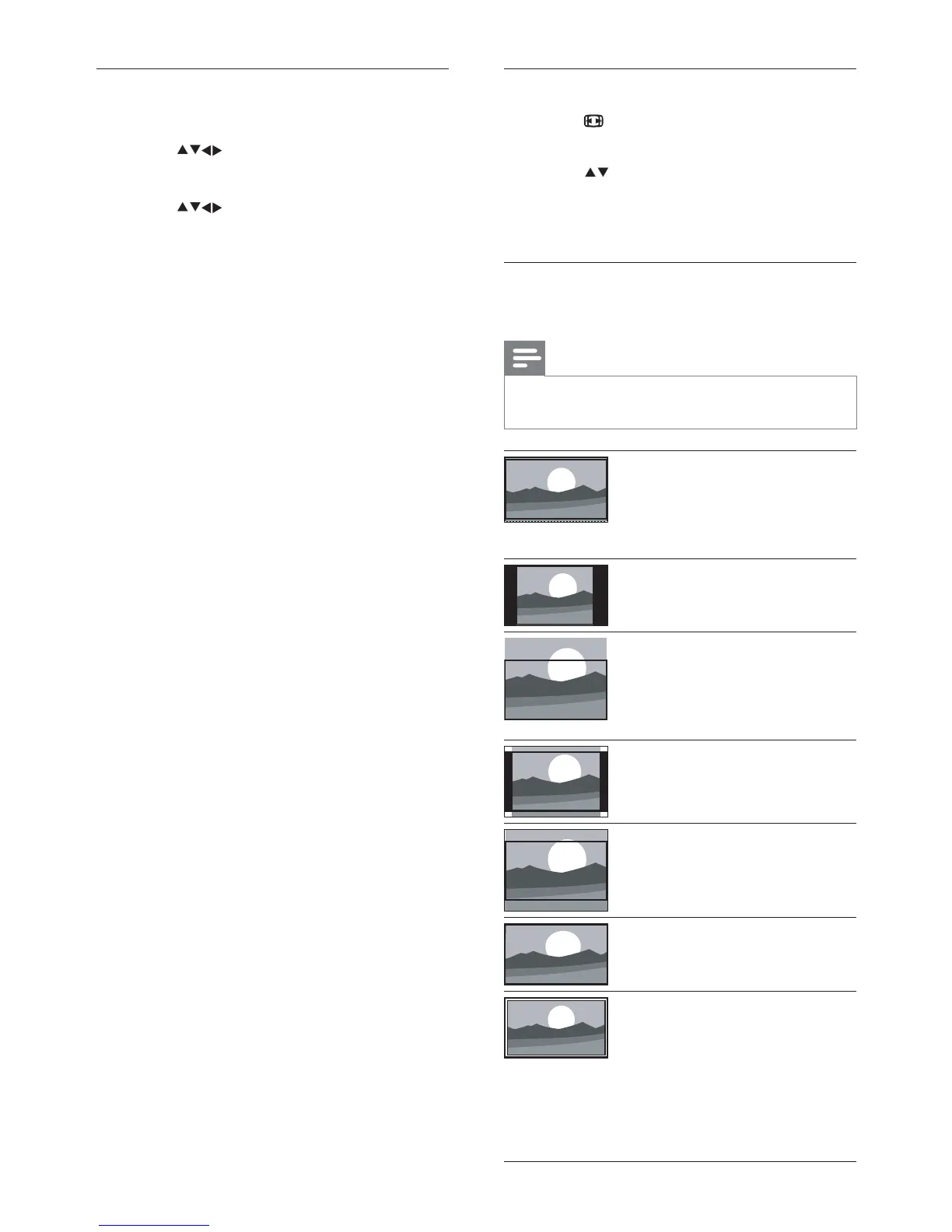
Summary of picture formats
The following picture settings can be con gured.
Note
Depending on the format of the picture •
source, some picture settings are not available.
[Super zoom] : (Not for HD
and PC mode.) Removes the
black bars on the side of 4:3
broadcasts. There is minimal
distortion.
[4:3] : Shows the classic 4:3
format.
[Subtitle zoom] : Displays 4:3
pictures over the full area of
the screen, with sub-titles
visible. Part of the top of the
picture is clipped off.
[Movie expand 14:9] : (Not
for HD and PC mode.) Scales
4:3 format to 14:9.
[Movie expand 16:9] : (Not
for HD and PC mode.) Scales
4:3 format to 16:9.
[Wide screen] : Scales 4:3
format to 16:9.
[Unscaled] : For HD and PC
mode only, and in selected
models only. Allows maximum
sharpness. Some distortion
may be present due to the
broadcaster’s systems. Set
your PC resolution to wide
screen mode for best results.
Manually adjust picture settings
1 Press MENU .
2 Press to select [Setup] > [Picture] .
The » [Picture] menu appears.
3 Press to select from the following
settings and adjust:
• [Smart picture] : Accesses pre-de ned
smart picture settings.
• [Backlight] : Adjusts the backlight.
• [Contrast] : Adjusts the intensity of bright
areas, keeping dark areas unchanged.
• [Brightness] : Adjusts the intensity and
details of dark areas.
• [Colour] : Adjusts colour saturation.
• [Sharpness] : Adjusts sharpness in the
image.
• [Noise reduction] : Filters and reduces
noise in an image.
• [Colour temp.] : Introduces more orange
tones ( [Warm] ) or blue tones ( [Cool] ).
• [Dig.CrystalClear] : Adjusts picture
quality to optimal contrast, colour and
sharpness.
• [Dynamic contrast] : Enhances
contrast.
• [Dynamic backlight] : Adjusts
brightness of the TV backlight to
match lighting conditions.
• [Colour enhancement] : Makes
colours more vivid and improves
the details in bright colours. You can
switch this feature on or off.
• [PC mode] : Adjusts picture settings when
a PC is connected to the TV.
• [Picture format] : Changes the picture
format.
• [Horizontal shift] : Adjusts the picture
horizontally for PC-VGA or HD input.
• [Vertical shift] : Adjusts the picture
vertically for PC-VGA or HD input.
EN










 To Next Page