Service Modes, Error Codes, and Fault Finding
EN 19TCM3.2L LA 5.
2009-Jun-19
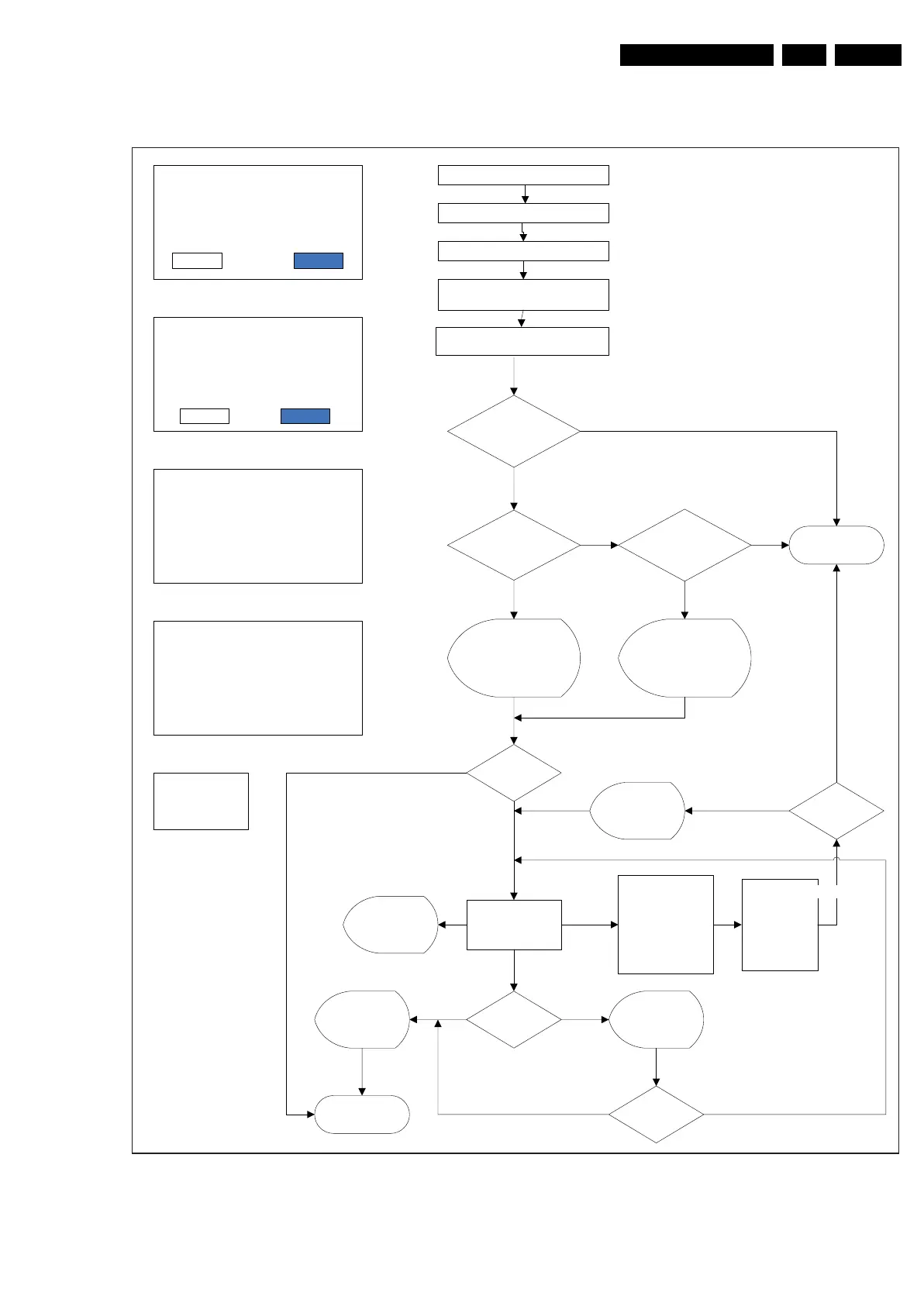
5.7.6 Main SW upgrade flowchart.
Figure 5-9 User SW upgrade flowchart
18520_215_090325.eps
090325
A newer version of software is deceted.
Do you want to update?
UpgradeCancel
An equal/older version of software is
detected .
Do you want to proceed?
Note: Should be done only if necessary.
UpgradeCancel
Layout 1
Layout 2
Power off the set
Plug-in the USB stick
Enter into Setup Menu and active
local upgrades
Valid auto-run file?
Is USB file version >
set SW
Is USB file version <=
set SW
End
Y
N
Y
N
N
Display USB sw
newer than the TV
sw.Prompt user to
comfirm
Y
Display USB sw
equal/older than the
TV sw.Prom pt user to
comfirm
Y
Power on the set
Detect USB þbreak inÿand
check autorun file
Please donÿt shut off the power
The software update may takes 3 to 5
minutes
Erasing...
Please donÿt shut off power
The software update may takes 3 to 5
minutes
Upgrading...18%
Layout 3
Layout 4
Proceed?
See Layout 1
See Layout 2
Set process with
sw upgrade
Successful ?
TV auto restart
the set, prompt
user to remove
USB
N
END
Y
If power drop
during the
upgrade
procedure,don’t
remove the U SB
portable memory
TV will
continue the
upgrade as
soon as power
comes back.
See Layout 3 See Layout 4
Power on TV
Valid auto-run
file
Y
N
TV auto erase
and upgrade
software
Display
upgrade
progress
YN
Prompt user to
try again
Software update
failed! Would you
like to try again
Layout 5
See Layout 5
Retry?
N
Y





 To Next Page