EN-12
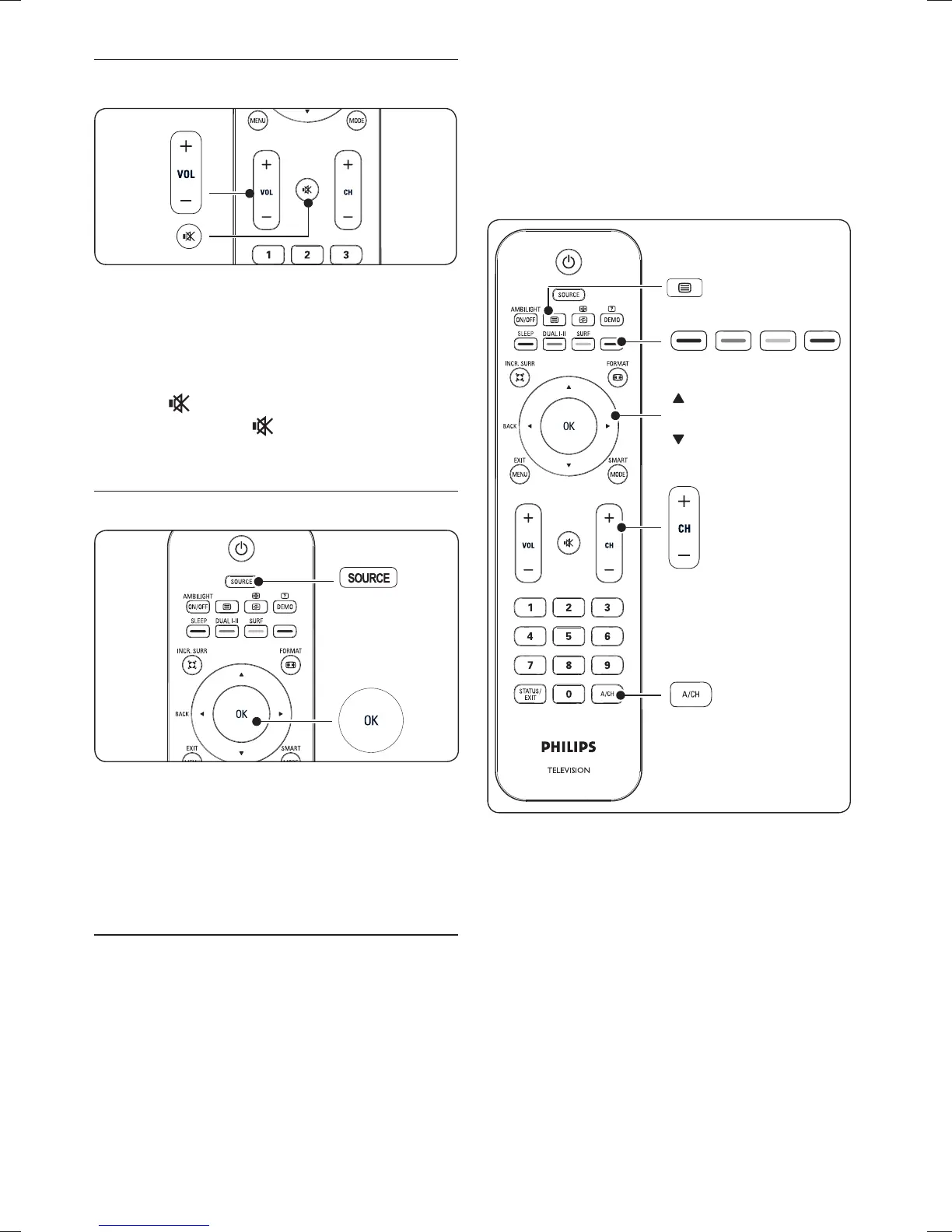
Adjust volume4.2.2.
Press • VOLUME + or - on the remote
control.
Press • VOLUME + or - on the side
controls of your TV.
Press •
on the remote control to mute
the sound. Press
again to unmute on the
sound.
Watch connected devices4.3
Switch on the device.1.
Press 2. SOURCE on the remote control
then select the input your device is
connected to.
Press 3. OK to select the device.
Use teletext4.4
Most TV channels broadcast information via
teletext.
Press 1. ¤ on the remote control.
The main index page appears.
To select a page with the remote control:2.
• Enter the page number with the number
keys.
• Press CH +/- or Î/ï to view the
next or the previous page.
• Press a colour key to select one of the
colour coded items at the bottom of the
screen.
Press 3. ¤ again to switch off teletext.
For more information on teletext, see Section
5.5 Use advanced teletext features.










 To Next Page