EN-33
EN
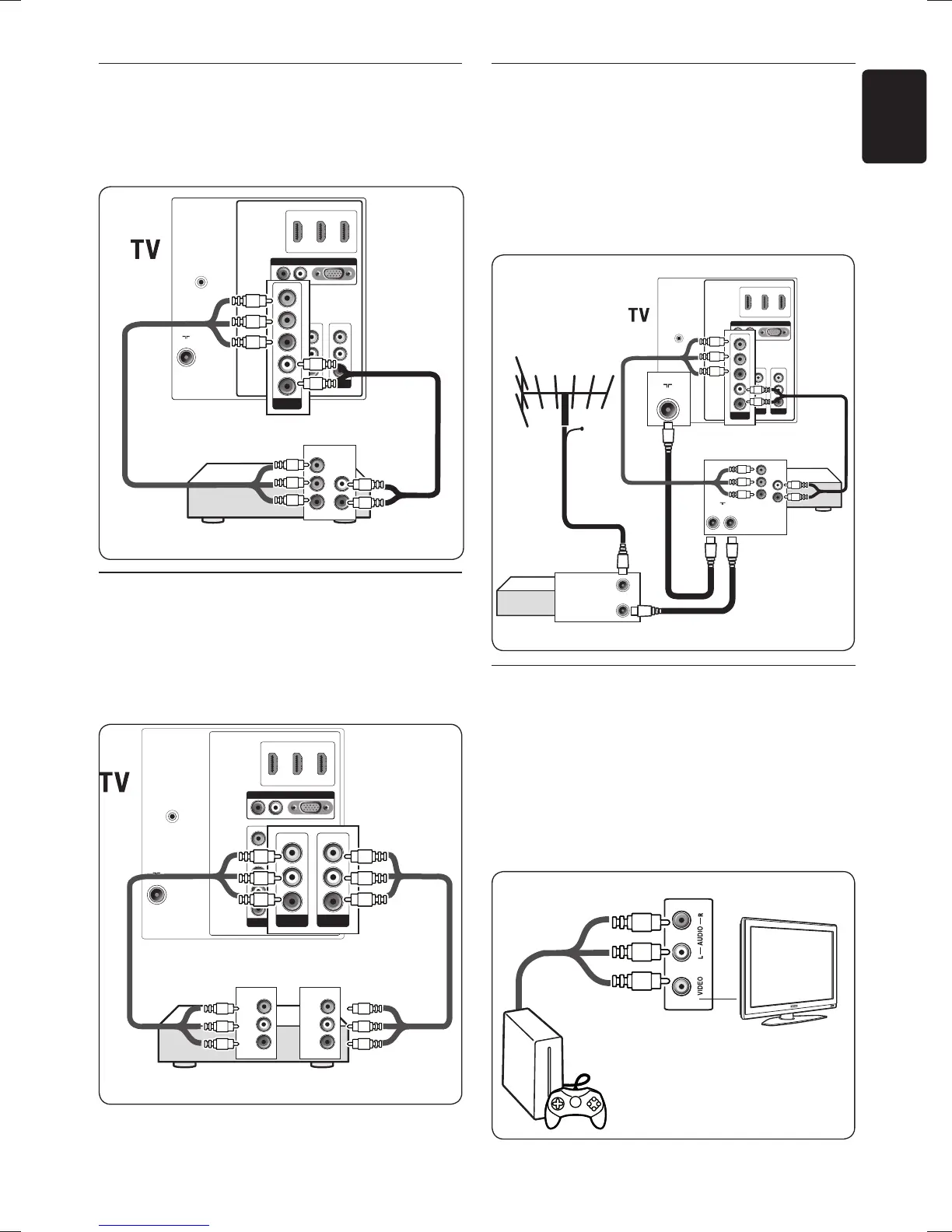
DVD player/Home theatre system7.3.3.
Connect a component video and audio cables
from the DVD player to CVI connectors on
the back of your TV.
HDMI 3HDMI 2
AV INAV OU T
VIDEO
R
RL
AUDIO IN
SERV. C
VGA
L
R
VIDEO
HDMI 1
TV ANTENNA
75X
Component
video IN
DVD player/Home Theatre System
L
R
Pr
Pb
Y
CVI
L
Pr
Pb
Y
R
L
VCR7.3.4.
Connect a composite video cable from the
player to the AV IN connectors on the back of
the TV. For recording of TV programmes on a
VCR, connect to the AV OUT connectors.
CVI
R
L
Pr
Pb
Y
HDMI 3HDMI 2
RL
AUDIO IN
SERV. C
VGA
HDMI 1
TV ANTENNA
75X
VCR
AUDIO L
AUDIO R
VIDEO
Composite video
IN OUT
AUDIO L
AUDIO R
VIDEO
AV OUT
VIDEO
L
R
AV IN
L
R
VIDEO
DVD 7.3.5. recorder and cable receiver
To receive channels via a cable receiver and
record programs on a DVD recorder, connect
an antenna cable and a component video cable
from the DVD recorder to your TV. Connect
another antenna cable from the recorder to
the cable receiver.
HDMI 3HDMI 2
AV I NAV OUT
VIDEO
L
R
RL
AUDIO IN
SERV. C
VGA
L
R
VIDEO
HDMI 1
TV ANTENNA
75Ω
Component video
DVD recorder
L
R
Pr
Pb
Y
Cable receiver
ANTENNA IN
ANTENNA OUT
Cable
ANTENNA
OUT IN
CVI
L
Pr
Pb
Y
R
TV ANTENNA
75X
Game console or camcorder7.3.6.
The most practical connection for a mobile
game console or camcorder may be at the side
of the TV. You can, for example, connect the
game console or camcorder to VIDEO/S-Video
and AUDIO L/R connectors at the side of the
TV. An HDMI connector is also available for
high-definition devices.









 To Next Page