EN-22
Create a surf list5.6
You can store up to eight frequently watched
channels in a surf list.
Select a channel that you want to add to 1.
the surf list.
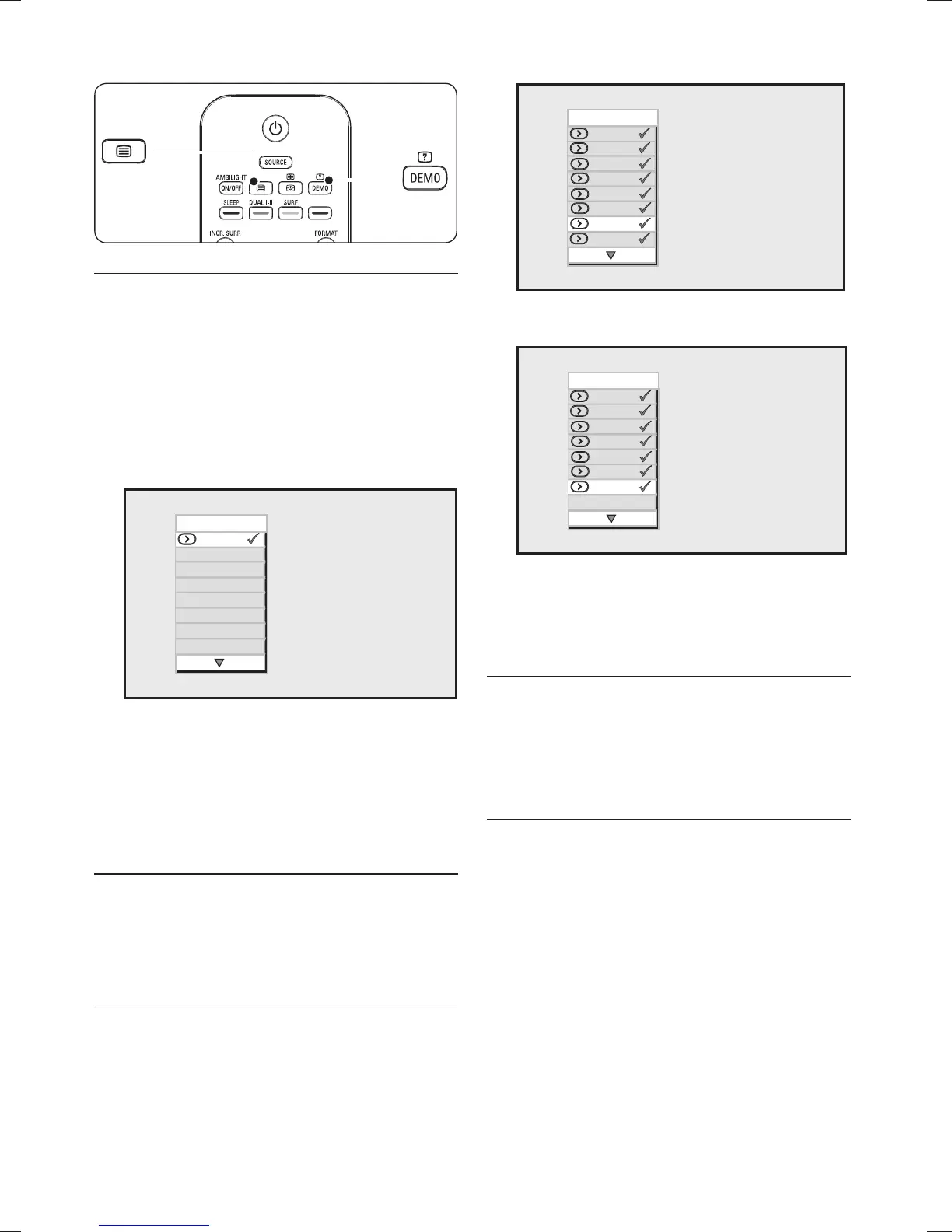
Press 2. SURF on the remote control to
display the surf list.
Surf
003
Press 3. Æ to add the selected channel to the
surf list.
Repeat steps 1 to 3 to add more channels 4.
to the list.
Press 5. STATUS/EXIT to exit.
To view the a channel from the surf list
Press 1. SURF to display the surf list.
Press 2. Î or ï until you find the channel.
To delete a channel from the surf list
Press 1. SURF to display the surf list.
Press 2. Î or ï until you find the channel
that you wish to delete.
Surf
003
006
008
001
005
009
010
002
Press 3. Æ to delete the channel.
Surf
003
006
008
001
005
009
002
Repeat steps 1 to 3 to delete more 4.
channels from the list.
Press 5. STATUS/EXIT to exit.
Use timers and child 5.7 lock
This section describes how to switch the TV on
or off at a specified time and to lock or unlock
the TV. Child lock is useful in preventing your
children from watching non-authorised content.
Automatically switch the TV to 5.7.1.
standby (Sleep timer)
Sleep timer switches the TV to standby after a
defined period of time.
Press 1. MENU on the remote control and
select Features > Timer > Sleep.









 To Next Page