EN
Notes:
- only a PC with digital sound can be connected to the HDMI connection;
- before connecting your PC to the TV, select your PC monitor settings to a refresh frequency of
60 Hz;
- supported PC monitor modes:
VGA 640 x 480
SVGA 800 x 600
XGA 1024 x 768
45
Connect a PC
L
Pr
H
R
Pb
V
Y
/R
/B
/G
Pr
PbL
YR
S-VIDEO
S-VIDEO AUDIO
AV 2
AV 3
AV 1
VIDEO
VIDEO
DIGITAL
AUDIO
IN
AUDIO
VGA (PC)
via RGB-HV
HDMI 1 HDMI 2
oo
HDMI
DVI
1
DIGITAL
AUDIO
IN
2
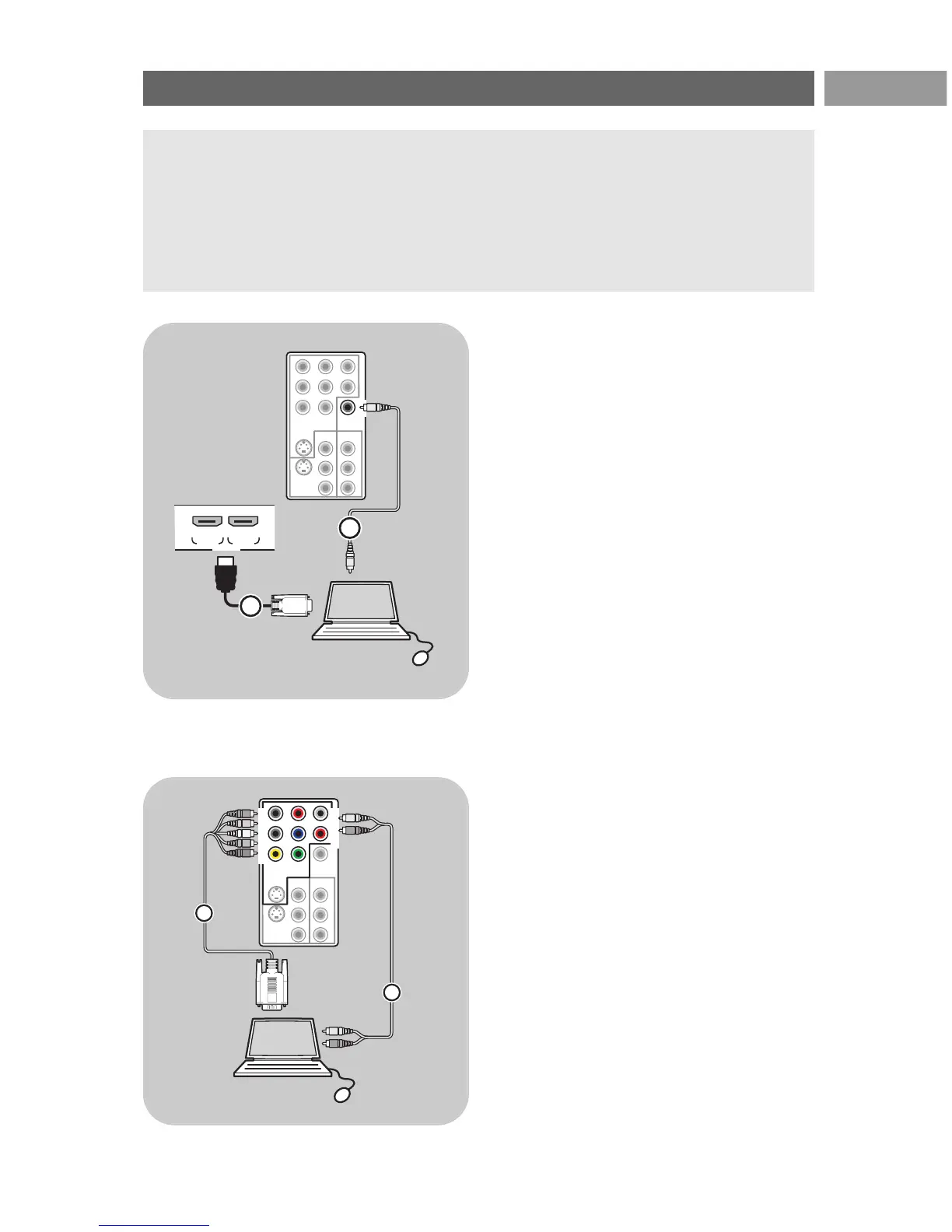
PC equipped with a DVI connector:
1. Use a DVI to HDMI cable to connect to one
of the
HDMI connectors of your TV 1.
2. Connect the audio cable 2 to the
DIGITAL
AUDIO IN
connector of the TV.
3. Select the equipment you have connected in
the Installation menu, Select your connections,
p. 29, and link it to
HDMI 1 or 2.
4. Also select Digital audio in in the same
Connections menu.
L
Pr
H
R
Pb
V
Y
/R
/B
/G
Pr
PbL
YR
S-VIDEO
S-VIDEO AUDIO
AV 2
AV 3
AV 1
VIDEO
VIDEO
DIGITAL
AUDIO
IN
AUDIO
VGA (PC)
via RGB-HV
AV1 :
RGB H/V
1
AV1:
AUDIO
L/R
VGA
2
PC equipped with a VGA connector:
1. Use a VGA to RGB H/V cable 1 to connect
to the
RGB H/V connectors of your TV.
2. Connect the audio cable 2 to the
AUDIO R
(right) and L (left) inputs of the TV.
3. Select the equipment you have connected in
the Installation menu, Select your connections,
p. 29.
2561.2 en 13-03-2006 16:18 Pagina 45




 To Next Page