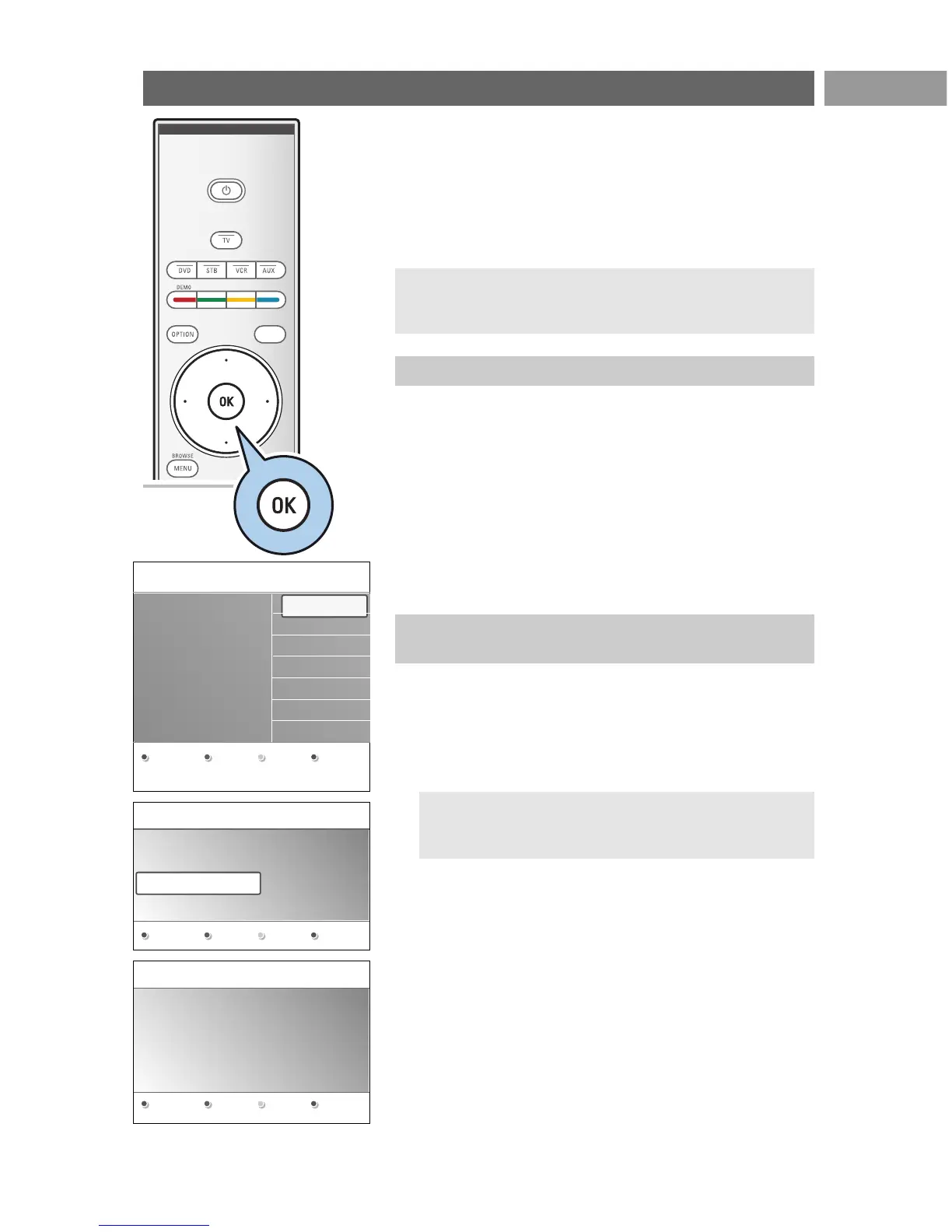
The first time (and only the first time) you switch on your TV,
you see a Welcome screen followed by the installation
procedure.
The installation procedure consists of a series of screens that
will guide you through the installation of your TV.
Follow the instructions on screen.
After the Welcome screen you are asked to select a language of
the TV's on-screen menus.The text of the header and the info
on screen continuously change language.
1. Press the cursor up/down to highlight your language.
2. Press the
OK key on the remote control.
3. Follow the instructions on screen to proceed.
First time installation EN
9
1. Press the green colour key on your remote control when
Television is highlighted.
2. Press the green colour key on your remote control to start
the Automatic channel installation.
> All available TV channels are searched for and stored
automatically.This will take a few minutes.
3. Press the red colour key when the search is completed.
Note: if you choose to install the channels at a later time,
select the Automatic installation in the TV menu,
Installation, Channels, p. 25, to scan available channels.
Note: if the TV has already been installed before and/or you
want to change the First time installation settings, proceed
with Use of the TV menu settings, p. 12.
Step 2: complete the initial TV installation
procedure
Step 1: select your on-screen language





 To Next Page