source, you may need to power off your player and
power on again when the player connected to TV
playing such content for the first time. HDR10+ content is
supported only when HDMI Ultra HD is set to Optimal
or Optimal (Auto Game xxxHz Pro). Dolby Vision
content is supported only when HDMI Ultra HD is set to
Optimal (Auto Game xxxHz Pro).
When selecting this option, you may need to power off
your game computer or game console and power on
again to complete the first time setup.
9.2. Home Theatre System -
HTS
Connect with HDMI ARC/eARC
Use an HDMI cable to connect a Home Theatre System
(HTS) to the TV. You can connect a Philips Soundbar or
an HTS with a built-in disc player.
HDMI ARC
Only HDMI 2 on the TV can offer the Audio Return
Channel (ARC) signal. Once you have connected the
Home Theatre System, the TV can only send the ARC
signal to this HDMI connection. With HDMI ARC, you do
not need to connect the extra audio cable. The HDMI
ARC connection combines both signals.
HDMI eARC
HDMI eARC (Enhanced Audio Return Channel) is an
advancement over the previous ARC. It supports the
latest high-bitrate audio formats up to192kHz, 24-bit,
and uncompressed 5.1 and 7.1, and 32-channel
uncompressed audio. HDMI eARC is only available on
HDMI 2.
Audio to video synchronisation (sync)
If the sound does not match the video on screen, you can
set a delay on most Home Theatre Systems with a disc
player to match the sound with the video.
Problems with HTS sound
Sound with loud noise
If you watch a video from a plugged in USB flash drive or
connected computer, the sound from your Home
Theatre System might be distorted. This noise is heard
when the audio or video file has DTS sound but the
Home Theatre System has no DTS sound processing. You
can fix this by setting the Digital Out Format of the TV
to Stereo.
Select Settings > Display and sound > Audio out
> Digital out format.
No sound
If you cannot hear the sound from the TV on your Home
Theatre System, check if you connected the HDMI cable
to an HDMI ARC/eARC connection on the Home Theatre
System. HDMI ARC/eARC is only available on HDMI 2.
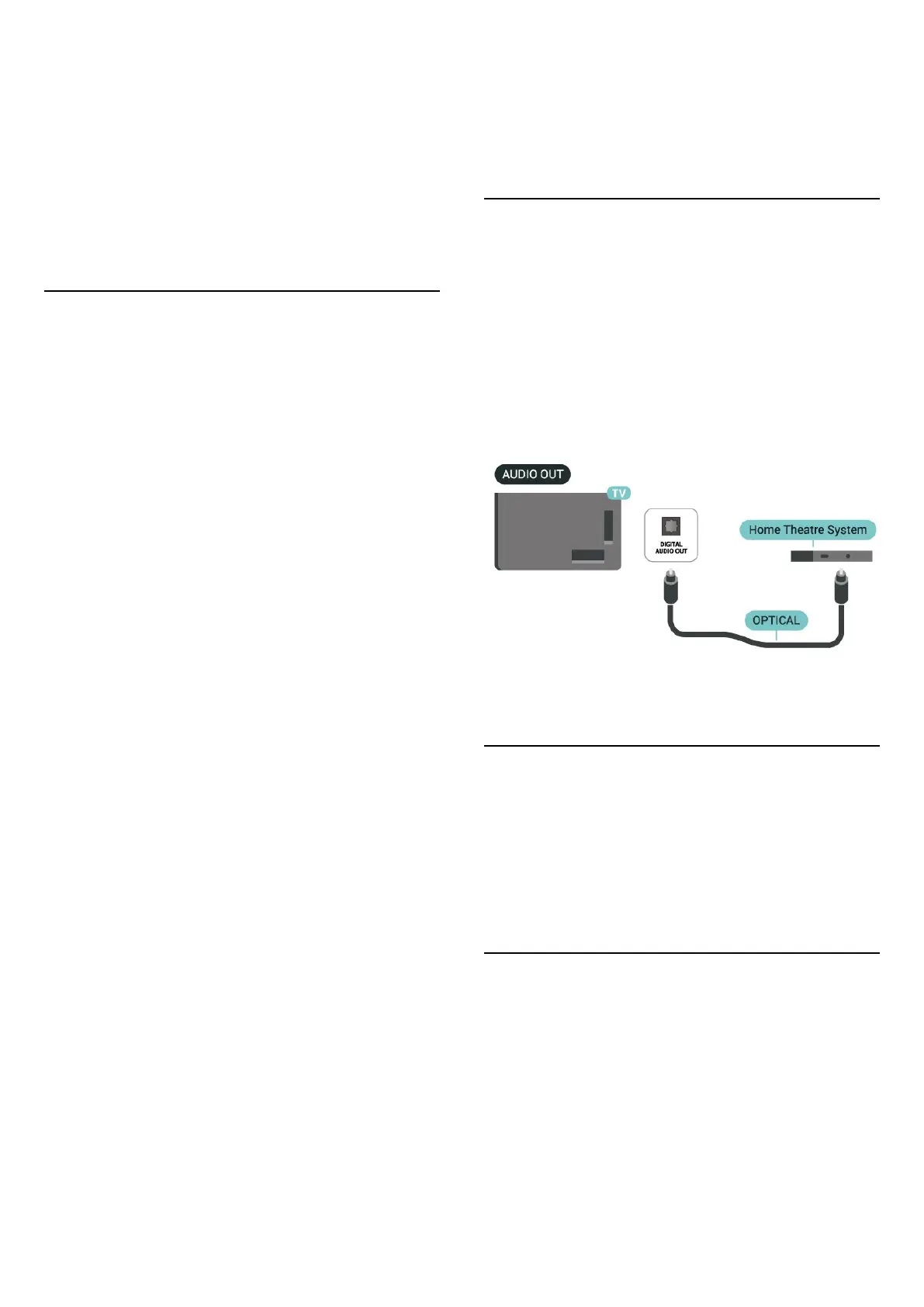
9.3. Digital Audio Out -
Optical
Audio Out - Optical is a high quality sound connection.
This optical connection can carry 5.1 audio channels. If
your device, typically a Home Theatre System (HTS), has
no HDMI ARC connection, you can use this connection
with the Audio In - Optical connection on the HTS. The
Audio Out - Optical connection sends the sound from
the TV to the HTS.
9.4. Smartphones and Tablets
To connect a smartphone or tablet to the TV, you can use
a wireless connection. For a wireless connection, on your
smartphone or tablet download the Philips Smart TV
app from your favourite app store.
9.5. Blu-ray Disc Player
Use an Ultra High speed HDMI cable to connect the Blu-
ray Disc player to the TV.
If the Blu-ray Disc player has EasyLink HDMI CEC, you can
operate the player with the TV remote control.
In Help, press the colour key Keywords and look
up EasyLink HDMI CEC for more information.
27







 To Next Page