65BDL3050Q
29
3)Test
Send Test Mail
To test Gmail account receive/send function.
Note
(1) When Email is Disable, “Send Test Mail Button” button will gray
out
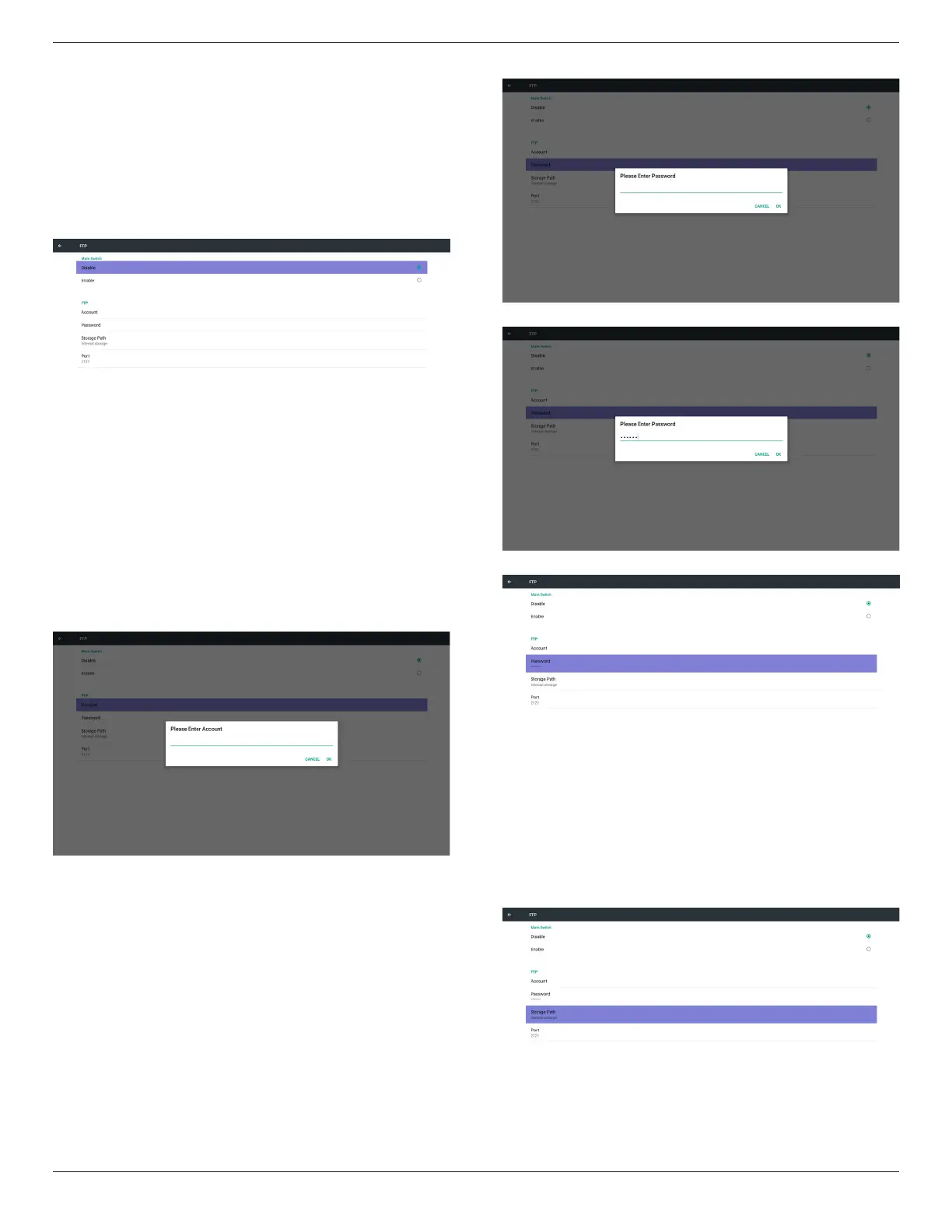
2. FTP
Via Enable/Disable to control FTP On/Off. After set up, PD can share
FTP les.
1) Account
Set up FTP account
Note:
Input limitation
(1) Length: 4-20 characters
(2) Format:
I. English a-z and A-Z
II. Number 0-9
2) Password
Set up FTP password.
Note:
Input limitation
(1) Length: 6-20 characters
(2) Format:
I. English a-z and A-Z
II. Number 0-9
FTP password display
(1) Will show “*” symbol to instead password if set up password via
remote control.
(2) After set up, the password text will show as “*” symbol.
Before password input:
After password input:
Set up completed screen:
3)Storage Path
Show default path: Internal storage
Note:
Can only display Internal storage, cannot be modied.(Only show
path)


 To Next Page