65BDL3050Q
28
(7) Send screenshots via email
After check this item, it will send screenshot to email of administrator
Please refer to Email notication
Note:
Please conrm Email setting is done.
5.5.2. Server Settings
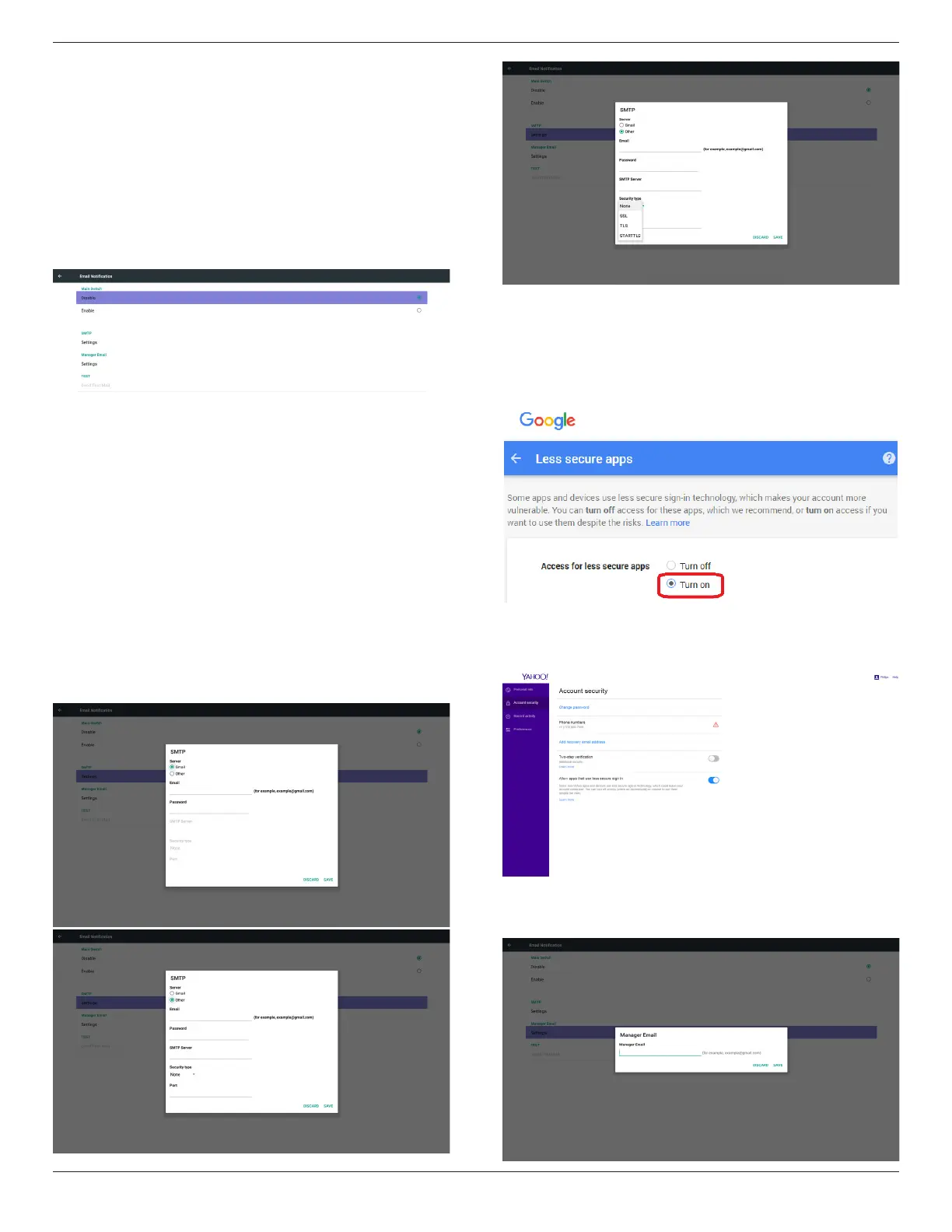
1. Email Notication
Via Enable/Disable to control Email On/Off)
After Enable, user can set up Email notication conguration.
1) SMTP
Set SMTP conguration)
User can set Gmail account or other mail account.
User can select other mail account and set up SMTP server, Security
type and port item
Note
Password input limitation
(1) Length: 6-20 characters
(2) Format: no limit
(3) unavailable port: 5000
Gmail safety setting
If Gmail is not working when the settings are completed, please test
the Gmail account via a PC and the below link
https://www.google.com/settings/security/lesssecureapps
And conrm on “Access for less secure apps”the“Turn on” item is
selected.
Yahoo Email Security Setting
If Yahoo Email is not working when setting complete, please conrm
“Allow apps that use less secure sign in” item is enabled.
2)Manager Email
Email
Set up Receiver mail account


 To Next Page